

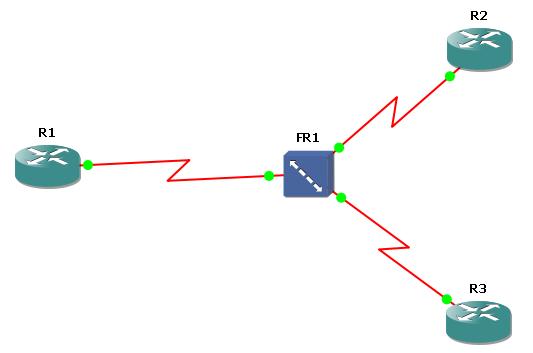
AS you know Frame-Relay is a well-known WAN technology that generally used for backbone routers. To understand the basic configuration of Frame-Relay, there is a configuration below with three Cisco 3600 Series Router and one Frame-Relay Switch.
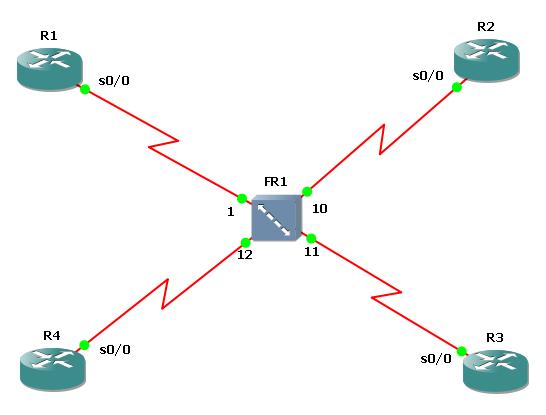
First of all, we will start with Frame-Relay Switch. On GNS3 create a Frame-Relay Switch and right click the Frame-Relay Switch. Configure the DLCI – port mapping like below:
R1 Configuration
Now, configure the R2 for Frame-Relay. Here you can get help from “show frame-relay pvc” command.
R2 Configuration

You can reach the other Frame-Relay articles below:
Basic Frame-Relay Configuration with both Inverse-ARP and Frame-Relay Map Command
Basic Point-to-Point Frame-Relay Configuration
Basic Multipoint Frame-Relay Configuration

Gokhan Kosem is a Network Engineer, Instructor and the Founder of IPCisco.com with 15+ years of experience in Cisco, Nokia, Huawei, Juniper, Linux, Service Provider Networks, Routing and Switching technologies.
He has worked on the backbone networks of major service providers and network vendors including Nortel, Alcatel-Lucent (Nokia) and has extensive hands-on experience with Cisco, Huawei, Juniper and Nokia networking technologies.
He has trained thousands of networking students worldwide through IPCisco.com, Udemy, books, labs, quizzes, and educational content across multiple social media platforms.
IPCisco.com | Best Route to Your Dreams






Leave a Reply