
- COURSES
- SPECIALS
- BLOG
- MEMBERS
- SHOP
- ABOUT
- ENROLL HERE

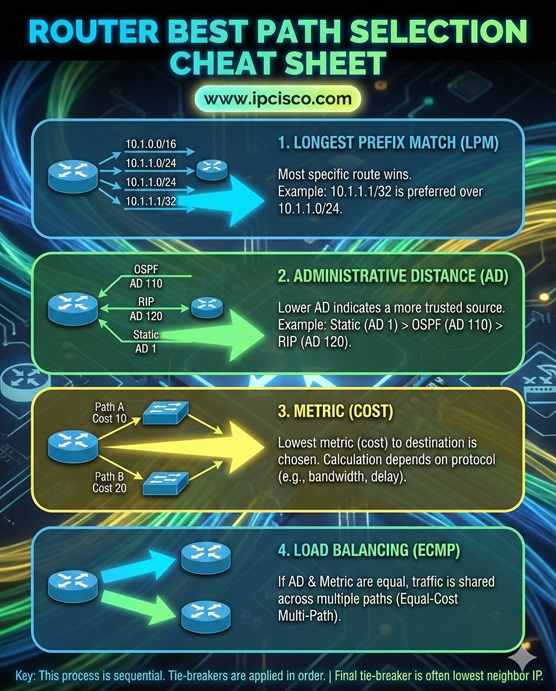
To choose the Best Path, a router firstly use Longest Prefix Match, then Lowest Administrative Distance, and finally the Lowest Metric. As you know, the best path to a destination is the optimum way for the data traffic. Let’s explain these steps a little detailly.
A router determines the best path to a destination by examining its Routing Table and applying a strict order of decision-making rules. These are:
Table of Contents
Firstly, the router checks for the Longest Prefix Match. So, what is longest match? Longest match means “the most specific route” to that destination IP address. In other words, the most specific network prefix. This means that the route that matches the most bits of the destination IP address.
If multiple routes have the same prefix length, the router checks Administrative Distance (Preference) values. As you know, both static and dynamic routes have default administrative distance values. This means that static routes and the routes that has calculated by routing protocols (RIP, OSPF, EIGRP, IS-IS, BGP) have administrative distance values. And to a router, a route which has the Lowest Administrative Distance is selected as best path. Because the lowest administrative value means “more reliable route”.
After these two checks, if there are still more than one valid route, the router compares Metric values. These metrics can be hop-count, bandwidth or any other default parameter for a routing protocol). Here, again, the Lowest Metric is the best choice for a router. Here, if there are multiple equal-cost routes, the router use Equal-Cost Multi-Path (ECMP) to load-balance traffic across them.
To check the best paths in a router, we should check routing table of the router. Because routing table stores all the routes in the router. For Cisco IOS, you can use “show ip route” to display routing table. In routing table, routes learned by different routing protocols and static routing will be displayed with different letters.
In Huawei routers like Huawei NE40, to check routing tables you should use “display ip routing-table” command. With “display ip routing-table” command, you can see all the routes in this router. Different routes learned by different routing protocols will be displayed with different letters in this router. In Huawei HCIA Exam and other Huawei certificaiton exams, this quesion is also important.
In Nokia Service Routers like Nokia 7750 SR, to check routing table, you should use “show router route-table” command in the enable mode. This command will display all the routes in this router. Beginning with Nokia NRS I, in al SRA exams, this command is very important.
A) Lowest metric
B) Administrative distance
C) Longest prefix match
D) Interface bandwidth

A) It selects the route with the highest metric
B) It selects the route with the lowest administrative distance
C) It randomly selects one route
D) It blocks both routes

Correct Answers: 1C, 2B






Leave a Reply