

To be successful in a network engineering technical interview, you should know almost all of the technical questions. In most technical job interviews for a network engineering role, some interview questions are fixed. Here, we will focus on most asked interview questions especially in a junior and senior network engineering roles. We will give enough long answers for every questions. These questions are also important for CCNA Level & CCNP Level Network Engineering candidates.
Table of Contents
What is the Difference Between TCP and UDP?
TCP (Transmission Control Protocol) is a connection-oriented protocol. It provides guaranteed secure transmission with acknowledgments, sequencing and retransmissions mechanism. It is slower than UDP but preferred for critical applications in which data security is important. It uses longer header as 20-60 bytes long.
On the other hand, UDP (User Datagram Protocol) is connectionless. It is faster than TCP but it does not guarantee delivery. Som it is less secure than TCP. UDP has shorter header size as 8 bytes. It is especially sued in real-time applications.
Follow-up Question: When we prefer UDP instead of TCP?
UDP is preferred when speed is more important than reliability as in Video streaming and VoIP.
To Get Your Dream Job: Download Network Engineer Interview Vaults!
What Happens When You Type a URL in a Browser?
When you enter a URL like www.example.com, the following steps occur one by one:
- DNS Resolution – The browser queries a DNS server to translate the domain name into an IP address.
- TCP Connection – A TCP three-way handshake is established with the server.
- HTTP/HTTPS Request – The browser sends an HTTP or HTTPS request to the web server.
- Server Response – The server sends back the requested webpage data.
- Rendering – The browser renders HTML, CSS, and JavaScript to display the page.
Follow-up Question: Which protocol allows users to access a website using a URL instead of an IP address?
DNS (Domain Name System) converts human-readable domain names (like google.com) into IP addresses that computers use to communicate. So, we do not need to know and write ip address of any website. We preferred easily remembered domain addresses.
What is the Difference Between a Switch and a Router?
Both switches and routers are most used network devices in modern networks. There are some differences between switches and routers.
First of all, a switch operates at Layer 2 (Data Link Layer) of OSI model. A router operates at Layer 3 (Network Layer) of OSI model.
Switches are used to connect devices in a Local Area Network. Routers connect different networks for example, LAN to WAN.
Switches uses 48 bits MAC Addresses to forward frames. Routers use 32 bits IPv4 Addresses or 128 bits IPv6 Addresses to forward packets.
Follow-up Question: Which table does a switch use to forward frames?
A switch uses a MAC address table (CAM table) to forward Ethernet frames. This table is filled with source MAC address of incoming frames and the related ports.
Follow-up Question: Which table does a router use to forward packets?
A router uses routing table to determine the best path for forwarding IP packets. All the routes like static routes, dynamic routes calculated by routing protocols and directly connected routes are stored here.
Download 250 Real Interview Questions & Answers
Junior Network Engineer Interview Vault!
What is a VLAN and Why do We Use it?
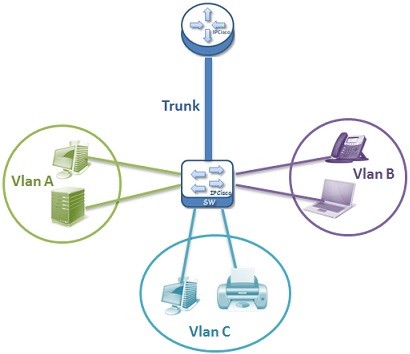
A VLAN (Virtual Local Area Network) is a logical segmentation of a physical network that separates broadcast domains within a switch. There are various reasons to use Virtual LANs. First of all VLANs are important for security. We can divide different departments traffic with VLANs. This also provides broadcast traffic reduce. Instead of one large network, we can divide our network into smaller parts. By doing this network management become easier.
Follow-up Question: What is the difference between an access port and a trunk port?
Access Port is a port which belongs to one VLAN and carries traffic for that VLAN. It is used for end devices like PCs and printers.
Trunk Port is a port that carries traffic for multiple VLANs between switches. VLAN information is preserved using VLAN tagging (802.1Q).
Follow-up Question: Can devices in different VLANs communicate directly?
No, they cannot. Because the devices in different VLANs are in separate broadcast domains. Here, Inter-VLAN Routing is required. There are two ways to use Inter-VLAN Routing: Using a Router or using a Layer 3 switch to use Switch Virtual Interfaces.
How do you Troubleshoot a Network Connectivity Issue?
In a connectivity issue, step by step structured troubleshooting approach is important. Here, firstly we check physical layer by controlling cable connection and link lights. Then, we check ip configuration of the related device. Then, we use ping tests by pinging localhost, default gateway, remote device.
We can also use traceroute to see the path follow towards the destination device. DNS settings, Access List and Firewall rules are also other parts that we can check during a network connectivity issue.
Follow-up Question: How do you verify if a device has a valid IP configuration?
In different systems, we can check ip configurations with different commands:
- In Windows: ipconfig
- In Linux/Mac: ifconfig or ip addr
With these commands we can verify IP address, Subnet mask, Default gateway, DNS server. These setting can be configured manually by static ip addressing or by the help of DHCP (Dynamic Host Configuration Protocol) with Dynamic IP Addressing. Here, we can also check if the device has an APIPA address (169.254.x.x) which indicates a DHCP failure.
To Get Your Dream Job: Download Network Engineer Interview Vaults!





Leave a Reply