
- COURSES
- SPECIALS
- BLOG
- MEMBERS
- SHOP
- BOOKSHELF
- ABOUT
- ENROLL HERE

DHCP (Dynamic Host Configuration Protocol) is a network protocol which is used for automatic IP credential assignments in a network. With DHCP, IP Addresses, Subnet Masks and Gateway Addresses are given to the hosts automatically. The name of this process is dynamic IP addressing. If you give you give IP credentials manually, this is called static IP addressing.
DHCP Server can be either hardware or a software. You can also configure a Cisco router as a DHCP Server.
Table of Contents
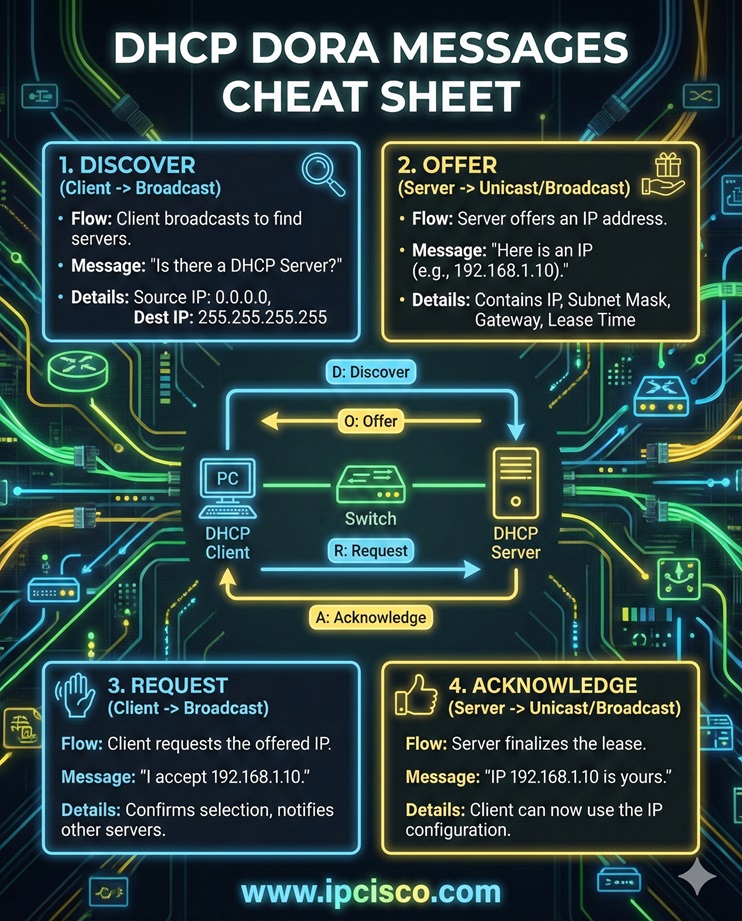
DHCP process uses different messages. There are four main messages, during IP assignment. These DHCP Messages are given below:
To remember these message names, network engineers combine the first letters of these messages and “DORA” word is created with these first letters of the DHCP messages.
What is the meanings of these messages? Here are their meanings:
DHCP Discover is used by DHCP clients. It is sent as broadcast to the network to find any available DHCP servers in the network.
DHCP Offer is sent by DHCP server with an available IP address and configuration details.
DHCP Request is sent by the client to request the offered IP address from a specific DHCP server.
DHCP Ack is the message used by DHCP Server to confirm the lease of IP address. With this message, server officially assigns the IP address to the client.
There are also other DHCP messages used for different DHCP processes. These messages are also given below:
DHCP NAK is used by the DHCP server to reject the client’s IP request. This can be becasue of invalid or not allowed IP address.
DHCP Release is used by DHCP client. With this message, client give back its IP address to DHCP server pool.
DHCP Decline is used by client to reject the assigned IP address because of the fact that it is already in used.
DHCP Inform is used by DHCP client to request additional IP information like DNS, gateway ip address etc.
To configure a Cisco router as a DHCP Server, we should do some configurations on Cisco router. First of all we should give rewuird ip address to the router interface that is connected to the network. Over this interface, IP address information will be distributed. Then, we will configure an IP Address Pool in which we will ahve ip addresses that we will use during auto IP address allocation.
A) Request → Offer → Discover → ACK
B) Offer → Discover → ACK → Request
C) Discover → Offer → Request → ACK
D) Discover → Request → Offer → ACK

A) To encrypt the DHCP request
B) Because the client does not yet know the DHCP server’s IP address
C) To reserve an IP address permanently
D) To reduce network traffic

A) Only the subnet mask
B) Only the client’s hostname
C) The client’s username and password
D) The client’s MAC address and lease time

A) The client automatically uses the offered IP permanently
B) The client retries the DHCP process or fails to obtain an IP
C) The client sends a DHCP Release
D) The client disables the network interface
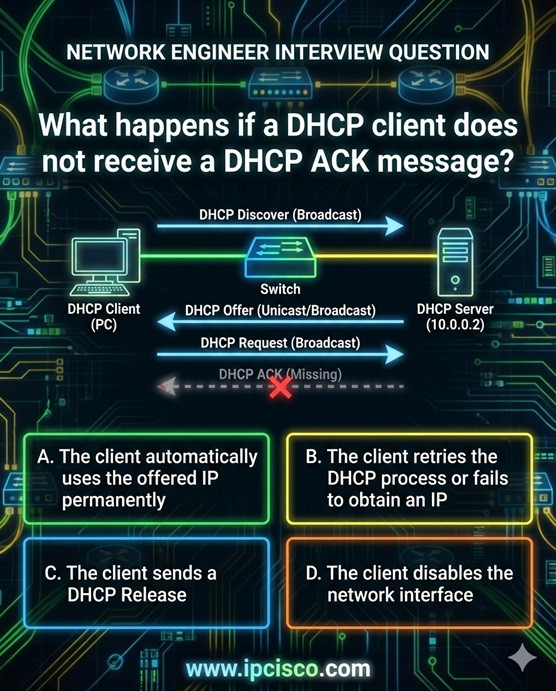
Correct Answers: 1C, 2B, 3D, 4B

Gokhan Kosem is a Network Engineer, Instructor and the Founder of IPCisco.com with 15+ years of experience in Cisco, Nokia, Huawei, Juniper, Linux, Service Provider Networks, Routing and Switching technologies.
He has worked on the backbone networks of major service providers and network vendors including Nortel, Alcatel-Lucent (Nokia) and has extensive hands-on experience with Cisco, Huawei, Juniper and Nokia networking technologies.
He has trained thousands of networking students worldwide through IPCisco.com, Udemy, books, labs, quizzes, and educational content across multiple social media platforms.
IPCisco.com | Best Route to Your Dreams







Leave a Reply