


Do you still view your domain expenses as a simple, fixed line item on your monthly budget? Most enterprise teams do. However, the infrastructure running quietly in the background- specifically how your global DNS gets routed – directly influences what your organization actually pays and the performance you receive in return. Understanding Anycast DNS goes far beyond standard network engineering. It is now a crucial budget and strategy concern for any business operating across multiple regions. Fortunately, making smart choices here is entirely within your reach. Wix offers transparent domain pricing and easy domain management in one place, giving you a practical starting point to build a reliable, cost-effective infrastructure. Let us explore how you can take control of your DNS routing to make better financial decisions for your growing enterprise.
Table of Contents
What Anycast DNS Actually Does and How It Affects Domain Pricing
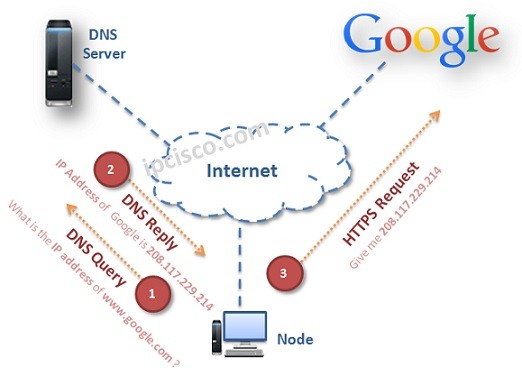
If you want to understand your infrastructure costs, you first need to understand how the technology works in plain language. Traditional DNS routing sends every single user query to one specific origin server. If your server sits in London, a user in Tokyo has to wait for their request to travel halfway across the globe. Anycast DNS solves this problem beautifully. Instead of relying on a single location, Anycast broadcasts the exact same IP address from multiple global nodes. It automatically directs each user query to the nearest physical point of presence, making the entire experience much faster.
You might wonder why finance teams need to care about server locations. The answer comes down to the bottom line. Enterprises that rely on premium DNS providers with massive Anycast networks typically pay more money upfront. However, these initial costs almost always offset massive downstream expenses. When your network runs efficiently, you avoid expensive latency penalties. You reduce the massive overhead required to build your own redundancy systems. Furthermore, a stable Anycast network protects your company from costly service-level agreement breaches. Understanding this fundamental balance between upfront investment and long-term savings provides the foundation you need before evaluating any domain service model.
How Your Domain and Internet Access Technologies Shape DNS Costs
Your DNS does not exist in a vacuum. The connection methods your company relies on have a massive impact on your overall deployment costs. The specific internet access technologies you use- whether you depend on dedicated fiber lines, SD-WAN architectures, or complex multi-cloud peering arrangements- determine exactly how efficiently your Anycast routing can actually operate.
When your access infrastructure and your DNS architecture do not match up well, you run into problems. These mismatches frequently lead to hidden inefficiencies that inflate the total cost of owning your domains. For example, routing traffic through inefficient cloud peering setups can add unnecessary hops to a user’s connection, negating the speed benefits you paid for with an Anycast setup. You can easily prevent this by auditing how your internal networks interact with the wider web. Before committing to a premium pricing tier, take the time to review your connection types. Aligning your internal technology with your external DNS providers ensures you get the fast, efficient performance you are paying for.
Reading the Numbers – What a Networking Cheat Sheet Reveals About DNS Tiers
When you start comparing DNS providers, you will notice they structure their pricing in tiers. These tiers usually revolve around query volumes, geographic coverage, and strict uptime guarantees. Making sense of these tables can feel overwhelming, but you can approach it like reading a networking cheat sheet. Once you know what the main metrics mean, you can easily decode the true value of each tier.
First, look at TTL (Time to Live) settings. Lower TTL settings allow you to update your records faster during an outage, but they often require more queries, which can push you into a higher pricing tier. Next, check the Anycast node count. A provider might boast hundreds of nodes, but if they are concentrated in regions where you have no customers, you are paying for coverage you do not need. Pay close attention to DNSSEC support, which adds vital security but requires more processing power. Finally, evaluate failover speed. Fast failover keeps your site running during a crisis. By mapping these specific metrics directly to your actual business needs, you can select the perfect tier without blindly defaulting to the most expensive option on the page.
The Infrastructure Costs Nobody Puts on the Slide Deck
When you budget for a new initiative, you have to look beyond the initial vendor quote. Much like the hidden costs of the digital life that catch remote workers off guard, enterprise domain strategies carry indirect expenses that rarely appear on a formal slide deck. Identifying these costs early keeps your budget completely safe and predictable.
Consider the internal engineering time required to maintain complex configurations. If a DNS platform is difficult to use, your highly paid engineers will waste hours troubleshooting simple routing issues. You also need to account for compliance overhead. If your enterprise operates in regions with strict data residency rules, configuring your Anycast nodes to comply with local laws requires ongoing legal and technical review. Most importantly, you must factor in the devastating cumulative cost of DNS-related downtime. If your network fails, your e-commerce revenue or SaaS subscriptions stop entirely. Create a practical checklist to surface these indirect expenses during your vendor evaluation process, and you will build a much more accurate financial model.
Building a Domain Pricing Strategy That Reflects Your Real Infrastructure Needs
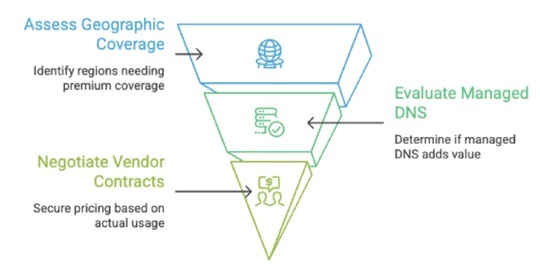
Now that you understand the underlying mechanics and hidden costs, you can confidently build a strategy that works for your enterprise. Start by analyzing your Anycast requirements from the very beginning. Look closely at your actual web traffic. How many distinct geographic regions actually need premium coverage? If ninety percent of your customers live in North America, paying for extensive nodes in Antarctica makes no financial sense.
Next, decide whether paying for a fully managed DNS layer brings enough value to your team. A managed service costs more, but it frees up your internal engineers to focus on building great products instead of maintaining server connections. Armed with your real traffic data, you can negotiate vendor contracts based on your actual usage tiers rather than accepting their standard headline prices. Match your architecture perfectly to your real-world traffic reality first, and then price your contracts accordingly.
Turn Infrastructure Knowledge Into a Smarter Domain Budget
Anycast DNS is far more than a simple technical preference for your engineering department. It is a major cost driver that absolutely belongs in every enterprise budget conversation. When you understand the powerful infrastructure operating right beneath your price tag, you immediately position your business to control spending while maximizing performance.
You have all the information you need to make incredibly smart decisions. Start today by auditing your current network setup against your global traffic patterns. Look for inefficiencies, spot the areas where you are overpaying, and let that hard data lead your next vendor negotiation. By taking an active, informed approach, you easily transform a basic line item into a powerful strategic advantage for your business.
Frequently Asked Questions
What happens if I choose a DNS provider without a global Anycast network?
Without an Anycast network, all your global user queries travel to a single server location. This creates significant latency for users located far away from that origin server. It also leaves your network highly vulnerable to localized outages and traffic bottlenecks.
How do DNS query limits affect my monthly enterprise budget?
Most providers charge based on the total volume of queries your network processes each month. If your website experiences an unexpected surge in traffic, or if a botnet targets your systems, you can quickly exceed your limit and face expensive overage fees.
Does upgrading to a premium DNS tier improve my website speed?
Yes, moving to a premium tier with a wider distribution of Anycast nodes generally improves your website speed. By routing visitors to a physically closer server, you reduce the time it takes to resolve their connection request.
How do data residency laws influence my Anycast node selection?
Certain countries require user data to remain within their physical borders. You must ensure your DNS provider can configure their Anycast nodes to comply with these local regulations, which sometimes requires purchasing specialized, higher-tier enterprise plans.
Can I negotiate my domain infrastructure costs with major vendors?
Absolutely. Enterprise teams with a clear understanding of their specific traffic patterns and node requirements can successfully negotiate custom contracts. Vendors are usually willing to adjust their standard pricing tiers to secure a long-term enterprise commitment.

Gokhan Kosem is a Network Engineer, Instructor and the Founder of IPCisco.com with 15+ years of experience in Cisco, Nokia, Huawei, Juniper, Linux, Service Provider Networks, Routing and Switching technologies.
He has worked on the backbone networks of major service providers and network vendors including Nortel, Alcatel-Lucent (Nokia) and has extensive hands-on experience with Cisco, Huawei, Juniper and Nokia networking technologies.
He has trained thousands of networking students worldwide through IPCisco.com, Udemy, books, labs, quizzes, and educational content across multiple social media platforms.
IPCisco.com | Best Route to Your Dreams






Leave a Reply