
- COURSES
- SPECIALS
- BLOG
- MEMBERS
- SHOP
- BOOKSHELF
- ABOUT
- ENROLL HERE

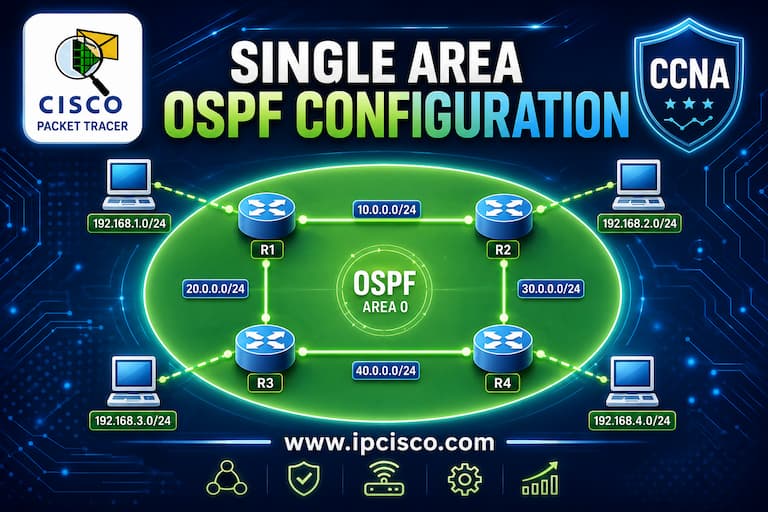
In this Packet Tracer Single Area OSPF Configuration example, we will focus on basic OSPF configuration on packet tracer with a single area. We will configure only Area 0 and all OSPF routers will be in this single area, backbone area. Here, we will use OSPFv2, Open Shortest Path First version 2.
For our Cisco Single Area OSPF Configuration packet tracer example, we will use the below OSPF Topology.
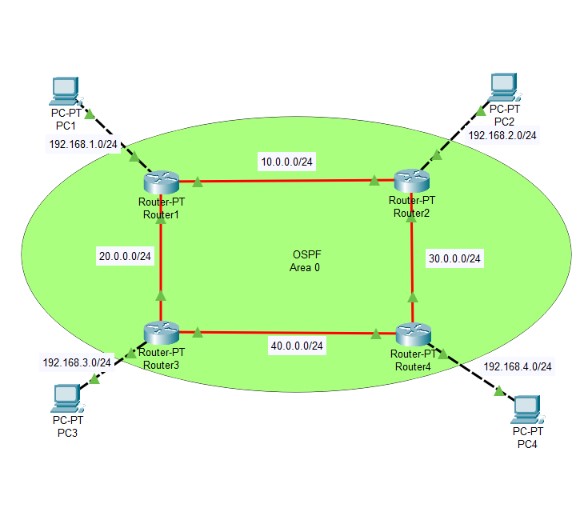
Basic OSPF Topology on Packet Tracer
You can also visit Full Cisco Packet Tracer Labs Course
Table of Contents
To configure OSPF on this topology, we will start with Router1. On Router1, we will create OSPF process with “router ospf Process ID” command. Here, Process ID is 1. So, we will use “router ospf 1” command.
After that, we will determine the Router ID of that rotuer with “router-id” command. For this router Router ID is 1.1.1.1, so we will use “router-id 1.1.1.1” command.
Then, we will add OSPF network with “network network-ip-address wildcard-mask and area number” command. We will add all the interface network addresses under this OSPF process as member of OSPF network. Router 1 has three interfaces and each interface is a member of this OSPF network.
Router1# configure terminal
Router1(config)# router ospf 1
Router1(config-router)# router-id 1.1.1.1
Router1(config-router)# network 192.168.1.0 0.0.0.255 area 0
Router1(config-router)# network 10.0.0.0 0.0.0.255 area 0
Router1(config-router)# network 20.0.0.0 0.0.0.255 area 0
Router1(config-router)# end
Router1# write
Now, we will continue packet tracer ospf configuration with Router2. On Router2, we will configure the similar steps with required numbers.
Router2# configure terminal
Router2(config)# router ospf 1
Router2(config-router)# router-id 2.2.2.2
Router2(config-router)# network 192.168.2.0 0.0.0.255 area 0
Router2(config-router)# network 10.0.0.0 0.0.0.255 area 0
Router2(config-router)# network 30.0.0.0 0.0.0.255 area 0
Router2(config-router)# end
Router2# write
Now, we will configure OSPF on Router3.
Router3# configure terminal
Router3(config)# router ospf 1
Router3(config-router)# router-id 3.3.3.3
Router3(config-router)# network 192.168.3.0 0.0.0.255 area 0
Router3(config-router)# network 20.0.0.0 0.0.0.255 area 0
Router3(config-router)# network 40.0.0.0 0.0.0.255 area 0
Router3(config-router)# end
Router3# write
Laslty, we will configure Router4 for OSPF on Packet Tracer.
Router4# configure terminal
Router4(config)# router ospf 1
Router4(config-router)# router-id 3.3.3.3
Router4(config-router)# network 192.168.3.0 0.0.0.255 area 0
Router4(config-router)# network 20.0.0.0 0.0.0.255 area 0
Router4(config-router)# network 40.0.0.0 0.0.0.255 area 0
Router4(config-router)# end
Router4# write
Now, we have finished OSPF configurations on the routers. It is time to verify our OSPF configuration.
We have finished OSPFv2 Configuration on Packet Tracer. Now, we will verify oud Cisco OSPF configuration.
The first command that we will use is “show ip protocols” command.
Router1# show ip protocols

Routing Protocol is "ospf 1"
  Outgoing update filter list for all interfaces is not set
  Incoming update filter list for all interfaces is not set
  Router ID 1.1.1.1
  Number of areas in this router is 1. 1 normal 0 stub 0 nssa
  Maximum path: 4
  Routing for Networks:
    10.0.0.0 0.0.0.255 area 0
    20.0.0.0 0.0.0.255 area 0
    192.168.1.0 0.0.0.255 area 0
  Routing Information Sources:
    Gateway         Distance      Last Update
    1.1.1.1              110      00:02:55
    2.2.2.2              110      00:00:56
    3.3.3.3              110      00:00:56
    4.4.4.4              110      00:07:07
  Distance: (default is 110)
With this command, we can see OSPF process, OSPF networks and Router IDs in this network.
The second command is “show ip ospf neighbor” command. Here, we can list OSPF neighbors.
Router1# show ip ospf neighbor

Neighbor ID     Pri   State           Dead Time   Address         Interface
2.2.2.2           1   FULL/DR         00:00:33    10.0.0.2        FastEthernet4/0
3.3.3.3           1   FULL/DR         00:00:33    20.0.0.2        FastEthernet5/0
Router1#
The other verification command is “show ip ospf interface” command. This command gives more details about OSPF interfaces. If you would like to see the brief of this information, you can use “show ip ospf interface brief” command.
Router1# show ip ospf interface

FastEthernet4/0 is up, line protocol is up
  Internet address is 10.0.0.1/24, Area 0
  Process ID 1, Router ID 1.1.1.1, Network Type BROADCAST, Cost: 1
  Transmit Delay is 1 sec, State BDR, Priority 1
  Designated Router (ID) 2.2.2.2, Interface address 10.0.0.2
  Backup Designated Router (ID) 1.1.1.1, Interface address 10.0.0.1
  Timer intervals configured, Hello 10, Dead 40, Wait 40, Retransmit 5
    Hello due in 00:00:03
  Index 1/1, flood queue length 0
  Next 0x0(0)/0x0(0)
  Last flood scan length is 1, maximum is 1
  Last flood scan time is 0 msec, maximum is 0 msec
  Neighbor Count is 1, Adjacent neighbor count is 1
    Adjacent with neighbor 2.2.2.2  (Designated Router)
  Suppress hello for 0 neighbor(s)
FastEthernet5/0 is up, line protocol is up
  Internet address is 20.0.0.1/24, Area 0
  Process ID 1, Router ID 1.1.1.1, Network Type BROADCAST, Cost: 1
  Transmit Delay is 1 sec, State BDR, Priority 1
  Designated Router (ID) 3.3.3.3, Interface address 20.0.0.2
  Backup Designated Router (ID) 1.1.1.1, Interface address 20.0.0.1
  Timer intervals configured, Hello 10, Dead 40, Wait 40, Retransmit 5
    Hello due in 00:00:03
  Index 2/2, flood queue length 0
  Next 0x0(0)/0x0(0)
  Last flood scan length is 1, maximum is 1
  Last flood scan time is 0 msec, maximum is 0 msec
  Neighbor Count is 1, Adjacent neighbor count is 1
    Adjacent with neighbor 3.3.3.3  (Designated Router)
  Suppress hello for 0 neighbor(s)
FastEthernet0/0 is up, line protocol is up
  Internet address is 192.168.1.2/24, Area 0
  Process ID 1, Router ID 1.1.1.1, Network Type BROADCAST, Cost: 1
  Transmit Delay is 1 sec, State DR, Priority 1
  Designated Router (ID) 1.1.1.1, Interface address 192.168.1.2
  No backup designated router on this network
  Timer intervals configured, Hello 10, Dead 40, Wait 40, Retransmit 5
    Hello due in 00:00:03
  Index 3/3, flood queue length 0
  Next 0x0(0)/0x0(0)
  Last flood scan length is 1, maximum is 1
  Last flood scan time is 0 msec, maximum is 0 msec
  Neighbor Count is 0, Adjacent neighbor count is 0
  Suppress hello for 0 neighbor(s)
Router1# show ip ospf interface brief

Interface     PID   Area                     IP Address/Mask          Cost  State  Nbrs F/C
Fa4/0           1   0                         10.0.0.1/255.255.255.0   1      BDR  0/0
Fa5/0           1   0                         20.0.0.1/255.255.255.0   1      BDR  0/0
Fa0/0           1   0                      192.168.1.2/255.255.255.0   1       DR  0/0
Another command is one of the most used commands by network engineers. This is “show ip route” that list the routers on this router. You can see OSPF routes here with the letter “O”.
Router1# show ip route

Codes: C - connected, S - static, I - IGRP, R - RIP, M - mobile, B - BGP
       D - EIGRP, EX - EIGRP external, O - OSPF, IA - OSPF inter area
       N1 - OSPF NSSA external type 1, N2 - OSPF NSSA external type 2
       E1 - OSPF external type 1, E2 - OSPF external type 2, E - EGP
       i - IS-IS, L1 - IS-IS level-1, L2 - IS-IS level-2, ia - IS-IS inter area
       * - candidate default, U - per-user static route, o - ODR
       P - periodic downloaded static route

Gateway of last resort is not set

     10.0.0.0/24 is subnetted, 1 subnets
C       10.0.0.0 is directly connected, FastEthernet4/0
     20.0.0.0/24 is subnetted, 1 subnets
C       20.0.0.0 is directly connected, FastEthernet5/0
     30.0.0.0/24 is subnetted, 1 subnets
O       30.0.0.0 [110/2] via 10.0.0.2, 00:08:58, FastEthernet4/0
     40.0.0.0/24 is subnetted, 1 subnets
O       40.0.0.0 [110/2] via 20.0.0.2, 00:08:58, FastEthernet5/0
C    192.168.1.0/24 is directly connected, FastEthernet0/0
O    192.168.2.0/24 [110/2] via 10.0.0.2, 00:08:58, FastEthernet4/0
O    192.168.3.0/24 [110/2] via 20.0.0.2, 00:08:58, FastEthernet5/0
O    192.168.4.0/24 [110/3] via 10.0.0.2, 00:08:58, FastEthernet4/0
                    [110/3] via 20.0.0.2, 00:08:58, FastEthernet5/0
Note: If are there any change in OSPF network and we do not see its effects, to clear OSPF process, we can use “clear ip ospf process” after the change.
We can also use the same commands on Router2.
Router2# show ip protocols

Routing Protocol is "ospf 1"
  Outgoing update filter list for all interfaces is not set
  Incoming update filter list for all interfaces is not set
  Router ID 2.2.2.2
  Number of areas in this router is 1. 1 normal 0 stub 0 nssa
  Maximum path: 4
  Routing for Networks:
    10.0.0.0 0.0.0.255 area 0
    30.0.0.0 0.0.0.255 area 0
    192.168.2.0 0.0.0.255 area 0
  Routing Information Sources:
    Gateway         Distance      Last Update
    1.1.1.1              110      00:16:51
    2.2.2.2              110      00:14:52
    3.3.3.3              110      00:14:52
    4.4.4.4              110      00:21:03
  Distance: (default is 110)
Router2# show ip ospf neighbor

Neighbor ID     Pri   State           Dead Time   Address         Interface
1.1.1.1           1   FULL/BDR        00:00:32    10.0.0.1        FastEthernet4/0
4.4.4.4           1   FULL/DR         00:00:39    30.0.0.2        FastEthernet5/0
Router2# show ip ospf interface

FastEthernet5/0 is up, line protocol is up
  Internet address is 30.0.0.1/24, Area 0
  Process ID 1, Router ID 2.2.2.2, Network Type BROADCAST, Cost: 1
  Transmit Delay is 1 sec, State BDR, Priority 1
  Designated Router (ID) 4.4.4.4, Interface address 30.0.0.2
  Backup Designated Router (ID) 2.2.2.2, Interface address 30.0.0.1
  Timer intervals configured, Hello 10, Dead 40, Wait 40, Retransmit 5
    Hello due in 00:00:06
  Index 1/1, flood queue length 0
  Next 0x0(0)/0x0(0)
  Last flood scan length is 1, maximum is 1
  Last flood scan time is 0 msec, maximum is 0 msec
  Neighbor Count is 1, Adjacent neighbor count is 1
    Adjacent with neighbor 4.4.4.4  (Designated Router)
  Suppress hello for 0 neighbor(s)
FastEthernet0/0 is up, line protocol is up
  Internet address is 192.168.2.2/24, Area 0
  Process ID 1, Router ID 2.2.2.2, Network Type BROADCAST, Cost: 1
  Transmit Delay is 1 sec, State DR, Priority 1
  Designated Router (ID) 2.2.2.2, Interface address 192.168.2.2
  No backup designated router on this network
  Timer intervals configured, Hello 10, Dead 40, Wait 40, Retransmit 5
    Hello due in 00:00:06
  Index 2/2, flood queue length 0
  Next 0x0(0)/0x0(0)
  Last flood scan length is 1, maximum is 1
  Last flood scan time is 0 msec, maximum is 0 msec
  Neighbor Count is 0, Adjacent neighbor count is 0
  Suppress hello for 0 neighbor(s)
FastEthernet4/0 is up, line protocol is up
  Internet address is 10.0.0.2/24, Area 0
  Process ID 1, Router ID 2.2.2.2, Network Type BROADCAST, Cost: 1
  Transmit Delay is 1 sec, State DR, Priority 1
  Designated Router (ID) 2.2.2.2, Interface address 10.0.0.2
  Backup Designated Router (ID) 1.1.1.1, Interface address 10.0.0.1
  Timer intervals configured, Hello 10, Dead 40, Wait 40, Retransmit 5
    Hello due in 00:00:09
  Index 3/3, flood queue length 0
  Next 0x0(0)/0x0(0)
  Last flood scan length is 1, maximum is 1
  Last flood scan time is 0 msec, maximum is 0 msec
  Neighbor Count is 1, Adjacent neighbor count is 1
    Adjacent with neighbor 1.1.1.1  (Backup Designated Router)
  Suppress hello for 0 neighbor(s)
Router2# show ip ospf interface brief

Interface     PID   Area                     IP Address/Mask          Cost  State  Nbrs F/C
Fa5/0           1   0                         30.0.0.1/255.255.255.0   1      BDR  0/0
Fa0/0           1   0                      192.168.2.2/255.255.255.0   1       DR  0/0
Fa4/0           1   0                         10.0.0.2/255.255.255.0   1       DR  0/0
Router2# show ip route

Codes: C - connected, S - static, I - IGRP, R - RIP, M - mobile, B - BGP
       D - EIGRP, EX - EIGRP external, O - OSPF, IA - OSPF inter area
       N1 - OSPF NSSA external type 1, N2 - OSPF NSSA external type 2
       E1 - OSPF external type 1, E2 - OSPF external type 2, E - EGP
       i - IS-IS, L1 - IS-IS level-1, L2 - IS-IS level-2, ia - IS-IS inter area
       * - candidate default, U - per-user static route, o - ODR
       P - periodic downloaded static route

Gateway of last resort is not set

     10.0.0.0/24 is subnetted, 1 subnets
C       10.0.0.0 is directly connected, FastEthernet4/0
     20.0.0.0/24 is subnetted, 1 subnets
O       20.0.0.0 [110/2] via 10.0.0.1, 00:15:47, FastEthernet4/0
     30.0.0.0/24 is subnetted, 1 subnets
C       30.0.0.0 is directly connected, FastEthernet5/0
     40.0.0.0/24 is subnetted, 1 subnets
O       40.0.0.0 [110/2] via 30.0.0.2, 00:21:54, FastEthernet5/0
O    192.168.1.0/24 [110/2] via 10.0.0.1, 00:15:47, FastEthernet4/0
C    192.168.2.0/24 is directly connected, FastEthernet0/0
O    192.168.3.0/24 [110/3] via 30.0.0.2, 00:15:47, FastEthernet5/0
                    [110/3] via 10.0.0.1, 00:15:47, FastEthernet4/0
O    192.168.4.0/24 [110/2] via 30.0.0.2, 00:21:54, FastEthernet5/0
To test our OSPF network, let’s start a ping test from PC2 to other PCs.
C:\>ipconfig

Bluetooth Connection:(default port)

   Connection-specific DNS Suffix..:
   Link-local IPv6 Address.........: ::
   IPv6 Address....................: ::
   IPv4 Address....................: 0.0.0.0
   Subnet Mask.....................: 0.0.0.0
   Default Gateway.................: ::
                                     0.0.0.0

FastEthernet0 Connection:

   Connection-specific DNS Suffix..:
   Link-local IPv6 Address.........: FE80::201:C7FF:FECA:5A53
   IPv6 Address....................: ::
   IPv4 Address....................: 192.168.2.1
   Subnet Mask.....................: 255.255.255.0
   Default Gateway.................: ::
                                     192.168.2.2
C:\> ping 192.168.1.1

Pinging 192.168.1.1 with 32 bytes of data:

Request timed out.
Reply from 192.168.1.1: bytes=32 time<1ms TTL=126
Reply from 192.168.1.1: bytes=32 time<1ms TTL=126
Reply from 192.168.1.1: bytes=32 time<1ms TTL=126

Ping statistics for 192.168.1.1:
    Packets: Sent = 4, Received = 3, Lost = 1 (25% loss),
Approximate round trip times in milli-seconds:
    Minimum = 0ms, Maximum = 0ms, Average = 0ms
C:\> ping 192.168.3.1

Pinging 192.168.3.1 with 32 bytes of data:

Request timed out.
Reply from 192.168.3.1: bytes=32 time<1ms TTL=125
Reply from 192.168.3.1: bytes=32 time=8ms TTL=125
Reply from 192.168.3.1: bytes=32 time<1ms TTL=125

Ping statistics for 192.168.3.1:
    Packets: Sent = 4, Received = 3, Lost = 1 (25% loss),
Approximate round trip times in milli-seconds:
    Minimum = 0ms, Maximum = 8ms, Average = 2ms
C:\> ping 192.168.4.1

Pinging 192.168.4.1 with 32 bytes of data:

Request timed out.
Reply from 192.168.4.1: bytes=32 time<1ms TTL=126
Reply from 192.168.4.1: bytes=32 time<1ms TTL=126
Reply from 192.168.4.1: bytes=32 time<1ms TTL=126

Ping statistics for 192.168.4.1:
    Packets: Sent = 4, Received = 3, Lost = 1 (25% loss),
Approximate round trip times in milli-seconds:
    Minimum = 0ms, Maximum = 0ms, Average = 0ms
We have completed OSPF Packet Tracer configuration and verification. You have learned OSPF configuration step by step and verification commands one by one. OSPF configuration is important on both Cisco CCNA, CCNP and CCIE exams.
Download All Cisco Packet Tracer Labs!

Gokhan Kosem is a Network Engineer, Instructor and the Founder of IPCisco.com with 15+ years of experience in Cisco, Nokia, Huawei, Juniper, Linux, Service Provider Networks, Routing and Switching technologies.
He has worked on the backbone networks of major service providers and network vendors including Nortel, Alcatel-Lucent (Nokia) and has extensive hands-on experience with Cisco, Huawei, Juniper and Nokia networking technologies.
He has trained thousands of networking students worldwide through IPCisco.com, Udemy, books, labs, quizzes, and educational content across multiple social media platforms.
IPCisco.com | Best Route to Your Dreams







Leave a Reply