
- COURSES
- SPECIALS
- BLOG
- MEMBERS
- SHOP
- BOOKSHELF
- ABOUT
- ENROLL HERE


Table of Contents
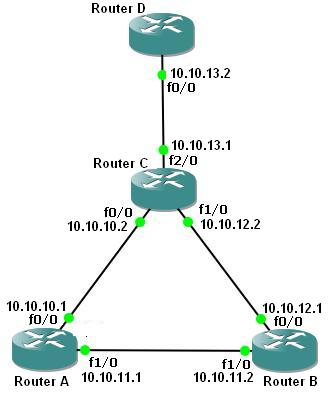
OSPF (Open Shortest Path First) protocol is a well-known Link-State Routing Protocol that is widely used in today’s networks. In this Single Area OSPF configuration tutorial, we will focus on Cisco OSPF Configuration step-by-step. After this Cisco OSPF Configuration example, you will be ready to configure OSPF on Cisco routers. To configure a network for OSPF properly, there are some steps. For basic OSPF Packet Tracer Configuration, we will use the below simple OSPF topology. You can use both Packet Tracer, GNS3 or EveNG to create this OSPF Configuration Example. (OSPFv2 Example).
You can also learn DHCP Server Configuration With Packet Tracer
Complete Cisco Packet Tracer Labs Course
First of all, we will configure the routers’ interfaces. After that we will configure OSPFv2 as our Routing Protocol. Here we assume that all the interfaces including loopback interfaces, their speed, duplex and descriptions have been configured.
To do OSPF Cisco Configuration, as best practices for Cisco OSPF configuration, we will follow the below steps one by one.
The first step of Single Area OSPF Configuration on Packet Tracer is enabling OSPF Process. To do this, we will use “router ospf ospf-process-number” command. In router A, we will enable OSPF Process, with Process Number “1“. We will do this on other routers also. After configuring process, command promt will be under router configuration mode.
A(config)# router ospf 1
A(config-router)#
Would you like to follow Cisco Packet Tracer Course on IPCisco?
After enabling OSPF process on our Cisco Router A, now, we will add our networks under this process. In our example, we will use only OSPF backbone area, area 0 as single area OSPF. So, we will use “network” command with the advertised network address, wildcard mask and the “area” keyword with “OSPF Area-id“.
A(config-router)# network 10.10.10.0 0.0.0.255 area 0
A(config-router)# network 10.10.11.0 0.0.0.255 area 0
A(config-router)# end
To save our OSPF configuration on a Cisco router, we will use “copy running-config startup-config” or “write” commands.
A # copy running-config startup-config
or
A # write
We will do Cisco OSPF configuration also on Router B like Router A. We will enable OSPF and then add OSPF Networks under this process.
B(config)# router ospf 1
B(config-router)# network 10.10.11.0 0.0.0.255 area 0
B(config-router)# network 10.10.12.0 0.0.0.255 area 0
B(config-router)# exit
B # copy running-config startup-config
We will configure Router C like Router A. We will enable OSPF and then add OSPF Networks under this process.
C(config)# router ospf 1
C(config-router)# network 10.10.10.0 0.0.0.255 area 0
C(config-router)# network 10.10.12.0 0.0.0.255 area 0
C(config-router)# network 10.10.13.0 0.0.0.255 area 0
C(config-router)# end
C# copy running-config startup-config
Lastly, we will configure OSPF on Router D like Router A. We will enable OSPF and then add OSPF Networks.
D(config)# router ospf 1
D(config-router)# network 10.10.13.0 0.0.0.255 area 0
D(config-router)# end
D# copy running-config startup-config
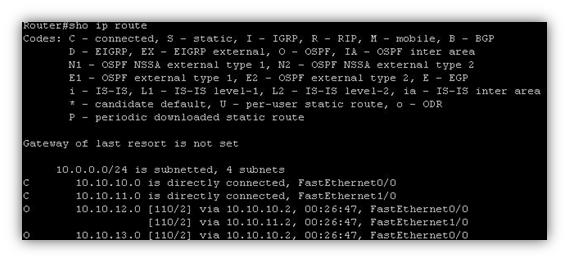
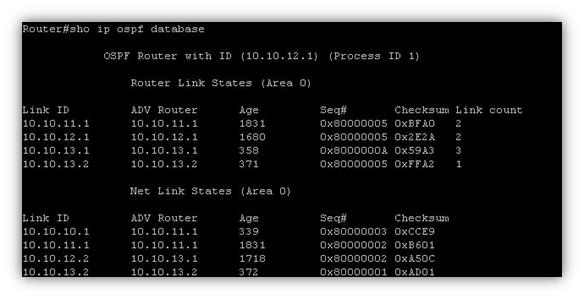
We have completed Single Area OSPF Configuration on Cisco routers. Now, it is time to verify our Cisco config. To do this, there are various OSPF Troublehooting and OSPF verification commands. These important OSPF commands are given below:
Now it is time to see the output os these OSPF commands. Some of the verify commands’ screenshot s are given below for our topology.
On Router A, verification screenshots are below:


On Router B, verification screenshots are below:


On Router C, verification screenshots are below:


On Router D, verification screenshots are below:


You can download “Cisco Packet Tracer” in Tools section.
Single Area OSPF is an OSPF network design where all routers belong to the same OSPF area. In this design, routers share routing information within one area, usually Area 0. Single Area OSPF is commonly used in small and medium-sized networks because it is simple to configure and manage.
Multi Area OSPF is an OSPF network design where routers are divided into multiple OSPF areas. This design improves network scalability, reduces routing updates and decreases CPU and memory usage on routers. In Multi Area OSPF, all areas connect to the backbone Area 0, which allows routing information to be exchanged between different areas efficiently.
Area 0 is the backbone area of an OSPF network. All other OSPF areas must connect to Area 0 to exchange routing information properly. The backbone area helps OSPF maintain efficient routing and organized network topology.
OSPFv2 is used for IPv4 networks, while OSPFv3 is designed for IPv6 networks. OSPFv3 supports IPv6 addressing and uses different neighbor discovery mechanisms compared to OSPFv2. Both versions use the same OSPF concepts such as areas, neighbors and link-state advertisements.

Gokhan Kosem is a Network Engineer, Instructor and the Founder of IPCisco.com with 15+ years of experience in Cisco, Nokia, Huawei, Juniper, Linux, Service Provider Networks, Routing and Switching technologies.
He has worked on the backbone networks of major service providers and network vendors including Nortel, Alcatel-Lucent (Nokia) and has extensive hands-on experience with Cisco, Huawei, Juniper and Nokia networking technologies.
He has trained thousands of networking students worldwide through IPCisco.com, Udemy, books, labs, quizzes, and educational content across multiple social media platforms.
IPCisco.com | Best Route to Your Dreams






Leave a Reply