
- COURSES
- SPECIALS
- BLOG
- MEMBERS
- SHOP
- BOOKSHELF
- ABOUT
- ENROLL HERE

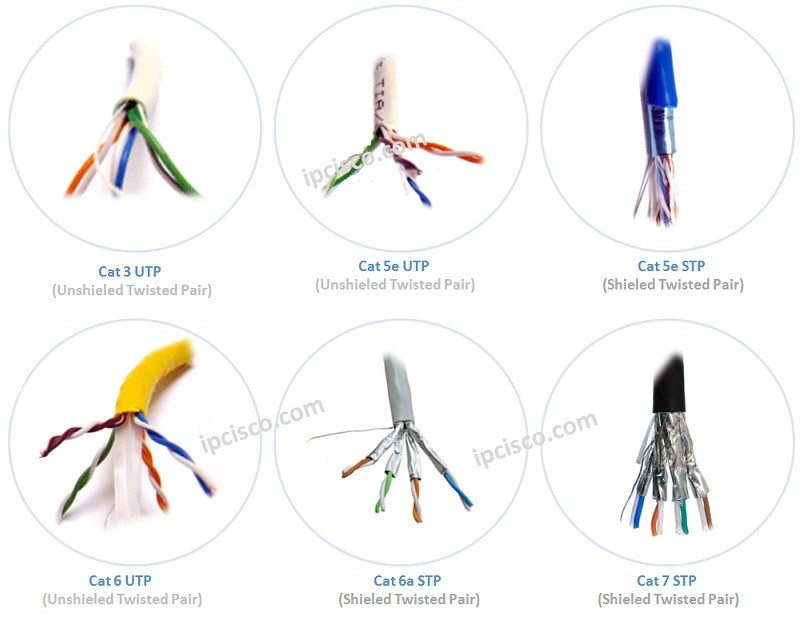
Table of Contents
Network Cabling is the Layer 1 of OSI Model. One of the most important part of a network. With the media the network traffic can travel from one end to the other end. This can be done through wireless networks also. But network cabling is always used even if wireless networks are used.
Different networks and interfaces require various cable types. Twisted-pair cables, Fiber-Optic cables, Coaxial cables are the common cable types.In this article, we will focus on these cable types and we will talk about them detailly.
To talk about cable types in network cabling, let’s start with Ethernet Standard. As you know Ethernet, is one of the Layer 2 standard that is commonly used. There are different cable types that are used with Ethernet Standard. These are:
Ethernet (10Base-T) is provided with Copper Twisted Pair cables. There are two standard for Ethernet (10Base-T):
Fast Ethernet (100Base-T) is know as 802.3u in network cabling and it has also Half and Full duplex modes. Normally it is used withing 100meters but according to the cable type used, this can be changed. If Multi Mode SFP (Fiber Optic) is used, then this distance can be up to 2km. If Single Mode is used, then the distance can be up to 25 km.
The types of Fast Ethernet are :
Learn more about RJ45 connectors, pinouts and Ethernet wiring in our RJ45 Connector guide.
Below, you can also watch Network Cabling Video Lesson:
Gigabit Ethernet (1000Base-T) is know as 802.3ab and it has only Full-duplex mode. It provides 100 meters with 4 Pair Category 5 (CAT5). But if we use Fiber Optic Multi Mode SFP, then this can be up to 550 meters. And if we use Single Mode this can be up to 70 km. Here, the SFP type is important. Different SFP types even if they are Single Mode, support different distances.
10 Gigabit Ethernet (1000Base-T) is know as 802.3ae in network cabling and it is used only with Optical cables. With Multi Mode, it is up to 300 meters. But with Single Mode SFPs, this distane can be up to 80 km.
Fiber Optic cables are high capacity cables. Beside lower speeds, they are also the cables that is used for 100Gbps connections.
To learn Networking Connectors, you can also visit Networking Connectors Lesson.
In network cabling Fiber Optic cables has two different modes. These two modes are given below:
There are also different types of each Fiber Optic Cable Mode.
Multimode Fiber Optic Cable Types are:
Single Mode Fiber Optic Cable Types are:
For detailed information, you can also check Fiber Optic Cable Types Lesson.
Different SFPs can be used with these Modes also. And this different SFPs provide different properties and distances. You will also hear too much LX, SX, ZX etc. These are the terms used with Fiber Optic Cables and each of them has different capability.
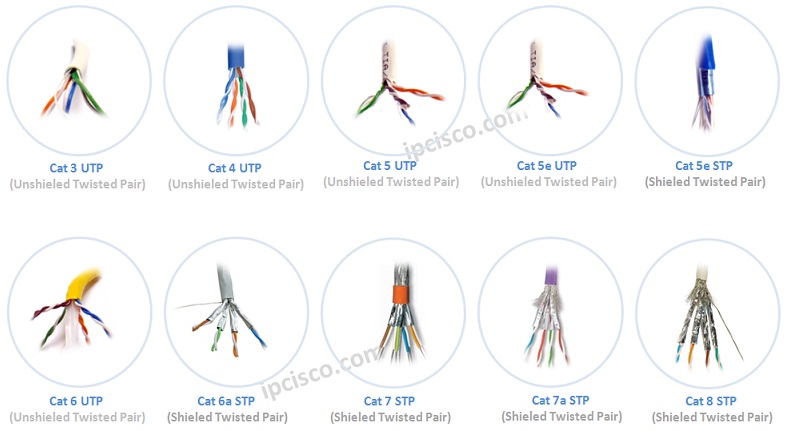
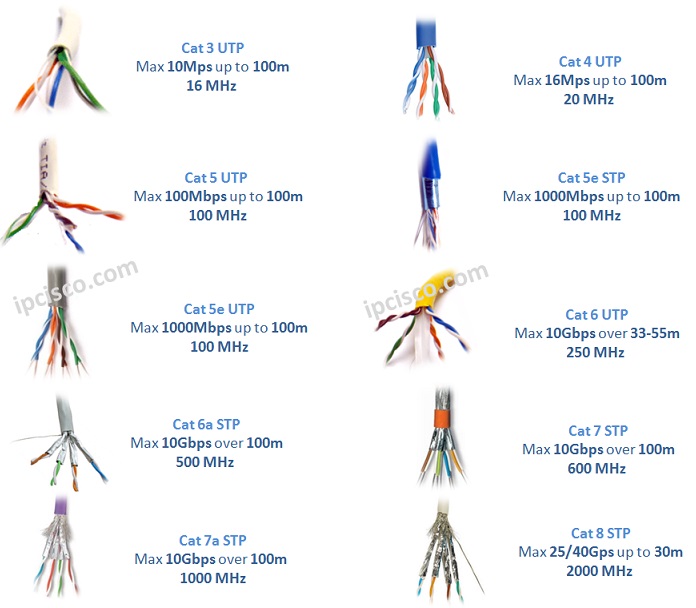
By the way, we will hear too much Category, when we talk about cables in networking. What are these Categories? Lets write each of them beginning with CAT3 to the new technology CAT8.
To learn Networking Connectors, you can also visit Networking Connectors Lesson.
Serial cables are the legacy transport mechanisms. It is evolving through the USB. But it is good to know about them even if they are old technology. There are two types important Serial cables. These are:
The below network cable comparison table compares the most common network cable types by speed, maximum transmission distance, resistance to electromagnetic interference and typical application. It includes Cat5e, Cat6, Cat6A, Cat7, Cat8, fiber-optic, coaxial and serial cables to provide a quick overview of modern network cabling options.
| Cable Type | Typical Speed | Maximum Distance | EMI Resistant | Common Use |
| Cat5e | 1 Gbps | 100 m | No | Home and Office LANs |
| Cat6 | 1 Gbps / 10 Gbps up to 55 m | 100 m | Better than Cat5e | Home and Enterprise LANs |
| Cat6A | 10 Gbps | 100 m | Yes | Enterprise Networks and Data Centers |
| Cat7 | 10 Gbps | 100 m | Yes | Specialized Shielded and Industrial Networks |
| Cat8 | 25 Gbps / 40 Gbps | 30 m | Yes | Short-Distance Data Center Links |
| Fiber Optic | 10 Gbps to 400 Gbps+ | Several kilometers | Yes | Backbones, Data Centers, and Long-Distance Links |
| Coaxial | Varies | Varies | Moderate | Cable Internet, CCTV, and Legacy Systems |
| Serial | Low | Varies | Varies | Console and Legacy WAN Connections |
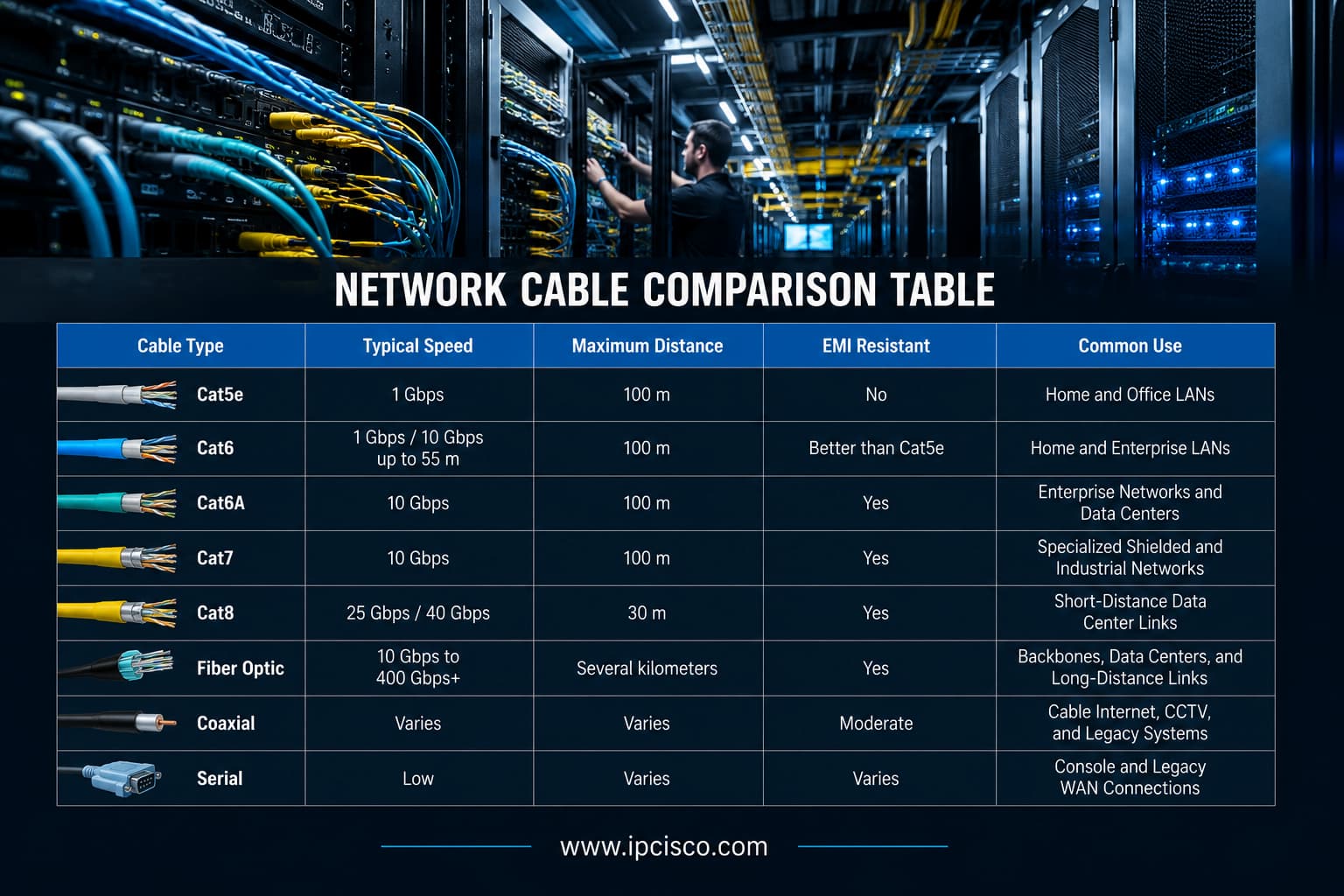
Side-by-side comparison of the most common network cable types used in modern computer networks
Choosing the right network cable depends on the required speed, transmission distance, installation environment and connected devices. The below table recommends suitable cable types for common home, office, enterprise, data center and Internet connectivity scenarios.
| If You Need… | Recommended Cable | Why? |
| Home Network | Cat6 | Provides an excellent balance of speed, cost, and reliability. |
| Future-Ready Home Network | Cat6A | Supports 10 Gigabit Ethernet up to 100 meters. |
| Standard Office LAN | Cat6 or Cat6A | Supports Gigabit Ethernet and future network upgrades. |
| Industrial or High-Interference Environment | Cat7 or Shielded Cat6A | Shielding helps reduce electromagnetic interference. |
| 25 Gbps or 40 Gbps Copper Link | Cat8 | Designed for short-distance, high-speed data center connections. |
| Long-Distance Network Link | Single-Mode Fiber | Provides high bandwidth over long distances. |
| Short High-Speed Fiber Link | Multimode Fiber | Suitable for high-speed links within buildings and data centers. |
| Data Center Backbone | Fiber Optic | Offers high speed, high density, long distance, and EMI immunity. |
| Cable Internet Connection | Coaxial | Commonly used between cable service providers and modems. |
| Router or Switch Console Connection | Console Cable | Provides local access to the network device command-line interface. |
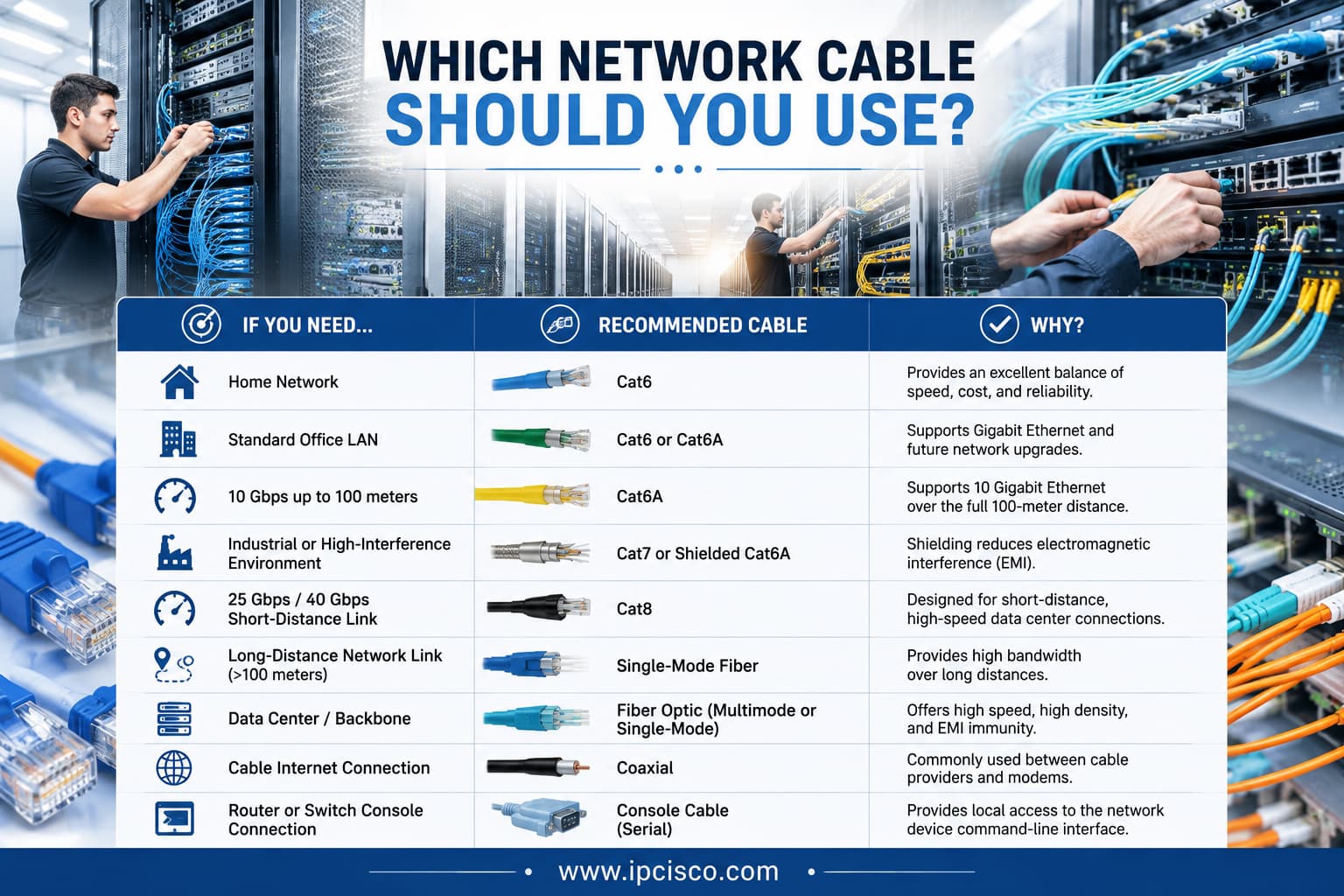
Quick guide to selecting the right network cable for different networking environments and applications
Choosing the right network cable depends on your network speed, transmission distance, installation environment and application requirements. You can fFollow the simple decision guide below to quickly identify the most suitable cable type for your home, office, enterprise or data center network.
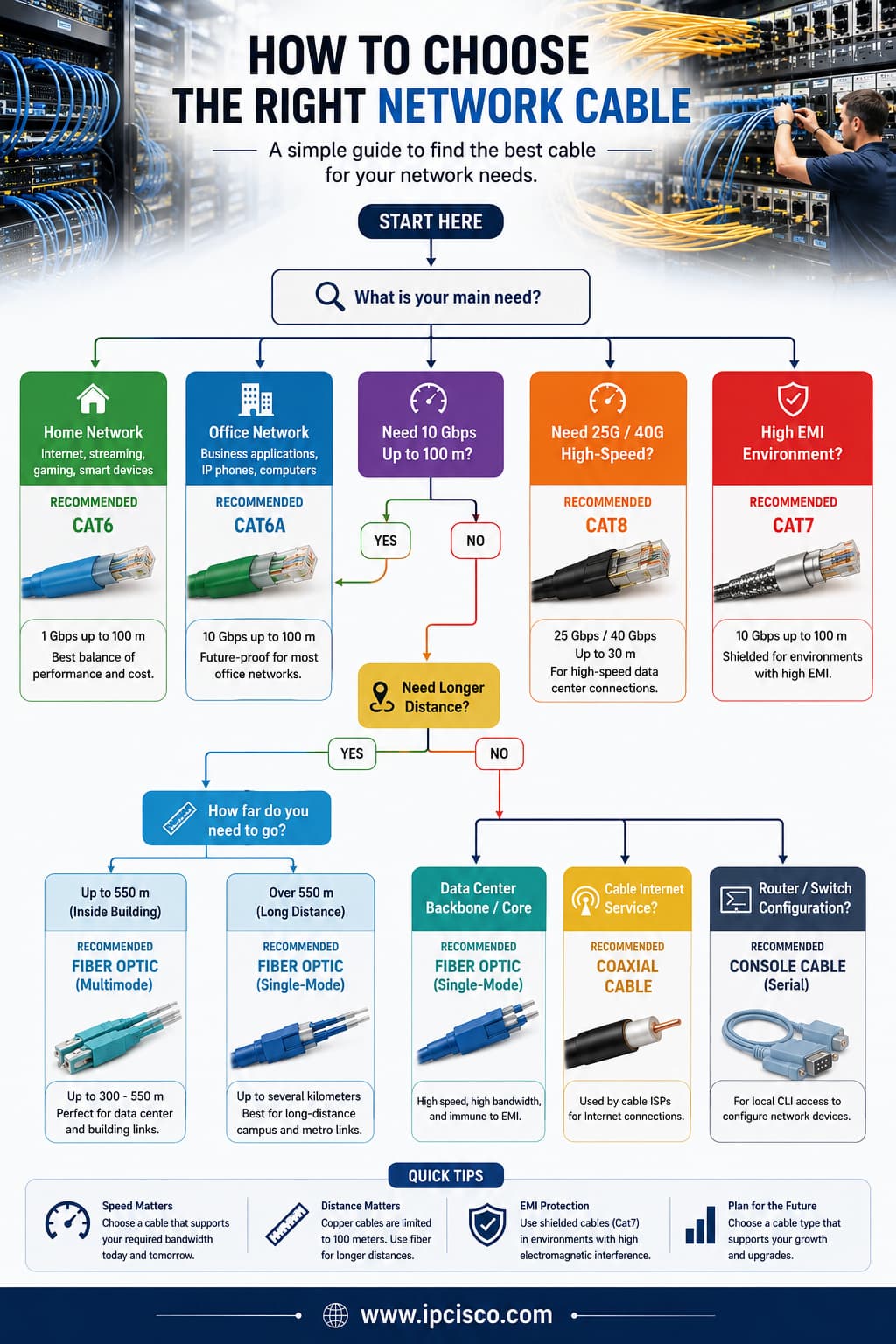
Network cable selection guide for choosing the most suitable cable based on your networking requirements
This Network Cabling Cheat Sheet summarizes the most common Ethernet, fiber-optic, coaxial and serial cables, including Cat5e, Cat6, Cat6A, Cat7, and Cat8. It provides a quick reference to typical speeds, maximum transmission distances, common applications, shielding characteristics and recommended use cases for CCNA, CCNP, Network+ and network engineering study.
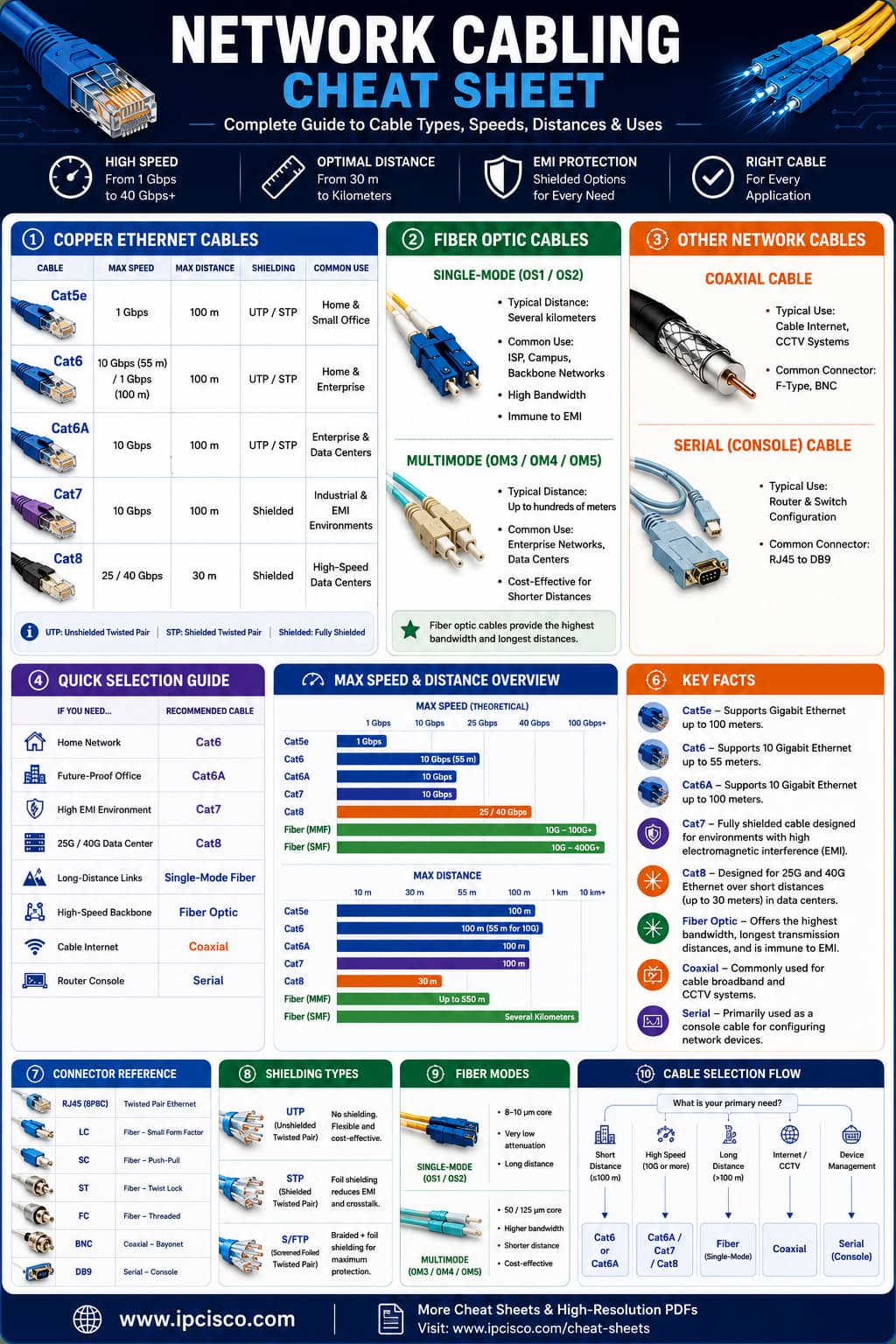
Quick reference guide to the most common network cable types, their capabilities, and recommended networking applications
There are three main types of network cables. These are twisted-pair copper cables, fiber-optic cables and coaxial cables. Twisted-pair cables are commonly used in Ethernet LANs, fiber-optic cables support high-speed and long-distance communication and coaxial cables are primarily used in cable Internet and legacy networking systems.
Cat5e and Cat6 are both Ethernet cable categories that use RJ45 connectors. Cat6 supports higher bandwidth and better performance over shorter distances, making it more suitable for Gigabit and 10 Gigabit Ethernet deployments.
Yes. Cat6 cables are backward compatible with Cat5e and can be used with the same RJ45 connectors. But here, your network speed will still depend on the capabilities of the connected equipment.
For most home networks, Cat6 Ethernet cable is the best choice because it offers excellent performance, supports Gigabit networking and provides better protection against interference than Cat5e.
Fiber-optic cable is the preferred for long-distance networking because it supports much greater distances, higher bandwidth and is immune to electromagnetic interference than twisted-pair cables.
The main differences between copper and fiber optic cables are their transmission method and their typical networking applications. Copper cables transmit electrical signals and are commonly used in local Ethernet networks. On the other hand, fiber optic cables transmit light signals and can be used both in local networks and in long distances. Here, fiber optic provides higher bandwidth, longer transmission distances and immunity to electromagnetic interference.
Yes, but only within their specified minimum bend radius. Excessive bending can increase signal loss or permanently damage the optical fiber.
Twisted-pair Ethernet cables such as Cat5e, Cat6 and Cat6A are the most commonly used network cables for Ethernet LANs in home networks, office and enterprise networks.
STP (Shielded Ethernet cables) include additional shielding to reduce electromagnetic interference, making them suitable for electrically noisy environments. UTP (Unshielded twisted-pair ) cables are more common, easier to install and sufficient for most office and home networks.
Yes. Different cable types can coexist within the same network. But generally we use them for different roles. For example, fiber-optic cables are commonly used for backbone connections, while Cat6 Ethernet cables connect end devices to switches.
Cat5e (Category 5 Enhanced) is an improved version of Cat5 with stricter specifications for reducing crosstalk and interference. Cat5 was primarily designed for older Ethernet networks, while Cat5e supports Gigabit Ethernet (1000BASE-T) up to 100 meters and is still widely used in modern LANs.

Gokhan Kosem is a Network Engineer, Instructor and the Founder of IPCisco.com with 15+ years of experience in Cisco, Nokia, Huawei, Juniper, Linux, Service Provider Networks, Routing and Switching technologies.
He has worked on the backbone networks of major service providers and network vendors including Nortel, Alcatel-Lucent (Nokia) and has extensive hands-on experience with Cisco, Huawei, Juniper and Nokia networking technologies.
He has trained thousands of networking students worldwide through IPCisco.com, Udemy, books, labs, quizzes, and educational content across multiple social media platforms.
IPCisco.com | Best Route to Your Dreams







Excellent reference material.
Learn a lot and special thanks for the post.
Regards.
M s H quayum
Thank you very much Quayum:) Enjoy!
Conteúdo super interessante
Always welcome Benedito:) Good luck!