

Remote Service Mirroting is the other Service Mirroring type. As we have talked about before, Remote Service Mirroring is the service mirroring that is done between different devices.
In this lesson, we will configure an example topology for Remote Service Mirroring.
For our example, we will use the below topology:
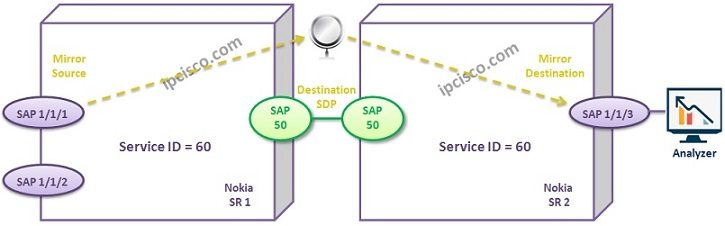
Think about that, we need to analyze one SAP on the left router. To do this, we will mirror this port to the another port reside on the right router.
Let’s start to configure Remote Service Mirroring.Firstly Router1.
We will start with the Mirror Destination configuration again. We will create Mirror Destination with a Servie ID. Our Service ID is 60 for this configuration. After that we will configure a description for this Mirror Destination. Lastly, we will set the SDP that we will use. Here, we will use SDP 100.

Other Mirroring Articles
Nokia Service Mirroring – Overview
Nokia Service Mirroring – Local Service Mirroring
Nokia Service Mirroring – Remote Service Mirroring

Gokhan Kosem is a Network Engineer, Instructor and the Founder of IPCisco.com with 15+ years of experience in Cisco, Nokia, Huawei, Juniper, Linux, Service Provider Networks, Routing and Switching technologies.
He has worked on the backbone networks of major service providers and network vendors including Nortel, Alcatel-Lucent (Nokia) and has extensive hands-on experience with Cisco, Huawei, Juniper and Nokia networking technologies.
He has trained thousands of networking students worldwide through IPCisco.com, Udemy, books, labs, quizzes, and educational content across multiple social media platforms.
IPCisco.com | Best Route to Your Dreams





Leave a Reply