

Link Aggregation (LAG) Configuration on Nokia Routers
In the previous article we focused on how to configure Link Aggregation on Cisco and Juniper devices. Here you will learn How to Configure Nokia Link Aggregation on Nokia 7750 Service Router.
The ports in a LAG must have the same characteristis, speed, duplex etc.
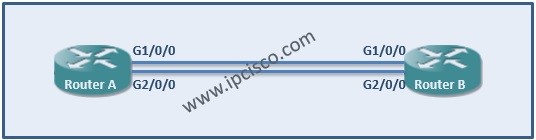
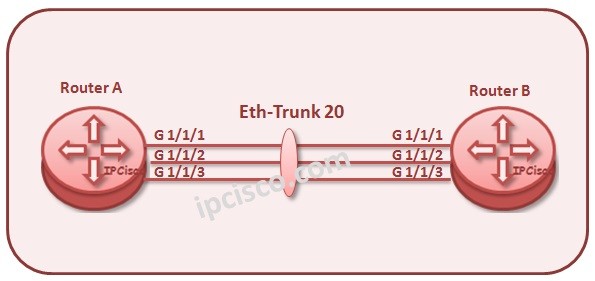
In this part of Nokia Link Aggregation, let’s start with the configuration of the ports. We have ports 1/1/1 and 1/1/2. We must ensure that these two ports have identical speed and duplex. Let’s starts with RouterA.
A : RouterA # configure port 1/1/1
A : RouterA >config>port# ethernet no autonegotiate
A : RouterA >config>port# ethernet speed 100
A : RouterA >config>port# ethernet duplex full
A : RouterA >config>port# exit
A : RouterA # configure port 1/1/2
A : RouterA >config>port# ethernet no autonegotiate
A : RouterA >config>port# ethernet speed 100
A : RouterA >config>port# ethernet duplex full
Above, the “no autonegotiation” command is used to ensure that autonegotiation is disabled and only a specific speed is advertised.
We must remove the port binding from the interface between RouterA and RouterB. To do this use the below command.
A : RouterA # configure router interface RouterAB no port
Next, we configure the LAG and associate the ports with this LAG.

Link Aggregation – Part 1 (Link Aggregation Control Protocol, LACP)
Link Aggregation – Part 2 (LACP Configuration on Cisco Devices)
Link Aggregation – Part 3 (LACP Configuration on Juniper Devices)
Link Aggregation – Part 4 (LAG Configuration on Alcatel-Lucent Devices)

Gokhan Kosem is a Network Engineer, Instructor and the Founder of IPCisco.com with 15+ years of experience in Cisco, Nokia, Huawei, Juniper, Linux, Service Provider Networks, Routing and Switching technologies.
He has worked on the backbone networks of major service providers and network vendors including Nortel, Alcatel-Lucent (Nokia) and has extensive hands-on experience with Cisco, Huawei, Juniper and Nokia networking technologies.
He has trained thousands of networking students worldwide through IPCisco.com, Udemy, books, labs, quizzes, and educational content across multiple social media platforms.
IPCisco.com | Best Route to Your Dreams





Leave a Reply