

MLD Configuration on Cisco
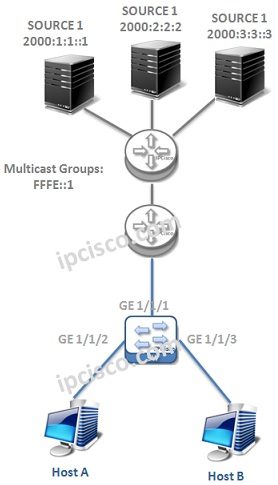
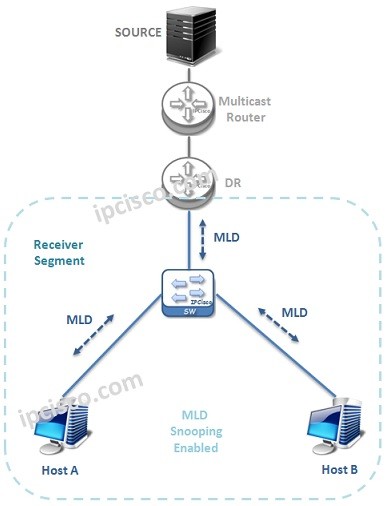
In this lesson we will configure Multicast Listener Discovery (MLD) on Cisco devices. Out Multicast Network will be like below:
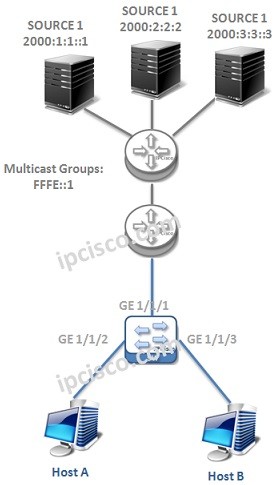
Now, let’s start to configure MLD.
MLD Version
The default version of MLD is version 2. But to show you, we will configure this version even it not required. To do this we will use “ipv6 mld version 2” command.
Nore: Here, we are showing only one interface, but this configuration must be done on each MLD interface. This is true for all the interface configurations.
Static Group Binding
To bind a group to an interface statically, we will use the below command under the interface:
MLD Timers
There are various timers used with MLD like IGMP. Here, we will show the most important and widely modified ones.
• MLD Startup Query Interval
• Querier Timeout
• Query Timeout
• Query Max Response Time
• Query Interval
• Last Member Query Response Time
• Group Timeout
MLD timers are configured under the interface that MLD run.
The default values of some of the MLD values are given below:

Other MLD Articles
Multicast Listener Discovery (MLD) – Overview
Multicast Listener Discovery (MLD) – MLD Operations
Multicast Listener Discovery (MLD) – MLD Configuration on Cisco

Gokhan Kosem is a Network Engineer, Instructor and the Founder of IPCisco.com with 15+ years of experience in Cisco, Nokia, Huawei, Juniper, Linux, Service Provider Networks, Routing and Switching technologies.
He has worked on the backbone networks of major service providers and network vendors including Nortel, Alcatel-Lucent (Nokia) and has extensive hands-on experience with Cisco, Huawei, Juniper and Nokia networking technologies.
He has trained thousands of networking students worldwide through IPCisco.com, Udemy, books, labs, quizzes, and educational content across multiple social media platforms.
IPCisco.com | Best Route to Your Dreams





Leave a Reply