

Table of Contents
How to Configure GRE Tunnel on Huawei Routers?
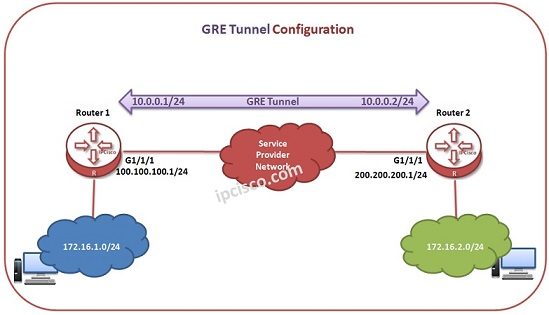
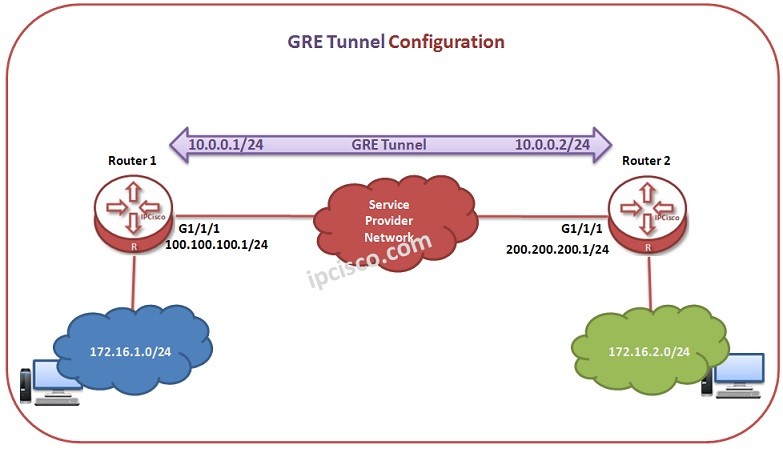
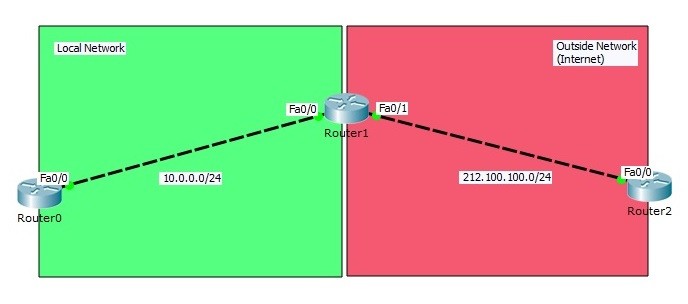
In this lesson, we will use Huawei Routers, to configure GRE Tunnels. For our example, we will use the topology given below:
You can also view Cisco GRE Configuration Example.
You can download this configuration on Huawei eNSP Labs Page.
GRE Tunnel Configuration
Let’s start to configure Huawei Router 1 firstly for the GRE Tunnel.
Firstly, we will create Tunnel interface. Then, we will give the Tunnel IP Address to this Tunnel Interface. After that, we will set the source and destination physical addresses.
system-view</strong>
[Huawei-Router1] interface Tunnel 1/1/1
[Huawei-Router1-Tunnel1/1/1] ip address 10.0.0.1 24
[Huawei-Router1-Tunnel1/1/1] tunnel-protocol gre
[Huawei-Router1-Tunnel1/1/1] source 100.100.100.1 24
[Huawei-Router1-Tunnel1/1/1] destination 200.200.200.1 24
[Huawei-Router1-Tunnel1/1/1] quit
Now, it is time to configure Router 2. We will configure the same things in Router 2, only the IP addresses will change.
system-view
[Huawei-Router2] interface Tunnel 1/1/1
[Huawei-Router2-Tunnel1/1/1] ip address 10.0.0.2 24
[Huawei-Router2-Tunnel1/1/1] tunnel-protocol gre
[Huawei-Router2-Tunnel1/1/1] source 200.200.200.1 24
[Huawei-Router2-Tunnel1/1/1] destination 100.100.100.1 24
[Huawei-Router2-Tunnel1/1/1] quit
Static Routes
After Tunnel configuration, we need to tell the routes of undirectly connected networks to the routers. Here, we will do it with Static Routes.


Gokhan Kosem is a Network Engineer, Instructor and the Founder of IPCisco.com with 15+ years of experience in Cisco, Nokia, Huawei, Juniper, Linux, Service Provider Networks, Routing and Switching technologies.
He has worked on the backbone networks of major service providers and network vendors including Nortel, Alcatel-Lucent (Nokia) and has extensive hands-on experience with Cisco, Huawei, Juniper and Nokia networking technologies.
He has trained thousands of networking students worldwide through IPCisco.com, Udemy, books, labs, quizzes, and educational content across multiple social media platforms.
IPCisco.com | Best Route to Your Dreams






Leave a Reply