

Table of Contents
Huawei Access-Lists
In this configuration example, we will learn the Access List (ACL) Configuration on Huawei Routers. Configuring Access Lists has some basic steps and we will cover all these steps in this article.
First of all, let’s remember the Access List types. There are three types Access Lists (ACLs) :
• Basic ACL
• Advanced ACL
• Layer 2 ACL
You can check each ACL type and their number ranges below. You can also find the parameters of each ACL type.
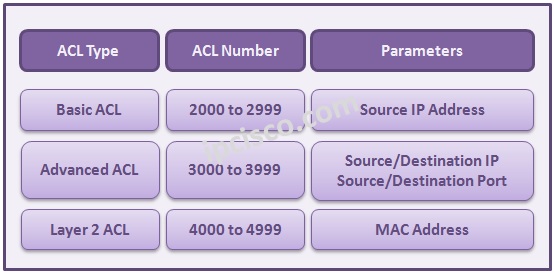
In this lesson, we will show Basic Access Lists (Basic ACLs) and Advanced Access Lists (Advanced ACLs) with specific examples.
Let’s firstly start with Basic Access List Configuration.
Basic Access List Configuration on Huawei Routers
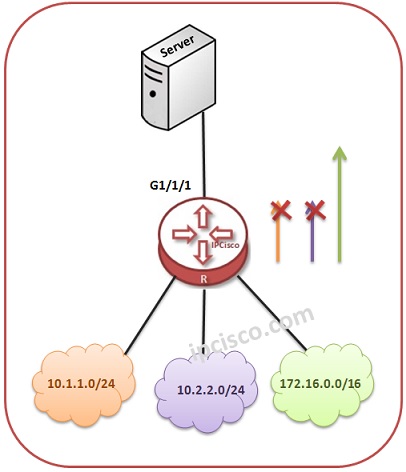
In the first example, we will focus on Basic Access List Configuration. With this Basic Access List Configuration, we will prevent the users on the subnet 10.1.1.0/24 and 10.2.2.0/24 to access the router. And we will allow the users, in the subnet 172.16.0.0/16 to access the router.


Gokhan Kosem is a Network Engineer, Instructor and the Founder of IPCisco.com with 15+ years of experience in Cisco, Nokia, Huawei, Juniper, Linux, Service Provider Networks, Routing and Switching technologies.
He has worked on the backbone networks of major service providers and network vendors including Nortel, Alcatel-Lucent (Nokia) and has extensive hands-on experience with Cisco, Huawei, Juniper and Nokia networking technologies.
He has trained thousands of networking students worldwide through IPCisco.com, Udemy, books, labs, quizzes, and educational content across multiple social media platforms.
IPCisco.com | Best Route to Your Dreams






Leave a Reply