

Table of Contents
Routing Tables of Juniper
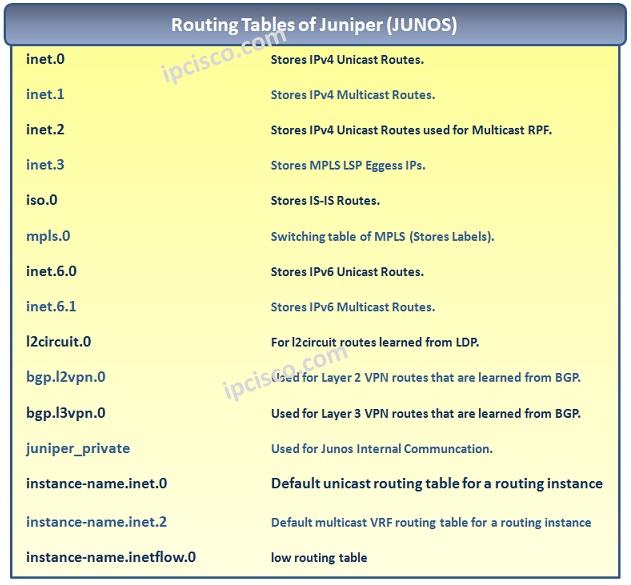
There are multiple Routing Tables in Juniper Routers. These Routing Tables and their roles are given below:
• inet.0 – Stores IPv4 Unicast Routes.
• inet.1 – Stores IPv4 Multicast Routes.
• inet.2 – Stores IPv4 Unicast Routes used for Multicast Reverse-path-forwarding (RPF).
• inet.3 – Stores MPLS LSP Eggess IPs.
• inet.6.0 – Stores IPv6 Unicast Routes.
• inet.6.1 – Stores IPv6 Multicast Routes.
• mpls.0 – Switching table of MPLS (Stores Labels).
• iso.0 – Stores IS-IS Routes.
• bgp.l2vpn.0 – Used for Layer 2 VPN routes that are learned from BGP.
• bgp.l3vpn.0 – Used for Layer 3 VPN routes that are learned from BGP.
• l2circuit.0 – For l2circuit routes learned from LDP.
• juniper_private – Used for Junos Internal Communcation.
• instance-name.inet.0 – Default unicast routing table for a routing instance
• instance-name.inet.2 – Default multicast VRF routing table for a routing instance
• instance-name.inetflow.0 – Flow routing table
https://www.juniper.net/documentation/en_US/junos/topics/concept/routing-tables-understanding.html
To check to Routes, you can use general “show route” command.
To check a specific Routing Table, you can use “show routing table” command with the related Routing Table name(inet.0, inet.1 etc.).
juniper-router@Kosem> show route table inet.0 inet.0: 4 destinations, 4 routes (4 active, 0 holddown, 0 hidden) + = Active Route, – = Last Active, * = Both 192.168.1.0/24 *[Direct/0] 00:09:12 > via ge-1/1/1 172.16.0.0/24 *[Direct/0] 00:09:12 > via ge-1/2/1 10.1.1.1/32 *[Local/0] 00:09:12 Local 172.16.5.0/32 *[Static/5] 00:10:32 > via ge-2/2/2
juniper-router@Kosem> show route table inet.1 inet.1: 2 destinations, 2 routes (2 active, 0 holddown, 0 hidden) + = Active Route, – = Last Active, * = Both 224.10.1.1,10.1.1.1/32*[PIM/105] 00:06:23 Multicast 224.20.2.2,200.1.1.1/32*[PIM/105] 00:07:12 Multicast
juniper-router@Kosem> show route table inet6.0 inet6.0: 2 destinations, 2 routes (2 active, 0 holddown, 0 hidden) + = Active Route, – = Last Active, * = Both fec0:abcd:11aa:1001::/64 *[Direct/0] 00:02:11 > via ge-1/1/1 fec0:abcd:22bb:2002::/64 *[Direct/0] 00:02:11 > via ge-1/1/2 fec0:0:bbbb:aaaa::5/128 *[Local/0] 00:2:11 Local via fe-0/0/1.0
Juniper Preference Values
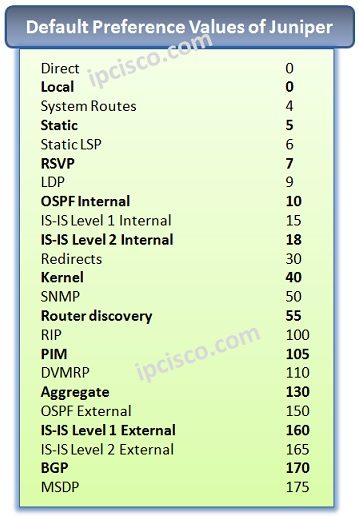
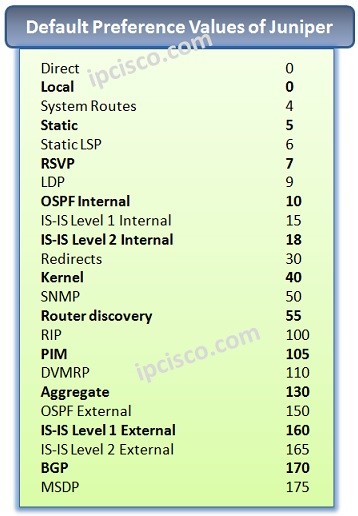
Preference Values (Administrative Distance in Cisco), are the values that provide the reliability ratio of a Routing Protocol. The lower values are most reliable routes in the Routing Table. If the preference value increase, the reliability is decrease too.
For this reason the better value is 0. Only direct and Local routes has this value. After that the most reliable value is by default 5 which is belong to Static Routes.
You can find the Juniper Preference values below:

Gokhan Kosem is a Network Engineer, Instructor and the Founder of IPCisco.com with 15+ years of experience in Cisco, Nokia, Huawei, Juniper, Linux, Service Provider Networks, Routing and Switching technologies.
He has worked on the backbone networks of major service providers and network vendors including Nortel, Alcatel-Lucent (Nokia) and has extensive hands-on experience with Cisco, Huawei, Juniper and Nokia networking technologies.
He has trained thousands of networking students worldwide through IPCisco.com, Udemy, books, labs, quizzes, and educational content across multiple social media platforms.
IPCisco.com | Best Route to Your Dreams






Leave a Reply