Basic Frame-Relay Configuration with both Inverse-ARP and Frame-Relay Map Command

Frame Relay Map

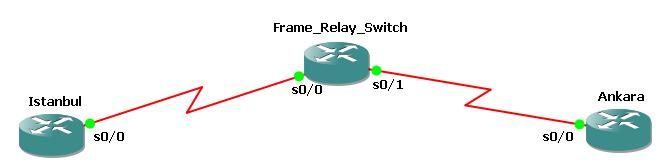
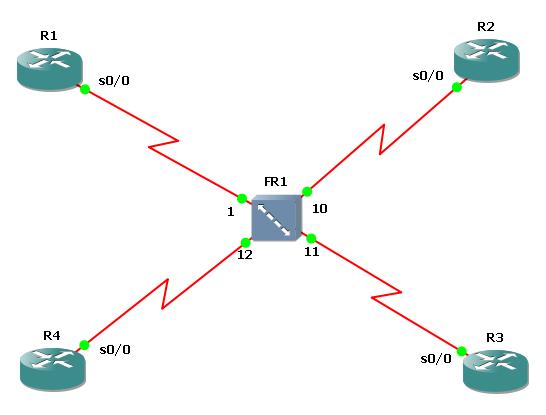
Here, we will talk about two options for configuring Frame-Relay Maps. One is Inverse-ARP and the other is with “frame-relay map” command. To show this in a basic topology, we will use the below topology configured with three Cisco 3600 series routers.


Firstly, we will start to do the configuration for Inverse-ARP way.The configurations are below:

Istanbul Router Configuration

Istanbul (config) # interface serial 0/0
Istanbul (config-if) # ip address 210.0.0.1 255.255.255.0
Istanbul (config-if) # encapsulation frame-relay
Istanbul (config-if) # frame-relay interface-dlci 100
Istanbul (config-if) # no shutdown
Istanbul (config-if) # end
Istanbul # write

Note 1 : In Cisco routers you must enter “frame-relay switching” command to configure the router as a frame-relay switch.

Note 2 : If there is another router aside from Cisco router, then you must use “encapsulation frame-relay ietf” command.

Frame-Relay Switch Configuration

FR_Switch (config) # interface serial 0/0
FR_Switch (config-if) # no ip address
FR_Switch (config-if) # encapsulation frame-relay
FR_Switch (config-if) # clock rate 64000
FR_Switch (config-if) # frame-relay intf-type dce
FR_Switch (config-if) # frame-relay route 100 interface serial 0/1 300 
FR_Switch (config-if) # no shutdown
FR_Switch (config-if) # exit
FR_Switch (config) # interface serial 0/1
FR_Switch (config-if) # no ip address
FR_Switch (config-if) # encapsulation frame-relay
FR_Switch (config-if) # clock rate 64000
FR_Switch (config-if) # frame-relay intf-type dce
FR_Switch (config-if) # frame-relay route 300 interface serial 0/0 100 
FR_Switch (config-if) # no shutdown
FR_Switch (config-if) # end
FR_Switch # write

Ankara Router Configuration

Ankara (config) # interface serial 0/0
Ankara (config-if) # ip address 210.0.0.2 255.255.255.0
Ankara (config-if) # encapsulation frame-relay
Ankara (config-if) # frame-relay interface-dlci 300
Ankara (config-if) # no shutdown
Ankara (config-if) # end
Ankara # write

To check the connection between the routers, you can use the below ping commands:

You can reach the other Frame-Relay articles below:

Basic Frame-Relay Configuration with both Inverse-ARP and Frame-Relay Map Command
Basic Point-to-Point Frame-Relay Configuration
Basic Multipoint Frame-Relay Configuration

 

gokhan-kosem-instructor-ipcisco

Table of Contents

Gokhan Kosem is a Network Engineer, Instructor and the Founder of IPCisco.com with 15+ years of experience in Cisco, Nokia, Huawei, Juniper, Linux, Service Provider Networks, Routing and Switching technologies.

He has worked on the backbone networks of major service providers and network vendors including Nortel, Alcatel-Lucent (Nokia) and has extensive hands-on experience with Cisco, Huawei, Juniper and Nokia networking technologies.

He has trained thousands of networking students worldwide through IPCisco.com, Udemy, books, labs, quizzes, and educational content across multiple social media platforms.

IPCisco.com | Best Route to Your Dreams
2 Responses to “Basic Frame-Relay Configuration with both Inverse-ARP and Frame-Relay Map Command”


  • Aaron Abrincia Meimban, CCNP - Phillipines / / Reply

    Thanks brother, It helps a lot.

  • Apostolos_Greece / / Reply

    Very useful article!! I think it’s ideal for those who will take their ccna exam soon..

Leave a Reply

Your email address will not be published. Required fields are marked *