

OSPF neighborship is one of the key lessons of Open Shortest Path First. It is very improtant key lesson for Cisco CCNA, CCNP ENCOR and CCIE Enteprise Infrastructure Certifications. In this post, we will focus on OSPF Neighbor Requiremetns and when does OSPF Neighborship form. We will explore each parameters thet OSPF use and look during the neighbourship establishment process. As you know, OSPF routers must establish a neighbor relationship before they can exchange routing information. To do this, we enable OSPF under the routers in OSPF Areas. But it does not guarantee OSPF adjaceny.
There are different OSPF parameters that need to be matched for neighborship formation. For example Area ID, Hello Timer, Dead Timer and authentication settings, normally need to match for neighborship. On the other hand, some parameters such as the OSPF Process ID, interface cost and OSPF priority, do not need to be the same on both neighbor. Especially on troubleshhoooing,it is improtant to know these parameters.
Below, we will explore the most important OSPF neighbor requirements one by one.
Download Routing Protocols Cheat Sheet | IPCisco Complete Cheat Sheet Library
Table of Contents
Do OSPF Area IDs Need to Match?
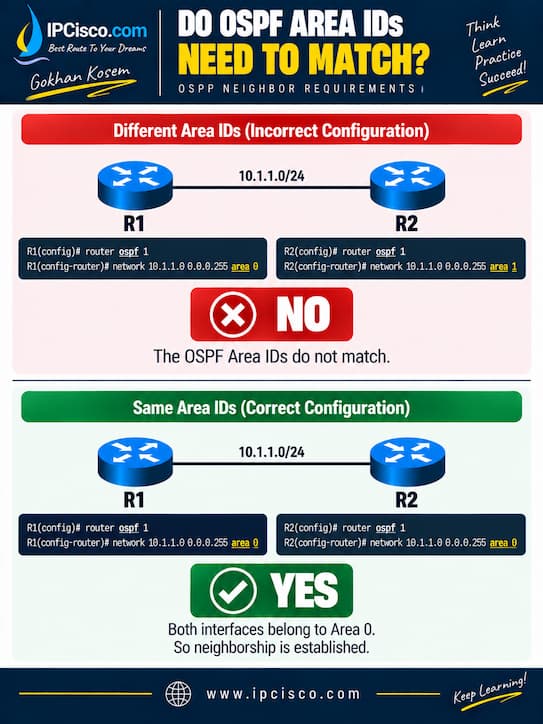
The answer of this question si YES. For OSPF neihgborship establishment, OSPF Area IDs must match. Let’s give an example.
In the below picture, when we use the above OSPF configuration, OSPF neighborhsip is not established. On the other hand, in the below part, neighborship is established.
Do OSPF Area IDs Need to Match?
Incorrect Configuration: (No Neighborship)
R1(config)# router ospf 1
R1(config-router)# network 10.1.1.0 0.0.0.255 area 0
R2(config)# router ospf 1
R2(config-router)# network 10.1.1.0 0.0.0.255 area 1
Correct Configuration: (Neighborship Established)
R1(config)# router ospf 1
R1(config-router)# network 10.1.1.0 0.0.0.255 area 0
R2(config)# router ospf 1
R2(config-router)# network 10.1.1.0 0.0.0.255 area 0
Complete Cisco Packet Tracer Rotuer and Switch Configuration Course!
Do OSPF Process IDs Need to Match?
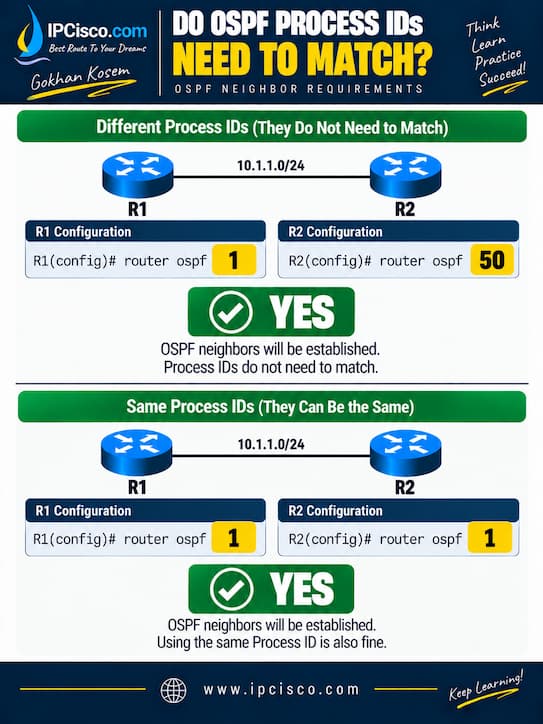
NO. there is no need for OSPF Process IDs match between OSPF neighbor routers. The OSPF Process ID is local significant. It identifies an OSPF process only on the local router and is not required to be the same on neighboring routers. Let’s give an example for this situations.
Do OSPF Process IDs Need to Match?
Correct Configuration: (Neighborship Established)
R1(config)# router ospf 1
R2(config)# router ospf 50
Correct Configuration: (Neighborship Established)
R1(config)# router ospf 1
R2(config)# router ospf 1
As you can see, we can use same or different process IDs during neighborship configuration.
Do OSPF Hello and Dead Timers Need to Match?
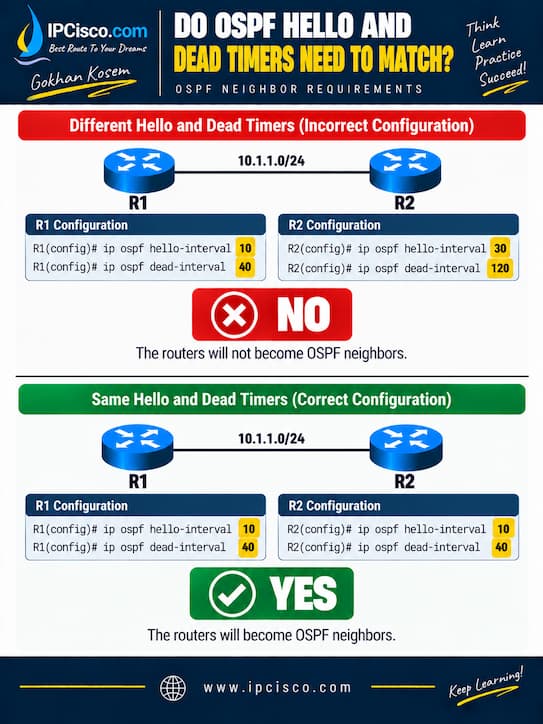
YES. OSPF Hello Timer and Dead Timer must match between neighbors. What is Hello Timer? OSPF routers periodically send Hello packets to discover and maintain neighbor relationships. How about Dead Timer? The Dead Timer determines how long a router waits without receiving OSPF Hello packets before announcing a neighbor down. Here, not only one fo them, but both of them must match ob OSPF neighbours.
Do OSPF Hello and Dead Timers Need to Match?
Incorrect Configuration: (No Neighborship)
R1(config)# ip ospf hello-interval 10
R1(config)# ip ospf dead-interval 40
R2(config)# ip ospf hello-interval 30
R2(config)# ip ospf dead-interval 120
Correct Configuration: (Neighborship Established)
R1(config)# ip ospf hello-interval 10
R1(config)# ip ospf dead-interval 40
R2(config)# ip ospf hello-interval 10
R2(config)# ip ospf dead-interval 40
Do OSPF Network Types Need to Match?
We can not say that OSPF network types must match but OSPF network types should be compatible. Because, network-type mismatch can cause differences in OSPF behavior, including Hello/Dead timers, DR/BDR election and next-hop handling. So, different network types can establish a neighborship but it can cause some sadjacency and routing problems. So, we can say that OSPF network types hould matchfor neighborship.
Some common network types in OSPF are, Broadcast, Point-to-Point, Non-Broadcast and Point-to-Multipoint. We can check this type with the below Cisco OSPF command.
R# show ip ospf interface
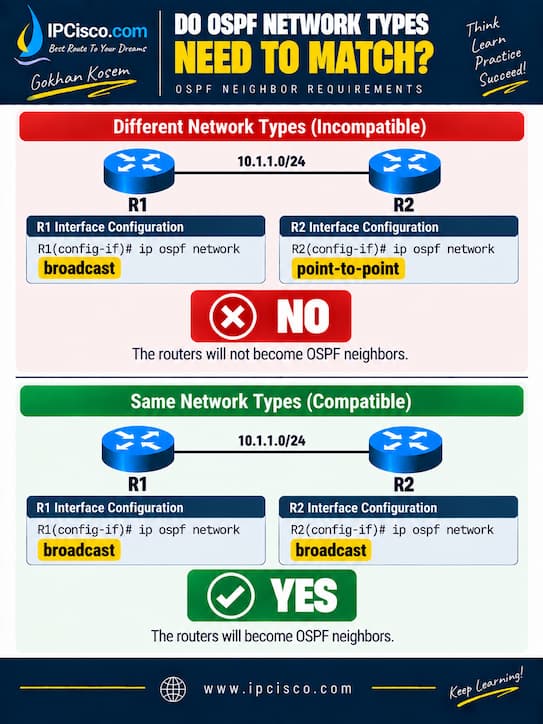
Do OSPF Network Types Need to Match?
Incorrect Configuration: (No Neighborship)
R1(config-if)# ip ospf network broadcast
R2(config)# ip ospf network point-to-point
Correct Configuration: (Neighborship Established)
R1(config-if)# ip ospf network broadcast
R2(config-if)# ip ospf network broadcast
Do OSPF Authentication Settings Need to Match?
YES. OSPF authentication settings must be compatible between neighbors. In an incompatible configuration, if one router expects authenticated OSPF packets while the other does not provide the expected authentication, the packets will be rejected.
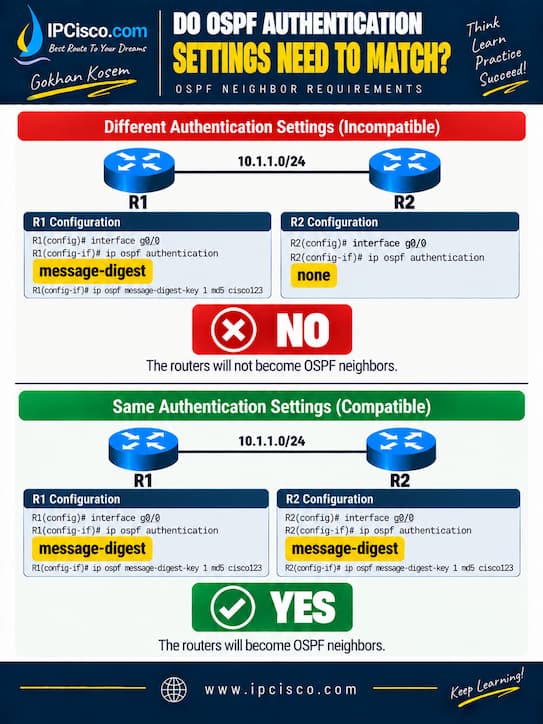
Do OSPF Authentication Settings Need to Match?
Incorrect Configuration: (No Neighborship)
R1(config)# interface g0/0
R1(config-if)# ip ospf authentication message-digest
R1(config-if)# ip ospf message-digest-key 1 md5 cisco123
R2(config)# interface g0/0
R2(config-if)# ip ospf authentication
Correct Configuration: (Neighborship Established)
R1(config)# interface g0/0
R1(config-if)# ip ospf authentication message-digest
R1(config-if)# ip ospf message-digest-key 1 md5 cisco123
R2(config)# interface g0/0
R2(config-if)# ip ospf authentication message-digest
R2(config-if)# ip ospf message-digest-key 1 md5 cisco123
Do OSPF MTU Values Need to Match?
MTU mismatch can prevent OSPF from reaching a FULL adjacency. This is slightly different from parameters such as the Area ID or Hello Timer. Two routers may initially discover each other and appear as OSPF neighbors. But MTU mismatch can cause the adjacency to become stuck during database synchronization around Exstart or Exchange.
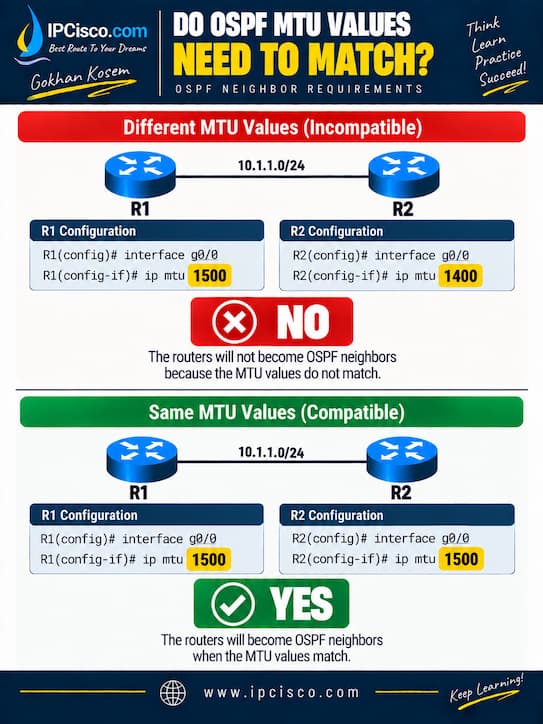
Do OSPF MTU Values Need to Match?
Incorrect Configuration: (No Neighborship)
R1(config)# interface g0/0
R1(config-if)# ip mtu 1500
R2(config)# interface g0/0
R2(config-if)# ip mtu 1400
Correct Configuration: (Neighborship Established)
R1(config)# interface g0/0
R1(config-if)# ip mtu 1500
R2(config)# interface g0/0
R2(config-if)# ip mtu 1500
In the first configuration (different MTUs), the routers can have problems exchanging Database Description (DBD) packets successfully. If the neighbor repeatedly remains in EXSTART/EXCHANGE, checking the interface MTU is an important troubleshooting step.
To check MTU values, we can use “show ip ospf neighbor” command on Cisco CLI.
On Cisco IOS, ip ospf mtu-ignore can alter OSPF’s MTU checking behavior. But fixing the underlying MTU inconsistency is generally preferable when the network design expects matching MTUs.
Do OSPF Routers Need to Be in the Same Subnet?
For a normal OSPF adjacency over common broadcast links such as Ethernet, the neighboring interfaces should be in the same IP subnet.
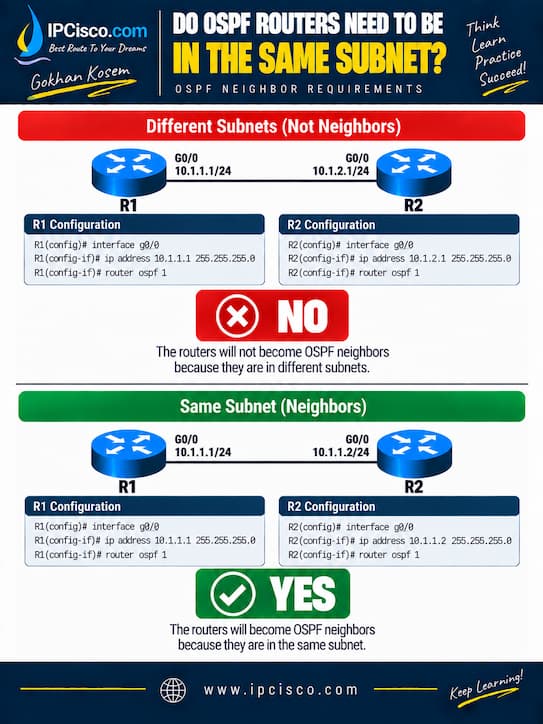
Do OSPF Routers Need to Be in the Same Subnet?
On Different Subnets: (No Neighborship)
R1(config)# interface g0/0
R1(config-if)# ip address 10.1.1.1 255.255.255.0
R2(config)# interface g0/0
R2(config-if)# ip address 10.1.2.1 255.255.255.0
On Same Subnet: (Neighborship Established)
R1(config)# interface g0/0
R1(config-if)# ip address 10.1.1.1 255.255.255.0
R2(config)# interface g0/0
R2(config-if)# ip address 10.1.1.2 255.255.255.0
You can learn the details of IP Subnetting with Examples on our subnetting lesson.
Do OSPF Router IDs Need to Match?
NO. But, OSPF Router IDs must be unique in OSPF network.The Router ID identifies each OSPF router in the network. Using the same Router ID on multiple OSPF routers creates a duplicate Router ID problem and this can interrupt OSPF operation. As you can see below, using different OSPF Router IDs provide a neighborship. But if the same Router ID is used on both routers, then this will cause a problem.
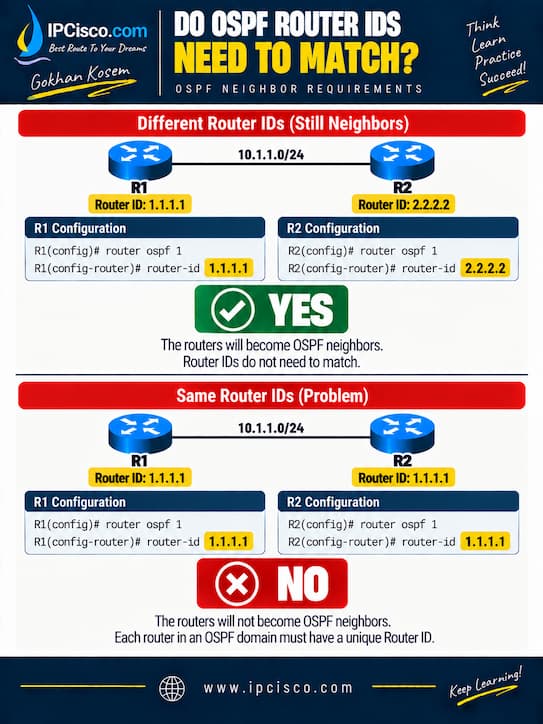
Do OSPF Router IDs Need to Match?
Using Different Router IDs: (Neighborship Established)
R1(config)# router ospf 1
R1(config-router)# router-id 1.1.1.1
R2(config)# router ospf 1
R2(config-router)# router-id 2.2.2.2
Using Same Router ID: (No Neighborship)
R1(config)# router ospf 1
R1(config-router)# router-id 1.1.1.1
R2(config)# router ospf 1
R2(config-router)# router-id 1.1.1.1
Do OSPF Area Types Need to Match?
YES. Neighboring routers must agree on relevant OSPF area characteristics. If one router considers an area as a stub area while the neighboring router does not, their Hello packet options can be incompatible. And this can cause a neighborship problem.
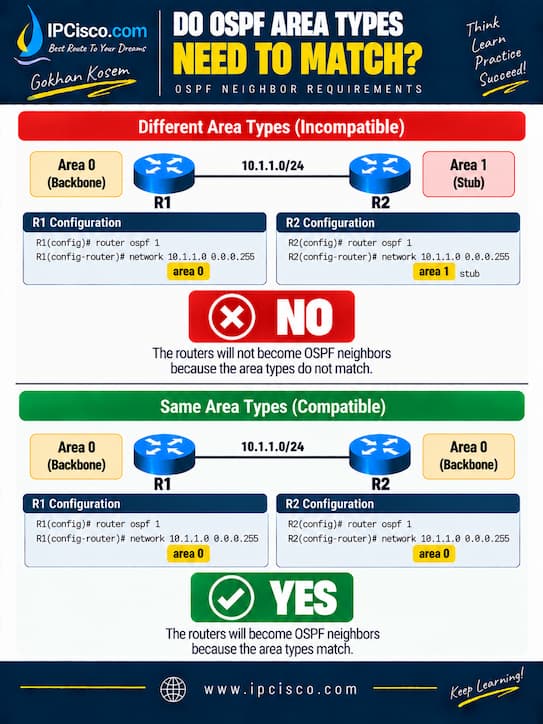
Do OSPF Area Types Need to Match?
Using Different Area Types: (No Neighborship)
R1(config)# router ospf 1
R1(config-router)# network 10.1.1.0 0.0.0.255 area 10
R2(config)# router ospf 1
R2(config-router)# network 10.1.1.0 0.0.0.255 area 10
R2(config-router)# area 10 stub
In this configuration, R1 treats Area 10 as a normal area, while R2 treats Area 10 as a stub area.
Using Same Area Type: (Neighborship Established)
R1(config)# router ospf 1
R1(config-router)# network 10.1.1.0 0.0.0.255 area 10
R1(config-router)# area 10 stub
R2(config)# router ospf 1
R2(config-router)# network 10.1.1.0 0.0.0.255 area 10
R2(config-router)# area 10 stub
OSPF Area Types must match to form an OSPF adjacency.
Do OSPF Priority Values Need to Match?
NO. OSPF priority values do not need to match. What was priority value? OSPF interface priority value is used during DR and BDR elections on multiaccess networks.
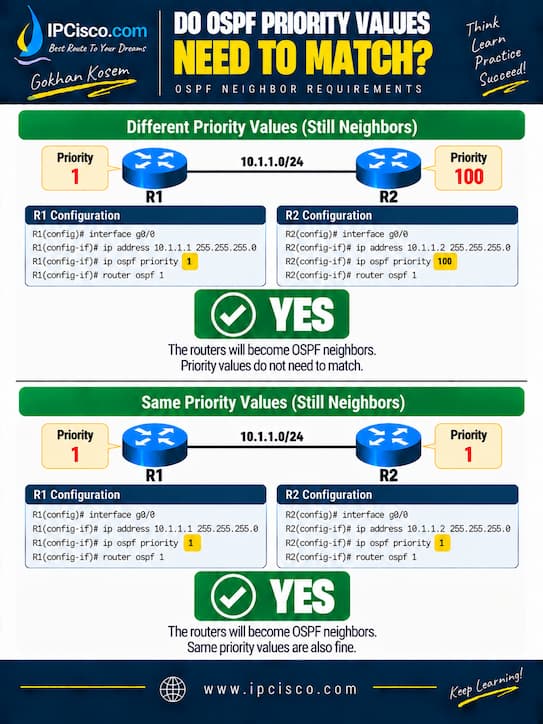
Do OSPF Priority Values Need to Match?
Using Different Priority Values: (Neighborship Established)
R1(config)# interface g0/0
R1(config-if)# ip ospf priority 1
R2(config)# interface g0/0
R2(config-if)# ip ospf priority 100
Using Same Priority Value: (Neighborship Established)
R1(config)# interface g0/0
R1(config-if)# ip ospf priority 1
R2(config)# interface g0/0
R2(config-if)# ip ospf priority 1
OSPF priority values do not need to match. Priority affects the DR/BDR election. It does not affects the neighborship.
Do OSPF Cost Values Need to Match?
NO. OSPF interface costs do not need to match. Neighbors can have different cost values. OSPF Cost is used for best-path selection, not for establishing OSPF neighborship.
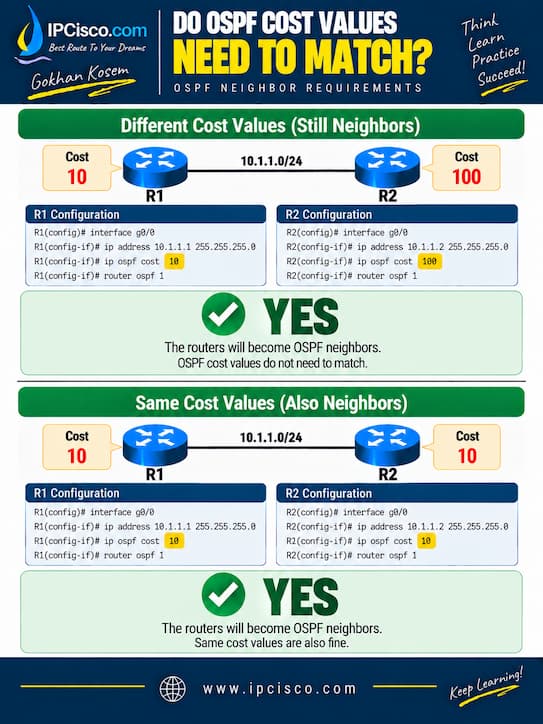
Do OSPF Cost Values Need to Match?
Using Different Cost Values: (No Neighborship)
R1(config)# interface g0/0
R1(config-if)# ip ospf cost 10
R2(config)# interface g0/0
R2(config-if)# ip ospf cost 100
Using Same Cost Value: (No Neighborship)
R1(config)# interface g0/0
R1(config-if)# ip ospf cost 10
R2(config)# interface g0/0
R2(config-if)# ip ospf cost 10
OSPF Neighbor Requirements Comparison
In this post, we have talked about OSPF neighborship requirements. We have seen that, some parameters must match and other not. For some of them there was no necessity but as a good configuraiton habit and for a pure routing, we need to use different values. In the below compariosn table, we will compare OSPF parameters that need to be match or need to be configured with different values.
| OSPF Parameter | Need to Match? | OSPF Neighborship |
| Area ID | Yes | Different Area IDs prevent neighborship. |
| Process ID | No | Different Process IDs are allowed. |
| Hello Timer | Yes | Hello timers must match. |
| Dead Timer | Yes | Dead timers must match. |
| Network Type | Not Strictly Always | Should be compatible; mismatches can cause adjacency or routing issues. |
| Authentication | Yes / Compatible | Authentication settings and credentials must be compatible. |
| MTU | For FULL Adjacency | Mismatch can cause EXSTART/EXCHANGE problems. |
| Subnet | Normally Yes | Same subnet is expected for typical broadcast Ethernet neighbors. |
| Router ID | No | Router IDs must be unique, not identical. |
| Area Type | Yes | Area options must be compatible. |
| Priority | No | Priority affects DR/BDR election, not neighborship. |
| Cost | No | Cost affects best-path selection, not neighborship. |


Gokhan Kosem is a Network Engineer, Instructor and the Founder of IPCisco.com with 15+ years of experience in Cisco, Nokia, Huawei, Juniper, Linux, Service Provider Networks, Routing and Switching technologies.
He has worked on the backbone networks of major service providers and network vendors including Nortel, Alcatel-Lucent (Nokia) and has extensive hands-on experience with Cisco, Huawei, Juniper and Nokia networking technologies.
He has trained thousands of networking students worldwide through IPCisco.com, Udemy, books, labs, quizzes, and educational content across multiple social media platforms.
IPCisco.com | Best Route to Your Dreams





Leave a Reply