
- COURSES
- SPECIALS
- BLOG
- MEMBERS
- SHOP
- BOOKSHELF
- ABOUT
- ENROLL HERE

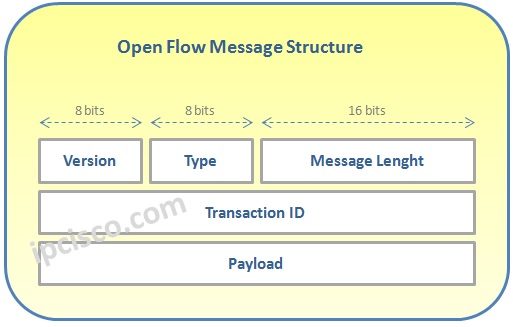
Open Flow Control Messages are based on TCP. To set up Open Flow communication, Open Flow Controller listens TCP ports 6633/6653. There are five main parts in Open Flow Messages. These are given below:
Open Flow supports three message types. These messages are:
Controller to Switch Messages are the massages that is used to manage and configure the switches . They managed the Flow Tables. Switch capability exchange is also done with these messages. Controller to Switch Messages are initiated from the Controller.
Asyncronous Messages are sent to inform the Control about any events and state changes. Asyncronous Messages are sent by Switches.
Symmetric Messages are used to diagnose any problems between Controller and Switches. Symmetric Messages can be sent both from Contoller and Switches.
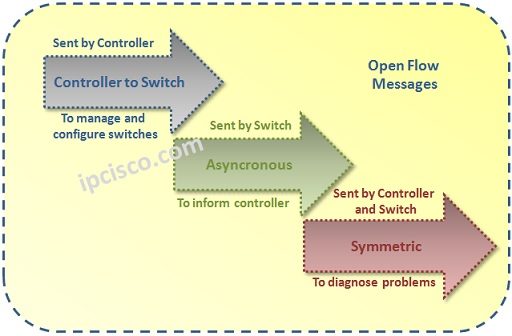
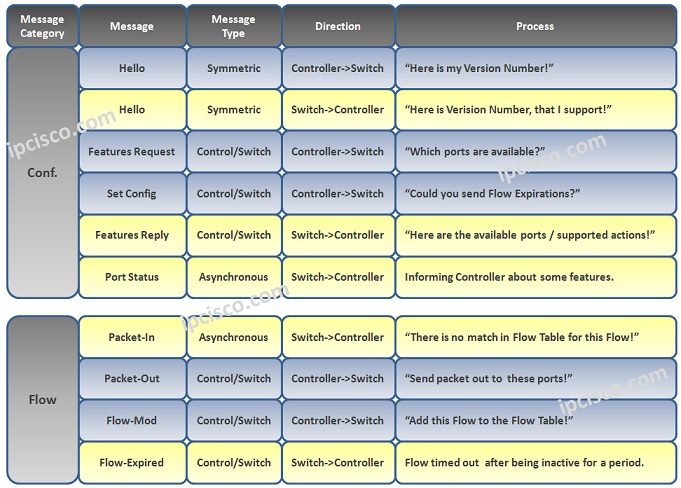
Table of Contents
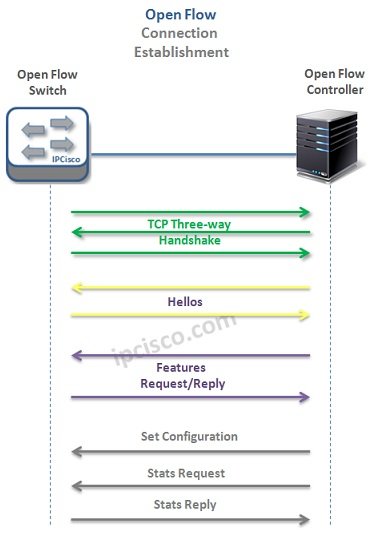
Open Flow connection establishment is done mainly in 4 stages. These stages are:
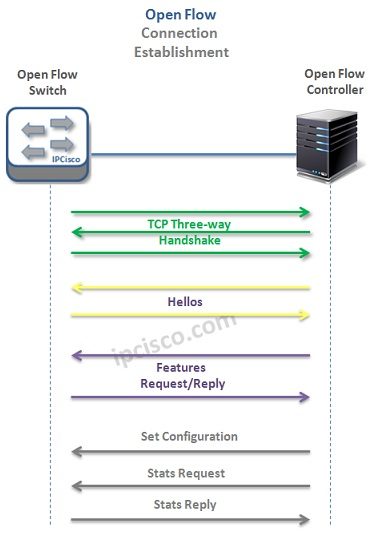
The second step is Hellos. In this step, Open Flow Controller send its version and Open Flow Switch sends the supported ersions on it as reply.
The thirt step is Features Request/Reply step. In this step, Open Flow Controller want to know Switch function info and the Open Flow Switch replies back with its function infos.
In the last step, firstly Open Flow Controller set the Switch configuration. After, it requests the switch status and Open Flow switch replies back to this mesasage.

Gokhan Kosem is a Network Engineer, Instructor and the Founder of IPCisco.com with 15+ years of experience in Cisco, Nokia, Huawei, Juniper, Linux, Service Provider Networks, Routing and Switching technologies.
He has worked on the backbone networks of major service providers and network vendors including Nortel, Alcatel-Lucent (Nokia) and has extensive hands-on experience with Cisco, Huawei, Juniper and Nokia networking technologies.
He has trained thousands of networking students worldwide through IPCisco.com, Udemy, books, labs, quizzes, and educational content across multiple social media platforms.
IPCisco.com | Best Route to Your Dreams







Leave a Reply