

Table of Contents
Packet Tracer BGP Configuration Example
To understand BGP (Border Gateway Protocol) better, we will make a basic Packet Tracer BGP Configuration example. Because of the limited numbers of commands available on Packet Tracer, we will practice a very basic configuration for our BGP Config Example. Beside this, I will add some additional cofiguration steps that is needed for IBGP but we can not config ure on Packet Tracer.
In the configuration we will use two AS (Autonomous System) with 3 routers for each. We will use the Private AS block (64512 to 65535) for this configuration, but in internet public AS numbers are used.
You can DOWNLOAD the Packet Tracer example with .pkt format HERE.
You can also DOWNLOAD all the Packet Tracer examples with .pkt format in Packet Tracer Labs section.
You can also test yourself with BGP Tests and Questions.
The topology that we will be used for our BGP Config is below:
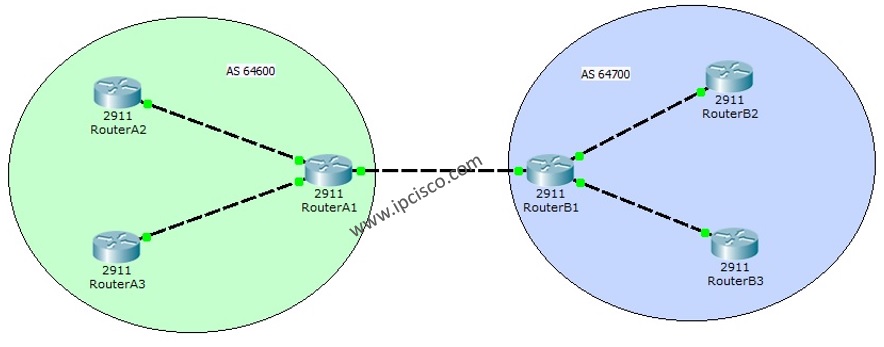
For Packet Tracer BGP Configuration, firstly we need to configure the IP addresses of interfaces as other examples. To do this, as a better network engineering rule, firstly make your IP plan or, use the existing one. Acording to my basic IP plan, I used the below IPs for my interfaces.
Interfaces IP Addresses
1.1.1.1
2.2.2.2
10.0.0.1
10.0.0.2
20.0.0.1
20.0.0.2
30.0.0.1
30.0.0.2
40.0.0.1
40.0.0.2
50.0.0.1
50.0.0.2
Interface Configurations for Packet Tracer BGP Configuration
RouterA1 Interface Configuration
RouterB1 Interface Configuration
RouterA2 Interface Configuration
RouterA3 Interface Configuration
RouterB2 Interface Configuration
RouterB3 Interface Configuration
BGP Configurations for Packet Tracer BGP Configuration
The exact important point of BGP Config is here. The configuration made in this part, is for the BGP.
As I said before, because of the Packet Tracer ‘s command limit, in the configuration file, th IBGP parts are not configured, but writen here (ibgp neighbourship and route reflector commands).
You can also test yourself with BGP Tests and Questions.


Gokhan Kosem is a Network Engineer, Instructor and the Founder of IPCisco.com with 15+ years of experience in Cisco, Nokia, Huawei, Juniper, Linux, Service Provider Networks, Routing and Switching technologies.
He has worked on the backbone networks of major service providers and network vendors including Nortel, Alcatel-Lucent (Nokia) and has extensive hands-on experience with Cisco, Huawei, Juniper and Nokia networking technologies.
He has trained thousands of networking students worldwide through IPCisco.com, Udemy, books, labs, quizzes, and educational content across multiple social media platforms.
IPCisco.com | Best Route to Your Dreams





Leave a Reply