
- COURSES
- SPECIALS
- BLOG
- MEMBERS
- SHOP
- BOOKSHELF
- ABOUT
- ENROLL HERE

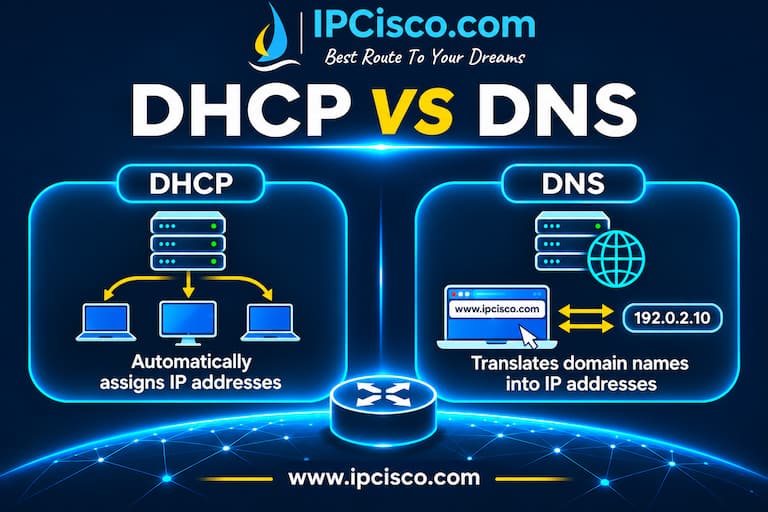
DHCP (Dynamic Host Configuration Protocol) and DNS (Domain Name System) are two important protocols used in computer networking. Both network protocols are widely used in home networks and in enterprise networks. But what is the difference between DHCP and DNS? In this CCNA lesson, we will focus on DHCP vs DNS and we will compare these important network protocols.
The main difference between DHCP and DNS is their purpose. In other words, the reason of why we use them. Here, DHCP (Dynamic Host Configuration Protocol) automatically assigns IP addresses and other ip parameters to the devices. On the other hand, DNS (Domain Name System) translates domain names into IP addresses. Two different protocols and two different purposes. In this lesson, we will explain DHCP vs DNS, their differences, DHCP and DNS port numbers, working principles and how they work together.
Table of Contents
DHCP (Dynamic Host Configuration Protocol) is a network protocol that automatically assigns IP addresses and other ip configuration parameters to the network devices. By using DHCP, we do not need to do manual ip configurations on the devices. With DHCP, ip address, subnet mask, default gateway and DNS server addresses are assigned automatically to the network devices. This is very useful especially in large networks.
Think about that, you are using a large network consist of hundreds of network devices. Like PCs, Servers, printers etc. Here, using DHCP to assigns the ip parameters automatically makes your job easier. It also prevents ip address conflicts and other human faults.
DNS (Domain Name System) is a network service that translates domain names into IP addresses. Without DNS we should write the ip addresses of the websites. This is very difficult for human memory. But instead of this, we remember the domain names of the websites and then we write these names. DNS automatically translates these names to ip addresses at the backplane. Shortly, DNS makes internet usage easier.
For example, when we write www.ipcisco.com into the web browser, DNS finds the IP address associated with this domain name. After the name resolution process, our computer can use the returned IP address to connect to the destination server.
Download DNS, DHCP & Other IP Services Cheat Sheets!
After explaining what is DHCP and what is DNS, now, it is time to talk about the main point of this lesson: DHCP vs DNS.
Both of DNS and DHCP are application layer protocols. They work on application layer of OSI Reference Model. But beside this same working layer, they have some differences. Here, we will talk about these differences. We will also give a DHCP vs DNS comparison table for you.
The key difference is their main purpose. We use DHCP to assign ip configuration automatically. On the other hand, we use DNS to resolve domain names.
The other difference between DHCP and DNS is about used network port numbers. DHCP uses UDP 67 port and UDP 68 port. DNS uses UDP 53 port and TCP 53 port.
The main components of DHCP are DHCP Client and DHCP Server. On the other hand, DNS components are NS Client, Resolver and Name Servers.
| Feature | DHCP | DNS |
| Main Purpose | Assigns IP configuration | Resolves domain names |
| Port Numbers | UDP 67, 68 | UDP 53 / TCP 53 |
| IP Assignment | Yes | No |
| Name Resolution | No | Yes |
| Main Components | DHCP Client and Server | NS Client, Resolver and Name Servers |
| Example | Assigning 192.168.1.1 to a PC | Resolving www.ipcisco.com |
As a short and main difference, DHCP helps network devices to get the necessary IP configuration to communicate on a network, while DNS helps devices find the IP addresses of domain names.
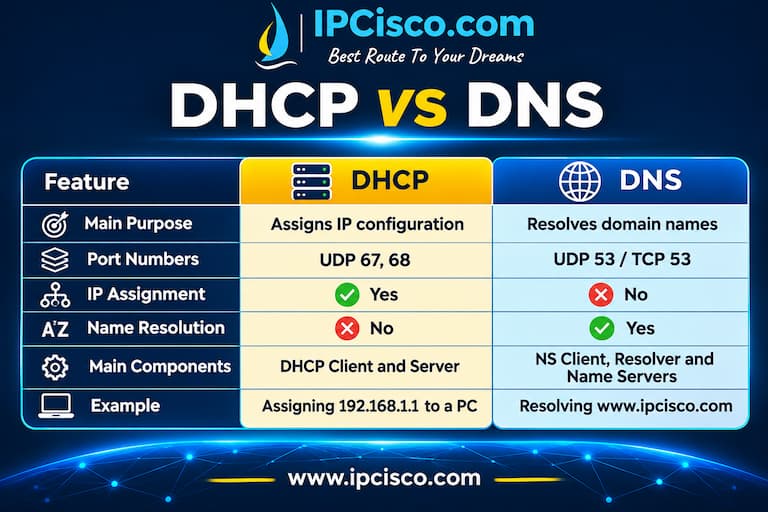
DHCP versus DNS Comparison Table
DHCP uses four main messages called shortly DORA. DORA is produced with the first letters of these four messages: Discover, Offer, Request and Acknowledge. These four messages are exchanged between a DHCP client and a DHCP server during the initial IP address allocation process. Here are the four main DHCP messages and steps of this process:
After this process, the client can use its assigned IP address and other network parameters. By the way, these IP addresses are assigned for a specific period, this is called DHCP lease times.
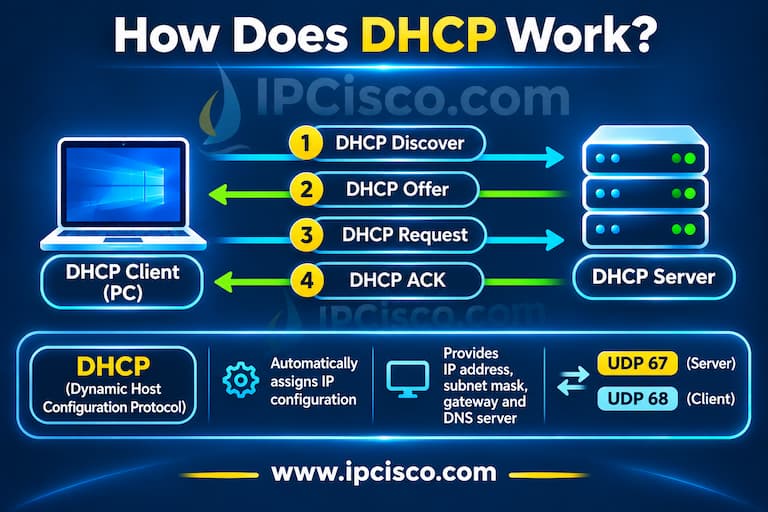
How DHCP Works?
The mechanism of DNS is different than DHCP. The main purpose of DNS is to resolve domain names into IP addresses. When a user enters a website name into a browser, the PC needs to determine the IP address of the destination server. So firstly, it checks whether the required DNS information is already available in its local cache. If it is not available, the computer sends a DNS query to its configured DNS resolver. The DNS resolver checks its cache and, if necessary, contacts other DNS servers to find the requested information. After receiving the DNS response, the computer can use the returned IP address to communicate with the destination server.
DNS mainly uses UDP port 53 for standard queries and can also use TCP port 53, for example, for zone transfers and certain DNS responses.
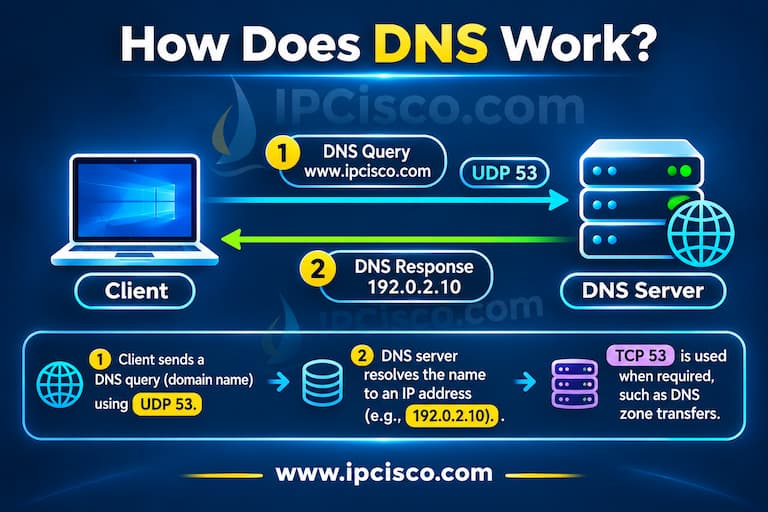
How DNS Works?
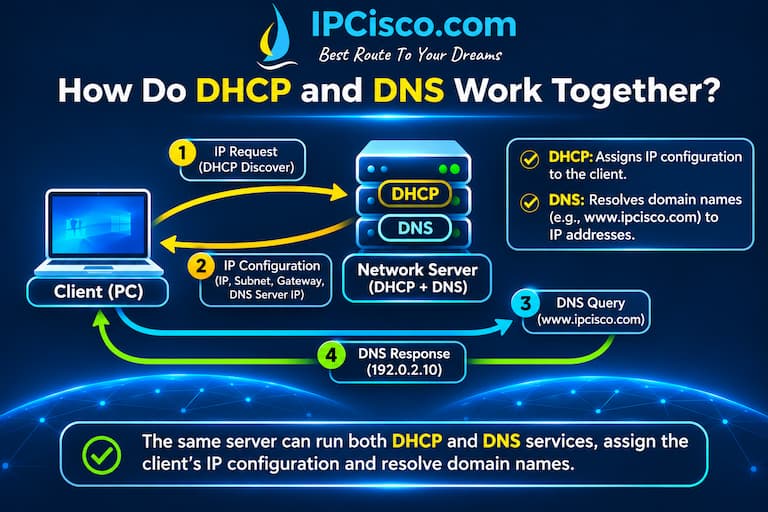
Although, DHCP and DNS have different responsibilities, they often work together in the same network. DHCP provides the network configuration that a device needs, while DNS helps the device resolve domain names. We can explain this processes with one example.
How DHCP and DNS Work Together?
For example, let’s say that a PC connects to a company network. First, the computer receives its IP address, subnet mask, default gateway and DNS server address from a DHCP server. After receiving these parameters, the user opens a browser and enters www.google.com. The computer sends a DNS query to the configured DNS server to learn the IP address of the website. Once the domain name is resolved, the computer can establish a connection to the website using the returned IP address. As you can see, DHCP provides the DNS server address, while DNS provides the IP address associated with the requested domain name.
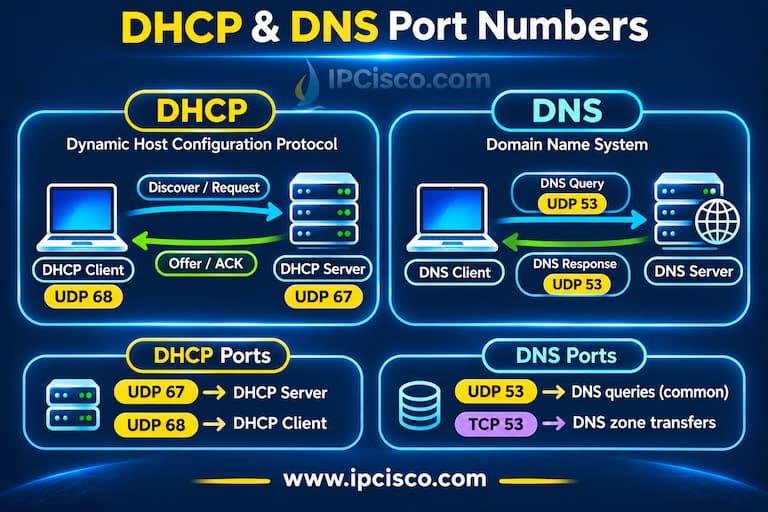
One of the main differences between DNS and DHCP is used network ports. Both application protocols operate at the application layer, but they use different transport layer ports.
DHCP (Dynamic Host Configuration Protocol) uses UDP ports 67 and 68. DHCP Servers use UDP port 67 and DHCP Clients use UDP port 68.
DNS (Domain Name System) uses UDP port 53 and TCP port 53. UDP is commonly used for DNS queries, while TCP is used when required, including DNS zone transfers. These port numbers are especially important for firewalls, access control lists (ACLs) and network security policy configurations.
DHCP and DNS Port Numbers
After talking about the differences between DNS and DHCP, now, let’s talk about how to troubleshoot DNS and DHCP problems.
When there is an Internet access problem, this can cause from DNS, DHCP or any other reason. Maybe, the user can not get the right ip address from the DHCP Server. At this point, an APIPA address is assigned to the user. With this ip address, he/she can not access Internet. This shows that there is a DHCP problem in the network.
Another problem can be about DNS. Maybe you can access a website with its ip address but when you type its domain name, you can not access this website. This shows that there is a DNS problem. DNS resolution is not working correctly.
To investigate these problems, as network engineers, we use some commands like ipconfig, ipconfig /all, ping and nslookup on windows PCs. With ipconfig /all, we display all ip configurations of the PC. With ping, we test the connectivity between two nodes. With nslookup, we test DNS resolution.
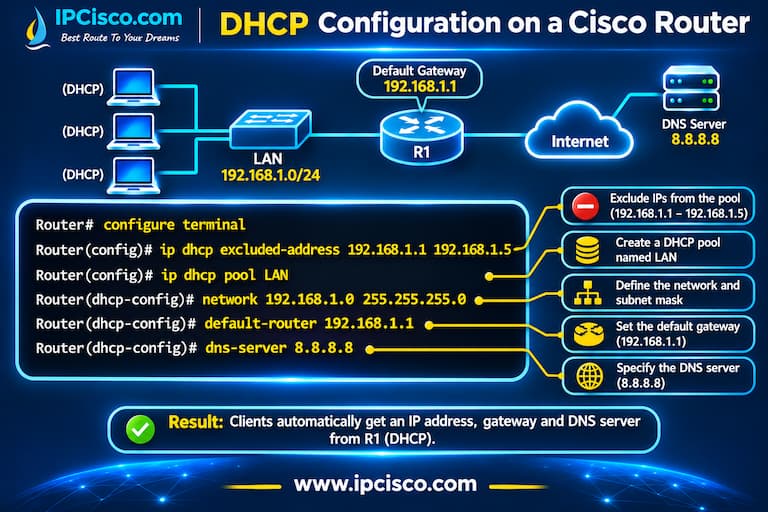
After comparing DNS and DHCP, it is time to focus on how can we configure DNS and DHCP on Cisco devices. With the below configuration example, we can configure both of these protocols on a Cisco router.
Here, firstly, we will exclude some IPs from the defined DHCP Pool. To do this, we will use “dhcp excluded-address” command. Then, we will define DHCP Pool with name “LAN”. This can be any other name that you want to give. Then, we will define the pool address range. After that we will define the default router ip address. Lastly, we will define DNS Server IP address.
Router# configure terminal
Router(config)# ip dhcp excluded-address 192.168.1.1 192.168.1.5
Router(config)# ip dhcp pool LAN
Router(dhcp-config)# network 192.168.1.0 255.255.255.0
Router(dhcp-config)# default-router 192.168.1.1
Router(dhcp-config)# dns-server 8.8.8.8
Here, our DHCP pool will be 192.168.1.0/24 network, excluding the first five addresses. In other words, DHCP will assign IP addresses from this range excluding the first five IP addresses.
As a default gateway, we assign 192.168.1.1 IP address. And for DNS, we have used 8.8.8.8 IP address.
Here, “dns-server” command does not configure the router as a DNS server. Instead, it tells DHCP clients which DNS server they should use.
Cisco DHCP and DNS Configuration Example
For detailed Cisco Packet Tracer DHCP Configuration Example, you can visit related lesson.
The main difference between DHCP and DNS is about their function or purpose. DHCP automatically assigns IP addresses and other ip parameters to the network devices, while DNS translates domain names into IP addresses.
DHCP does not perform DNS resolution, but it can provide DNS server addresses to network devices.
Yes, DNS can work without DHCP. If a device has a manually configured IP address and DNS server address, it can use DNS services without receiving any configuration from a DHCP server.
Yes, DHCP can work without DNS. DHCP can automatically assign IP addresses and other network parameters even if DNS services are unavailable. But if there is no DNS, devices may have problems accessing resources using domain names. They can access websites with their IP address.
DHCP and DNS can run on the same server, but it is not a requirement. In small networks, both services may run on the same device. In larger enterprise networks, they can run on separate servers for better management, security and availability.
DNS is not required for the basic DHCP address allocation process. However, DHCP and DNS can work together through Dynamic DNS updates, which allow DNS records to be updated when devices receive or change their IP addresses.
8.8.8.8 is a public IPv4 address used by Google’s Public DNS service. Devices can use this address as their DNS resolver to translate domain names into IP addresses.
If DNS is disabled or unavailable, devices may not be able to resolve domain names into IP addresses. However, network communication using IP addresses can still work if the required connectivity is available.
Yes, internet communication can work without DNS because IP routing does not depend on domain name resolution. However, accessing websites and other services by their domain names becomes difficult without DNS or an alternative name resolution method. Because it is difficult to remember website IP addresses.
DHCP uses UDP ports 67 and 68. UDP port 67 is used by DHCP servers, while UDP port 68 is used by DHCP clients. DNS uses both UDP and TCP port 53.
Download DNS, DHCP & Other IP Services Cheat Sheets!

Gokhan Kosem is a Network Engineer, Instructor and the Founder of IPCisco.com with 15+ years of experience in Cisco, Nokia, Huawei, Juniper, Linux, Service Provider Networks, Routing and Switching technologies.
He has worked on the backbone networks of major service providers and network vendors including Nortel, Alcatel-Lucent (Nokia) and has extensive hands-on experience with Cisco, Huawei, Juniper and Nokia networking technologies.
He has trained thousands of networking students worldwide through IPCisco.com, Udemy, books, labs, quizzes, and educational content across multiple social media platforms.
IPCisco.com | Best Route to Your Dreams







Leave a Reply