
- COURSES
- SPECIALS
- BLOG
- MEMBERS
- SHOP
- BOOKSHELF
- ABOUT
- ENROLL HERE

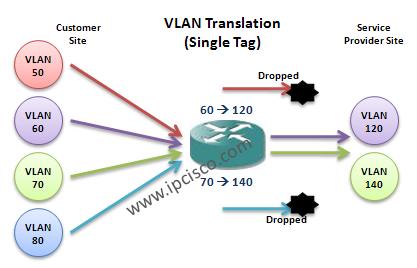
On Juniper devices, VLAN translation term is used for mentioning the swap of incoming VLAN id to a new VLAN id. In the below configuration examples, we will do this job on Juniper devices.
In the first example, we will swap the incoming VLAN 60 tag with the new VLAN 120 tag and incoming VLAN tag 70 with the new VLAN tag 140. The other packets with the different VLAN tag than 60 and 70, will be dropped if there is no other VLAN translation configuration. Only the incoming packets with the VLAN tag 60 and VLAN tag 70 will be passed and they will be swapped with VLAN id 120 and 140.
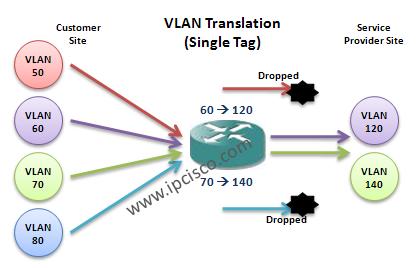
Here, we use “dot1q-tunneling” command because of the fact that there are more than one VLAN. If we make this translation for one VLAN, we do not need this command.

Gokhan Kosem is a Network Engineer, Instructor and the Founder of IPCisco.com with 15+ years of experience in Cisco, Nokia, Huawei, Juniper, Linux, Service Provider Networks, Routing and Switching technologies.
He has worked on the backbone networks of major service providers and network vendors including Nortel, Alcatel-Lucent (Nokia) and has extensive hands-on experience with Cisco, Huawei, Juniper and Nokia networking technologies.
He has trained thousands of networking students worldwide through IPCisco.com, Udemy, books, labs, quizzes, and educational content across multiple social media platforms.
IPCisco.com | Best Route to Your Dreams





Leave a Reply