
- COURSES
- SPECIALS
- BLOG
- MEMBERS
- SHOP
- BOOKSHELF
- ABOUT
- ENROLL HERE


In this IPv6 Static Route Juniper Example lesson, we will focus on IPv6 static routing on Juniper routers. You can also view Cisco IPv6 static route example. On a Juniper router to create a static route for IPv6, firstly we use “routing-options” hierarchy as we do for IPv4. But this time after this hierarchy, we go under another hierarchy, “rib inet6.0”. The below example will be a basic example of configuring IPv6 static routes on Juniper routers.

Fristly, let ‘s configure ipv6 addresses of the router interfaces. To do this, we will use “set address ipv6-address” command.
For Junos1 Router:
root> configure
[edit]
root# set interfaces em0 unit 0 family inet6
[edit interfaces em0 unit 0 family inet6]
root# set address 2001:200:20:1::1/64
For Junos 2 Router:
root> configure
[edit]
root# set interfaces em0 unit 0 family inet6
[edit interfaces em0 unit 0 family inet6]
root# set address 2001:200:20:1::2/64
[edit interfaces em0 unit 0 family inet6]
root# set interfaces em1 unit 0 family inet6
[edit interfaces em1 unit 0 family inet6]
root# set address 2001:200:30:2::2/64
For Junos 3 Router:
root> configure
[edit]
root# set interfaces em0 unit 0 family inet6
[edit interfaces em0 unit 0 family inet6]
root# set address 2001:200:30:2::1/64
After committing these changes, it is time to add static routes and commit:
For Junos 1 Router:
[edit routing-options rib inet6.0]
root# set static route 2001:200:30:2::1/128 next-hop 2001:200:20:1::2
[edit routing-options rib inet6.0]
root# commit
For Junos 3 Router:
[edit routing-options rib inet6.0]
root# set static route 2001:200:20:1::1/128 next-hop 2001:200:30:2::2
[edit routing-options rib inet6.0]
root# commit
We can check our configurations by “run show | display set “ command under “edit mode”. The results are below:
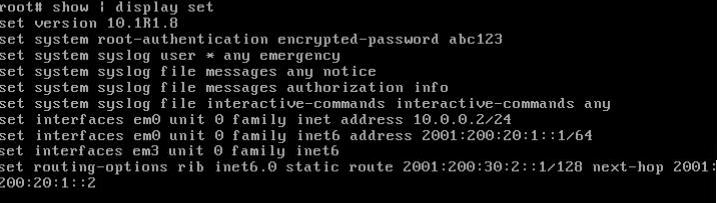
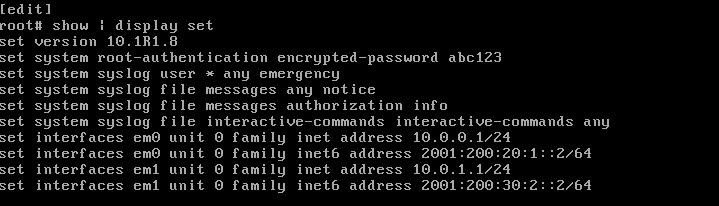
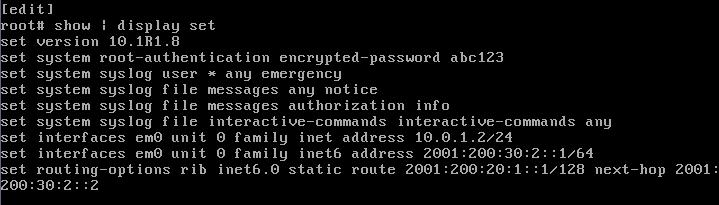
Lasty, it is time to ping from one end to another to test IPv6 static routing on Juniper routers. to do this, we will use “ping inet6 target-ipv6-address” command.

As shown on above output, ping from the Junos Router 1 to Junos Router 2 is successfull.
Download GNS3 IPv6 Static Routes on Juniper Routers Lab.

Gokhan Kosem is a Network Engineer, Instructor and the Founder of IPCisco.com with 15+ years of experience in Cisco, Nokia, Huawei, Juniper, Linux, Service Provider Networks, Routing and Switching technologies.
He has worked on the backbone networks of major service providers and network vendors including Nortel, Alcatel-Lucent (Nokia) and has extensive hands-on experience with Cisco, Huawei, Juniper and Nokia networking technologies.
He has trained thousands of networking students worldwide through IPCisco.com, Udemy, books, labs, quizzes, and educational content across multiple social media platforms.
IPCisco.com | Best Route to Your Dreams







Leave a Reply