
- COURSES
- SPECIALS
- BLOG
- MEMBERS
- SHOP
- BOOKSHELF
- ABOUT
- ENROLL HERE

In all network devices, there is a File System. In Huawei routers and switches there is also a File System. File System stores many important files for the system like sytem files, configuration files, software upgrades etc. In thi slesson, we will focus on Huawei Router File System. We will talk about File System commands and important files in a Huawei Router.
Table of Contents
Almost everyone has used window command line (cmd). There are some commands used with File System in Huawei devices and these System commands are very similar to windows command line commands. Let’s give some examples to this File System commands:
Now, let’s talk about the some specific system files.
Configuration Files are the files that includes all the configurations about the device. There are two types Configuration Files in Huawei devices. These Configuration Files are:
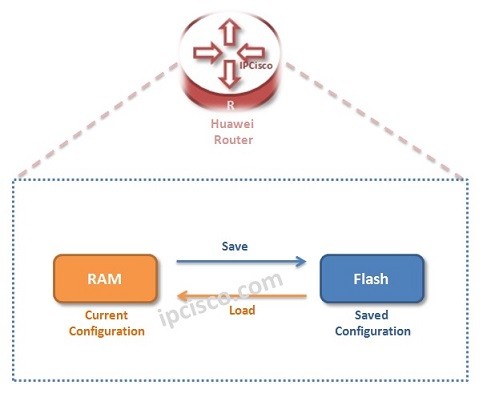
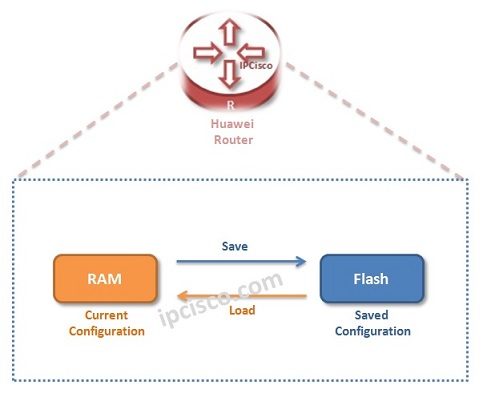
Current-Configuration is the configuration lastly on the device. Current-Configuration File is not in Flash yet. It is stored in RAM.
Saved-Configuration is the configuration lastly saved on the device. Saved-Configuration File is stored in Flash and it is loaded from here at the system startup.
To view these two Configuration Files, we will use display commands.
display current-configuration
display saved-configuration
At this point, let’s talk about one more important command, “save” command. After all configuration changes, we need to use “save” command to save our configuration from Current-Configuration to Saved-Configuration. If you do not do this, after a reload, your changes will be lost.
Save The current configuration will be written to the device. Are you sure to continue? [Y/N] : y
reset saved-configuration
Warning : The action will delete the saved configuration in the device.
The configuration will be erased to reconfigure. Continue? [Y/N]: y
As we have talked before, Saved-Configuration is loaded from the flash at the bootup. We can determine the location of Saved-Configuration.
startup saved-configuration flash:/our_config_file.zip
Info: Succeed in setting the configuration for booting system.
We can also check this infromation beside other startup information with “display startup” command:
display startup
Lastly, another important command can be used about configurations. This is “compare configuration” command. With this command, you can configure different configurations.
compare configuration
As in other network equipments, Huawei devices also has some different File Storage devices. These are:
To show this devices, we can use “display version” command. With this command, we can also see the capacity of each of these File Storage Devices.
display version
We can erase or recover these File Storage Devices. This is a critical issue, so we need to be careful.
format flash
format sd1
fixdisk flash
fixdisk sd1

Gokhan Kosem is a Network Engineer, Instructor and the Founder of IPCisco.com with 15+ years of experience in Cisco, Nokia, Huawei, Juniper, Linux, Service Provider Networks, Routing and Switching technologies.
He has worked on the backbone networks of major service providers and network vendors including Nortel, Alcatel-Lucent (Nokia) and has extensive hands-on experience with Cisco, Huawei, Juniper and Nokia networking technologies.
He has trained thousands of networking students worldwide through IPCisco.com, Udemy, books, labs, quizzes, and educational content across multiple social media platforms.
IPCisco.com | Best Route to Your Dreams







Leave a Reply