
- COURSES
- SPECIALS
- BLOG
- MEMBERS
- SHOP
- BOOKSHELF
- ABOUT
- ENROLL HERE

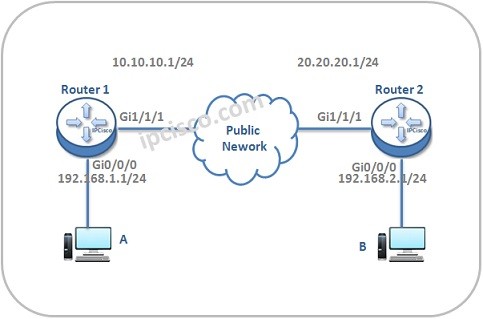
In this lesson we will see IPSec VPN Configuration On Huawei Routers. IPSec configurations has some basic steps.
These steps are given below:
For our Huawei IPSec VPN Configuration, we will use the below basic topology.
You can download this configuration on Huawei eNSP Labs Page.
Firstly, we will configure authentication and encription mode. To do this, we will enter the “ipsec proposal tran” command. Our authentication algorithm will be SHA-2 and we will use AES as encryption algorithm. Firstly we will configure Router 1.
[Huawei-Router1] ipsec proposal tran
[Huawei-Router1-ipsec-proposal-trans1] esp authentication-algorithm sha2
[Huawei-Router1-ipsec-proposal-trans1] esp encryption-algorithm aes
[Huawei-Router1-ipsec-proposal-trans1] quit
Then, we will configure IPSec with the same commands on Router 2 too.
[Huawei-Router2] ipsec proposal tran
[Huawei-Router2-ipsec-proposal-trans1] esp authentication-algorithm sha2
[Huawei-Router2-ipsec-proposal-trans1] esp encryption-algorithm aes
[Huawei-Router2-ipsec-proposal-trans1] quit
Other IPSec VPN Lessons:
IPSec VPN – IPSec VPN Overview
IPSec VPN – IPSec VPN Configuration on Huawei Routers

Gokhan Kosem is a Network Engineer, Instructor and the Founder of IPCisco.com with 15+ years of experience in Cisco, Nokia, Huawei, Juniper, Linux, Service Provider Networks, Routing and Switching technologies.
He has worked on the backbone networks of major service providers and network vendors including Nortel, Alcatel-Lucent (Nokia) and has extensive hands-on experience with Cisco, Huawei, Juniper and Nokia networking technologies.
He has trained thousands of networking students worldwide through IPCisco.com, Udemy, books, labs, quizzes, and educational content across multiple social media platforms.
IPCisco.com | Best Route to Your Dreams







J’aimerais apprendre plus encore sur les routeurs et la configuration
Toujours bienvenue pour apprendre Ore! :)