
- COURSES
- SPECIALS
- BLOG
- MEMBERS
- SHOP
- ABOUT
- ENROLL HERE

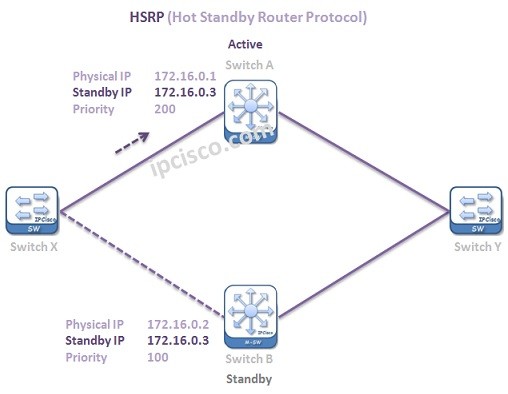
Table of Contents
HSRP (Hot Standby Router Protocol) is a Cisco proprietary First Hop Redundancy Protocol (FHRP). Hot Standby Router Protocol first hop redundancy mechanism provides an alternative path as a redundant and a proactive action for any failure on a device. In this HSRP tutorial, we will learn this gateway redundancy protocol and in the following lessons, we will also learn Cisco HSRP Configuration. You can also view related RFC 2281.
HSRP is typically implemented in a redundant gateway topology where multiple routers are grouped together to provide a single virtual gateway for end devices.With this mechanism, even if a failure occurs on one device in the HSRP group, traffic is automatically redirected through another available router in the same group. This ensures continuous network connectivity without requiring any changes on end hosts.
HSRP Topology Example
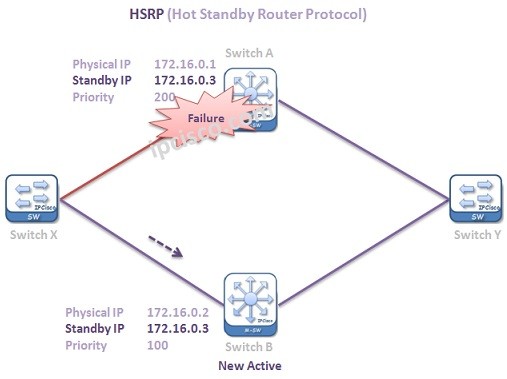
HSRP Switching Stanby to Active
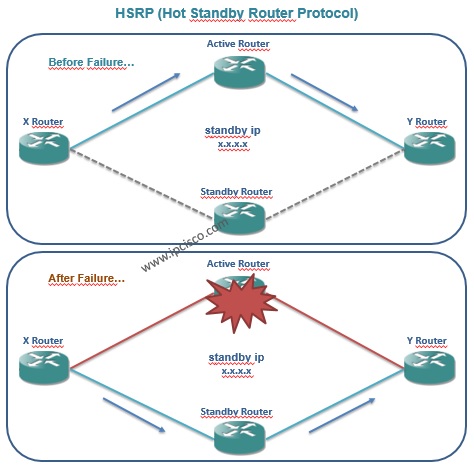
In traditional network designs, the default gateway represents a single point of failure. If the router acting as the gateway becomes unavailable, all connected devices lose external connectivity. HSRP solves this problem by introducing gateway redundancy.By allowing multiple routers to act as a single virtual gateway, HSRP ensures continuous network availability even when one device fails. This is especially critical in enterprise environments where downtime must be minimized and high availability is required.
HSRP operates by creating a virtual router that is shared among multiple physical routers within the same HSRP group. End devices use a virtual IP address as their default gateway, while the HSRP-enabled routers continuously exchange hello messages to monitor each other’s status and maintain group synchronization.
Within the group, one router is elected as the Active router, which is responsible for forwarding all user traffic. Another router is selected as the Standby router and remains in a passive state, continuously monitoring the Active router to take over its role in case of failure. The selection process is based on priority values and ensures deterministic failover behavior.
This mechanism allows HSRP to provide seamless gateway redundancy, meaning that end devices are not affected during failover events. The transition between Active and Standby routers happens automatically and is transparent to hosts, ensuring continuous network availability and stable connectivity.
HSRP uses a virtual IP address and a virtual MAC address to provide seamless gateway redundancy. All routers in the HSRP group share the same virtual IP address, which is configured as the default gateway for end devices. However, only the Active router responds to ARP requests using the virtual MAC address, which follows the format 0000.0c07.acxx, where xx represents the HSRP group number. This design ensures that traffic is transparently redirected during failover without requiring any changes on client devices.
Additionally, HSRP group numbers are configured using the “standby” keyword, and multiple groups can exist on a single interface.
Hot Standby Router Protocol works with HSRP Groups. For each group, there are different routers that has different roles. These roles are:
The Active Router is the router that the traffic flow goes through. It is the router that provides active traffic flow.
The Standby Router is the backup of Active Router. When the active router fails then this router becomes Active and the traffic goes through this router.
Lastly the Listening Routers are the other routers that are participating in the HSRP group.
The main two roles of HSRP are Active and Standby. For these roles, routers does an election between them. In this election two parameters are important. The elections are done according to two parameters. These are:
First of all, HSRP Priority values are used for Active/Standby election. The highest Priority wins and the router that has highest priority becomes Active Router. If the Priority values of HSRP Routers are equal, then the Interface IP addresses are used as tie breaker.The highest IP address wins and become Active Router. The router that has the second highest IP address, becomes Standby Router.
Priority values can be manually set to any value between 0 and 255. The default HSRP Priority is 100.
After the configuration of Hot Standby Router Protocol, some states are passed one by one. After these steps, Active and Standby routers are elected and the HSRP become active. So, what are these states?
These HSRP states are mentioned below respectively:
Only in three states, hellos are sent. Speak, Standby and Active states. As you know standby and active routers already send hellos each other. In the last one, in speak state, hellos are sent to determine the active and standby routers.
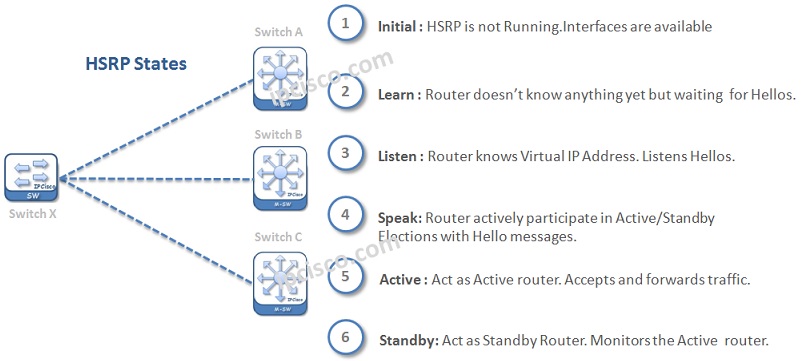
States of HSRP
There are two HSRP versions. These Hot Standby Router Protocol versions are:
The default version is HSRPv1. It is used by IPv4 networks. In v1, Group numbers can be from 0 to 255. v1 uses 224.0.0.2 as Hot Standby Router Protocol Multicast Address to send Hellos. This is also the address that CGMP Leave process uses.The packet format of v1 is different than v2 packet format.
HSRPv2 is the enhanced version of v1. v2 supports IPv6. For Hello messaging, v2 uses a different Multicast address than v1. The new Multicast addres that v2 uses is 224.0.0.102. v2 uses Group numbers from 0 to 4095.The packet format of v2 is different than v1.
In the Cisco HSRP Configuration example, we will also configure Hot Standby Router Protocol versions.
By default periodic HSRP Hello packets are sent every 3 seconds. Active router is controlled by standby router with periodic hello packets by default every 3 seconds. In case of a failure of active router, this mechanism provide switching to the backup router.
The Hold Time value is 10 seconds.
HSRP configuration on Cisco devices is straightforward and is typically applied on Layer 3 interfaces. Each router in the HSRP group is configured with the same virtual IP address, which acts as the default gateway for end devices. The router with the highest priority becomes the Active router, while the other takes the Standby role. By enabling the preempt feature, a higher priority router can reclaim the Active role after recovering from a failure. This configuration ensures seamless gateway redundancy and minimizes network downtime in real-world environments.
You can find an example Cisco HSRP Configuration below:
Router1(config)# interface g0/0
Router1(config-if)# ip address 192.168.1.2 255.255.255.0

Router1(config-if)# standby 1 ip 192.168.1.1
Router1(config-if)# standby 1 priority 110
Router1(config-if)# standby 1 preempt

Router1(config-if)# standby 1 timers 3 10

Router1(config-if)# standby 1 track g0/1 20

Router1(config-if)# standby 1 authentication cisco
HSRP configuration ensures that Router1 becomes the Active gateway with higher priority, while tracking and preempt features provide intelligent failover and recovery in real network scenarios. Another router must be configured with lower priority (e.g., 100) as Standby.
For detailed configuration example, you can check two different HSRP Configuration example lessons below.
Cisco HSRP Configuration Example | HSRP Configuration with GNS3
HSRP tracking enhances redundancy by dynamically adjusting the priority of a router based on the status of tracked interfaces or objects. When a tracked interface goes down, the router’s HSRP priority is reduced, which may cause it to lose the Active role. This mechanism is especially useful in scenarios where upstream connectivity is lost but the local interface remains up. By using interface or object tracking, HSRP can make smarter failover decisions and prevent traffic from being forwarded through a partially failed path.
You can configure HSRP tracking with the below command:
Router1(config-if)# standby 1 track g0/1 20
Heere, the last number (20) is the decrement value for HSRP priority.
Troubleshooting HSRP involves verifying the state, priority and configuration consistency between routers in the same group. Common issues include mismatched group numbers, incorrect virtual IP configuration or missing preempt settings. Network engineers typically use commands like “show standby brief” and “show standby” to quickly identify the Active and Standby routers, check timers, and verify tracking status. Effective troubleshooting ensures fast detection of failover issues and maintains high network availability.
Router1# show standby brief
Router1# show standby
Router1# debug standby
In critical systems, we need a resundant mechanism with multiple devices. Even one of these devices fails, the traffic continues over another. Gateway redundancy protocols provide this mechanism by ensuring seamless gateway failover.
The “preempt” command is used to allow taking the active role again with a higher priority. Here, if a device has higher priority, it takes active role without waiting for the failure of the standby device.
Beside Hot Standby Router Protocol, there are two other gateway redundancy protocol. These are VRRP (Virtual Router Redundancy Protocol) and GLBP (Gateway Load Balancing Protocol).
Cisco default priority value is 100 for Hot Standby Router Protocol.
To track an interface you can use standby <group> track <interface> <decrement> command. After this configuration, whenever this interface goes down, HSRP priority is reduced.
For verification, you can use “show standby brief” or “show standby” commands on Cisco devices. With these commands, you can check states (Active/Standby), VIP, priority, timers, and tracking status.
The HSRP Active router is determined by the highest priority value. The router with the highest priority becomes the Active router and forwards traffic.
If two routers have the same priority, the router with the highest IP address becomes the Active router. The other router becomes the Standby router.
All First Hop Redundancy Lessons:
What is FHRP (First Hop Redundancy Protocol)? | HSRP vs VRRP vs GLBP
What is HSRP (Hot Standby Router Protocol)?
What is VRRP (Virtual Router Redundancy Protocol)?
What is GLBP (Gateway Load Balancing Protocol)?
Cisco HSRP Configuration Example
Cisco VRRP Configuration Example
Cisco GLBP Configuraton Example






Hello
Hello Mehdi :)
We are sorry
Full access is only for IPcisco cres
:)