
- COURSES
- SPECIALS
- BLOG
- MEMBERS
- SHOP
- BOOKSHELF
- ABOUT
- ENROLL HERE

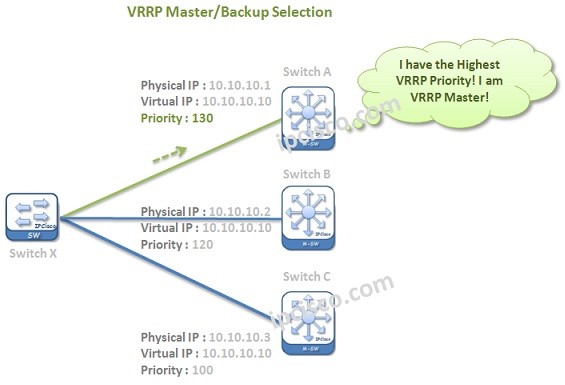
Table of Contents
VRRP (Virtual Router Redundancy Protocol) is a standard based First Hop Redundancy Protocol. It eliminates the single point of failure by using multiple optional devices through the destination. Basically with this mechanism, FHRP configuration is done over multiple devices and one of them is selected as Master. The traffic prefers going through the selected Master device. The other ones waits to be activated even Master fails. In this lesson, we will learn the details of this standard based FHRP (Vendor-neutra FHRP). If you would like to learn How to Configure VRRP on Cisco devices, you can also check the related lesson.
To learn more about VRRP, you can also reach the related RFC 5798.
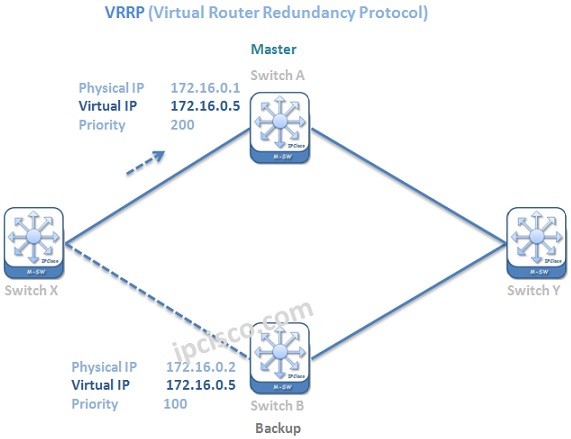
VRRP Configuration
If a failure occurs, then the traffic go through the new selected Master device (One of the Old Backup devices).
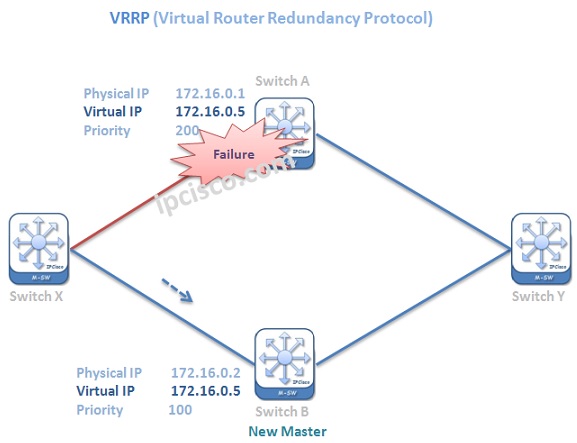
VRRP Failure Scenario
VRRP uses a Virtual address and two or more nodes are configured with this Virtual address. Devices uses this virtual address as next hop. And according to master/backup situation, traffic prefers one node.
The configuration of Virtual Router Redundancy Protocol is like another First Hop Redundancy Protocol, Cisco proprietary HSRP. There are only small differences in configuration and operation. We will talk about these difference below.
You can check Cisco VRRP Configuration Example below:
The devices that are configured with Virtual Router Redundancy Protocol have two roles. These roles are given below:
The Active or selected device that the traffic will flow through has the role Master. The remainning devices has the role Backup. There is one Master,but there can be one more Backups. Here, the principle is similar to HSRP. If the Master go down, then one of the Backups takes the Master role.
In Virtual Router Redundancy Protocol, preempt feature is enabled by default. What was preempt? Preempt is the process of “taking the Master role back”. If the failedd Master come back, it can take its role back again. This is enabled by default.
Virtual Router Redundancy Protocol uses Virtual MAC address. The value of this MAC address is 0000.5e00.01xx. Here, xx specifies the hexadecimal group number.
Hellos are sent to the Multicast address 224.0.0.18. Virtual Router Redundancy Protocol Hello time is 1 seconds by default.
Virtual Router Redundancy Protocol supports up to 255 VRRP Groups on a router. There can be up to 4 virtual Routers on each interface.
VRRP packet is mainly consist of the below fields:
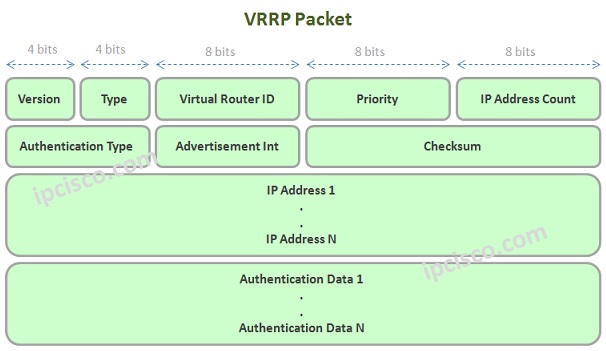
VRRP Packet Fields
Master/Backup selection is done firstly according to the VRRP Priority values. The highest priority wins the election and become Master. Virtual Router Redundancy Protocol Priority values can be confiugured from 1 to 254. The default VRRP priority value is 100.
Master Backup Selection
After the selection, during Virtual Router Redundancy Protocol operation, if VRRP Master failes, the election of new Master is done with these Priority values first.
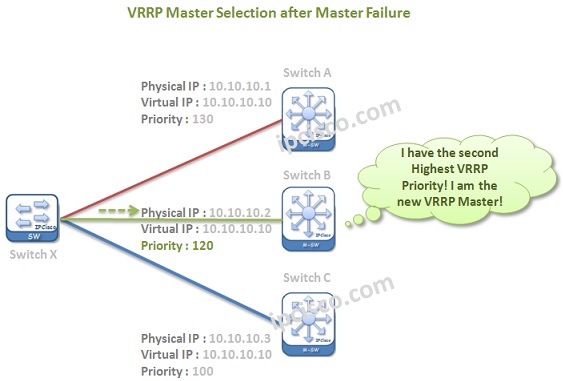
Master Selection After Master Failure
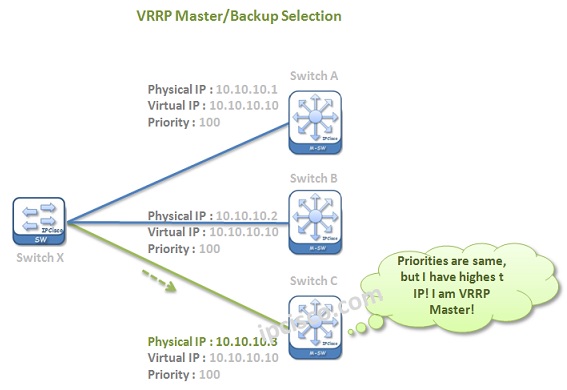
Master Backup Selection Process
One more important point is about the Virtual Router Redundancy Protocol election, if the Virtual IP address is equal to a physical of a device, then this device become Virtual Router Redundancy Protocol Master.
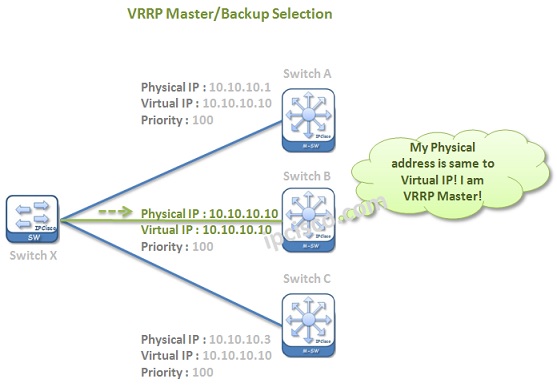
VRRP Master Backup Selection Process
The configuration steps of Virtual Router Redundancy Protocol is very simple. You can find the general steps of VRRP Configuration below:
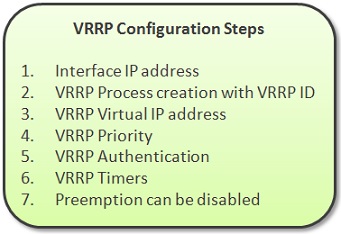
VRRP Configuration Steps
According to your need, you can configure the above steps of Virtual Router Redundancy Protocol. We will give VRRP Configuration Examples on different vendors in the other articles.
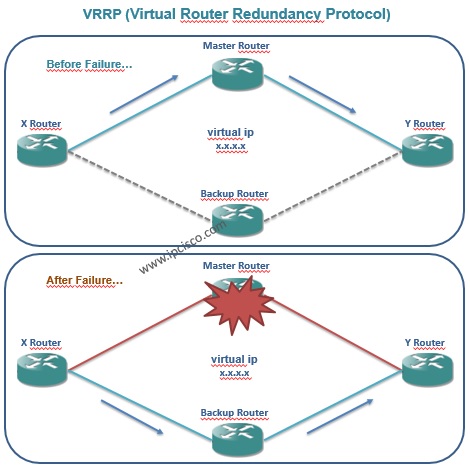
How VRRP Works?
All First Hop Redundancy Lessons:
What is FHRP (First Hop Redundancy Protocol)? | HSRP vs VRRP vs GLBP
What is HSRP (Hot Standby Router Protocol)?
What is VRRP (Virtual Router Redundancy Protocol)?
What is GLBP (Gateway Load Balancing Protocol)?
Cisco HSRP Configuration Example
Cisco VRRP Configuration Example
Cisco GLBP Configuraton Example

Gokhan Kosem is a Network Engineer, Instructor and the Founder of IPCisco.com with 15+ years of experience in Cisco, Nokia, Huawei, Juniper, Linux, Service Provider Networks, Routing and Switching technologies.
He has worked on the backbone networks of major service providers and network vendors including Nortel, Alcatel-Lucent (Nokia) and has extensive hands-on experience with Cisco, Huawei, Juniper and Nokia networking technologies.
He has trained thousands of networking students worldwide through IPCisco.com, Udemy, books, labs, quizzes, and educational content across multiple social media platforms.
IPCisco.com | Best Route to Your Dreams







Good
Thank u Sridhar:)