
- COURSES
- SPECIALS
- BLOG
- MEMBERS
- SHOP
- BOOKSHELF
- ABOUT
- ENROLL HERE

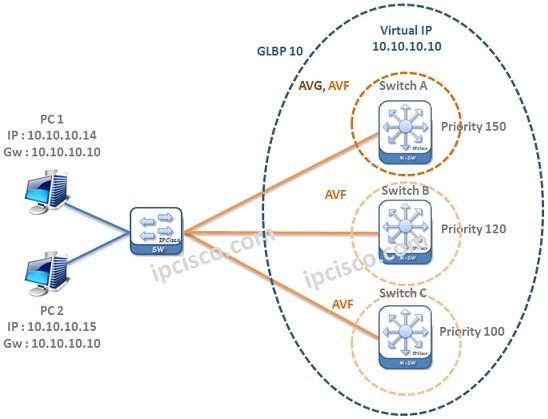
Table of Contents
GLBP (Gateway Load Balancing Protocol)is a Cisco Proprietary First Hop Redundancy Protocol. In this lesson, we will configure GLBP on Cisco devices with a GLBP Cisco Configuation Example. Here, you will learn How to Configure GLBP on Cisco Routers.
For our GLBP Example, we will use the below topology.
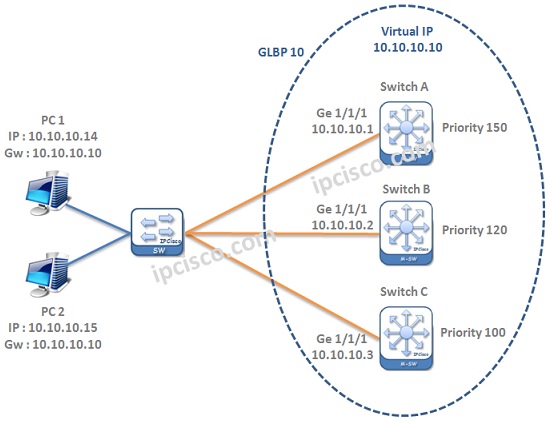
GLBP Example Topology
Now, let’s start GLBP Cisco Configuation and learn How to Do GLBP Cisco Configuration practically.
Youn can also check Cisco VRRP Configuration and Cisco HSRP Configuration
Interface configuration is the basic IP configurations of switch ports. Here, our swicthes are Layer 3 switch.
Switch A# configure
Switch A(config)# interface Gigabitethernet 1/1/1
Switch A(config-if)# ip address 10.10.10.1 255.255.255.0
Switch A(config-if)# no shutdown
Switch B# configure
Switch B(config)# interface Gigabitethernet 1/1/1
Switch B(config-if)# ip address 10.10.10.2 255.255.255.0
Switch B(config-if)# no shutdown
Switch C# configure
Switch C(config)# interface Gigabitethernet 1/1/1
Switch C(config-if)# ip address 10.10.10.3 255.255.255.0
Switch C(config-if)# no shutdown
PC 1
IP : 10.10.10.14
Gw : 10.10.10.10
PC 2IP : 10.10.10.15 Gw : 10.10.10.10
In this step, we will create GLBP process with GLBP Group ID and Virtual IP Address. We will do this configuration under the interfaces again. Our GLBP Group ID is 10 and our Virtual IP address is 10.10.10.10.
Switch A(config-if)# glbp 10 ip 1.10.10.10.10
Switch B(config-if)# glbp 10 ip 1.10.10.10.10
Switch C(config-if)#glbp 10 ip 1.10.10.10.10
GLBP Router roles are determined with the GLBP Priority values firsltly. If there is a tie break then the highes IP address determines the roles. Here, we will manuplate this election and give a higher GLBP Priority to Switch A. So, it will be AVG. Switch A, Switch B and Switch C will be AVF.
Switch A(config-if)# glbp 10 priority 150
Switch B(config-if)# glbp 10 priority 120
Switch C(config-if)# glbp 10 priority 100
The default GLBP Priority is 100. So, it is not necessary to configure Switch C. Here, we write it to show you only.
GLBP Example Topology
By default Preemption is off in GLBP. To open it, we wil use the below command.
Switch A(config-if)# glbp 10 preempt
Switch B(config-if)# glbp 10 preempt
Switch C(config-if)# glbp 10 preempt
There are three options for GLBP Load Balancing. These are:
Here, we will select the Round-robin for GLBP load balancing example. With Round-robin, traffic flow select each device orderly.
Switch A(config-if)# glbp 10 load-balancing round-robin
Switch B(config-if)# glbp 10 load-balancing round-robin
Switch C(config-if)# glbp 10 load-balancing round-robin
The last step of configuration before the verification is saving the GLBP Cisco Configuration.
Switch A# copy running-config startup-config
Switch B# copy running-config startup-config
Switch C# copy running-config startup-config
To verify GLBP, we can use “show glbp brief” command. Beside this, you can use trace option on the PCs to see the traffic that is going through different AVFs in each time.
All First Hop Redundancy Lessons:
What is FHRP (First Hop Redundancy Protocol)? | HSRP vs VRRP vs GLBP
What is HSRP (Hot Standby Router Protocol)?
What is VRRP (Virtual Router Redundancy Protocol)?
What is GLBP (Gateway Load Balancing Protocol)?
Cisco HSRP Configuration Example
Cisco VRRP Configuration Example
Cisco GLBP Configuraton Example

Gokhan Kosem is a Network Engineer, Instructor and the Founder of IPCisco.com with 15+ years of experience in Cisco, Nokia, Huawei, Juniper, Linux, Service Provider Networks, Routing and Switching technologies.
He has worked on the backbone networks of major service providers and network vendors including Nortel, Alcatel-Lucent (Nokia) and has extensive hands-on experience with Cisco, Huawei, Juniper and Nokia networking technologies.
He has trained thousands of networking students worldwide through IPCisco.com, Udemy, books, labs, quizzes, and educational content across multiple social media platforms.
IPCisco.com | Best Route to Your Dreams






Leave a Reply