
- COURSES
- SPECIALS
- BLOG
- MEMBERS
- SHOP
- BOOKSHELF
- ABOUT
- ENROLL HERE

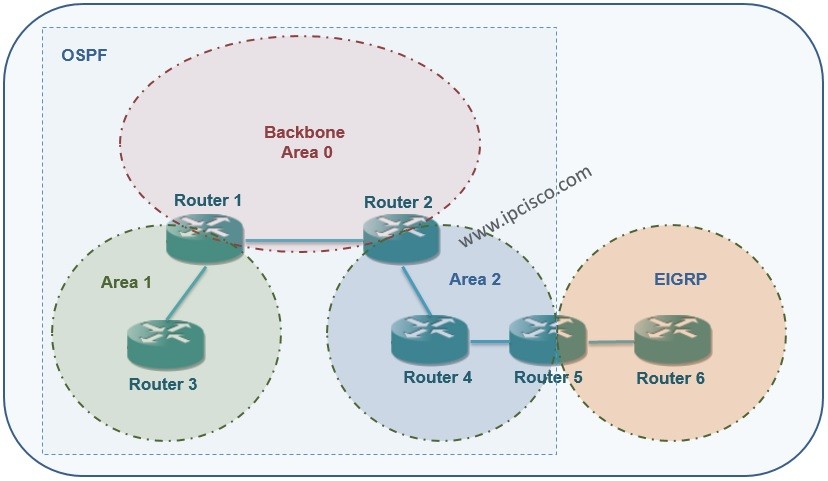
As you know External Routes are the routes that provide connection to the other networks working with different IGP. And for OSPF Protocol, the networks routed by another routing protocol will be OSPF External Routes for us. In this Open Shortest Path First lesson, we will focus on OSPF External Routes, E1 and E2. We will comapre them with Cisco Packet Tracer and with acomparison table.
In this post, we will use the below topology. We will have only oe External network and this will be EIGRP network. The routes to that network will be OSPF External Routes.
You can check the below lessons for the configuration of different OSPF Area Types:
You can DOWNLOAD the Packet Tracer example with .pkt format HERE.
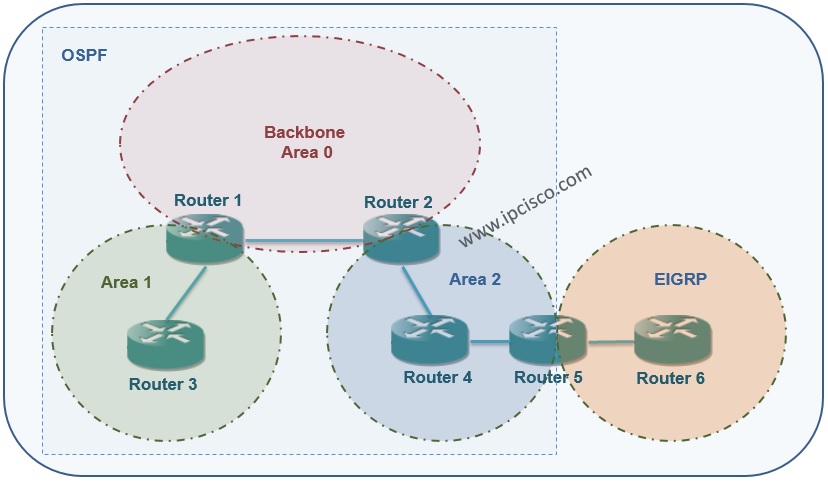
Here, we will bypass the interface configurations and the OSPF configuration. Because in the previous article, we had configured them. Here, the main points will be the exceptional EIGRP configuration. Think about, all the interface and OSPF configuration is done.
We will also make Redistribution configurations from OSPF to EIGRP and from EIGRP to OSPF. Redistribution lesson is another big lesson. So we will talk about them detailly later.
Let’s check the EIGRP, OSPF and Redistribution configurations on Router5 and Router6.
Router5
Router5(config)# router eigrp 1
Router5(config-router)# redistribute ospf 1 metric 150 10 200 200 1500
Router5(config-router)# network 10.5.0.0 0.0.0.255
Router5(config-router)# no auto-summary
Router5(config-router)# exit
Router5(config)# router ospf 1
Router5(config-router)# router-id 5.5.5.5
Router5(config-router)# log-adjacency-changes
Router5(config-router)# redistribute eigrp 1 metric 100 subnets
Router5(config-router)# network 10.4.0.0 0.0.0.255 area 2
Router5(config-router)# default-information originate
Router5
Router6(config)# router eigrp 1
Router6(config-router)# network 10.5.0.0 0.0.0.255
Router6(config-router)# no auto-summary
Router5#show ip eigrp neighbors
IP-EIGRP neighbors for process 1
H   Address         Interface      Hold Uptime    SRTT   RTO   Q   Seq
                                   (sec)          (ms)        Cnt  Num
0   10.5.0.2        Gig0/1         14   00:16:08  40     1000  0   9
Router5#show ip eigrp interfaces
IP-EIGRP interfaces for process 1

                        Xmit Queue   Mean   Pacing Time   Multicast    Pending
Interface        Peers  Un/Reliable  SRTT   Un/Reliable   Flow Timer   Routes
Gig0/1             1        0/0      1236       0/10           0           0
After this configurations, let’s check the Routing Table of each router. In this routers, you will see the External Routes like “O E2“. In EIGRP router, the External Routes will be like “D EX“. Here, we will focus on OSPF External Routes.
Router1#show ip route
Codes: L - local, C - connected, S - static, R - RIP, M - mobile, B - BGP
       D - EIGRP, EX - EIGRP external, O - OSPF, IA - OSPF inter area
       N1 - OSPF NSSA external type 1, N2 - OSPF NSSA external type 2
       E1 - OSPF external type 1, E2 - OSPF external type 2, E - EGP
       i - IS-IS, L1 - IS-IS level-1, L2 - IS-IS level-2, ia - IS-IS inter area
       * - candidate default, U - per-user static route, o - ODR
       P - periodic downloaded static route

Gateway of last resort is not set

     10.0.0.0/8 is variably subnetted, 7 subnets, 2 masks
C       10.1.0.0/24 is directly connected, GigabitEthernet0/0
L       10.1.0.1/32 is directly connected, GigabitEthernet0/0
C       10.2.0.0/24 is directly connected, GigabitEthernet0/1
L       10.2.0.1/32 is directly connected, GigabitEthernet0/1
O IA    10.3.0.0/24 [110/2] via 10.1.0.2, 00:16:20, GigabitEthernet0/0
O IA    10.4.0.0/24 [110/3] via 10.1.0.2, 00:16:10, GigabitEthernet0/0
O E2    10.5.0.0/24 [110/100] via 10.1.0.2, 00:16:10, GigabitEthernet0/0
Router2#show ip route
Codes: L - local, C - connected, S - static, R - RIP, M - mobile, B - BGP
       D - EIGRP, EX - EIGRP external, O - OSPF, IA - OSPF inter area
       N1 - OSPF NSSA external type 1, N2 - OSPF NSSA external type 2
       E1 - OSPF external type 1, E2 - OSPF external type 2, E - EGP
       i - IS-IS, L1 - IS-IS level-1, L2 - IS-IS level-2, ia - IS-IS inter area
       * - candidate default, U - per-user static route, o - ODR
       P - periodic downloaded static route

Gateway of last resort is not set

     10.0.0.0/8 is variably subnetted, 7 subnets, 2 masks
C       10.1.0.0/24 is directly connected, GigabitEthernet0/0
L       10.1.0.2/32 is directly connected, GigabitEthernet0/0
O IA    10.2.0.0/24 [110/2] via 10.1.0.1, 00:16:58, GigabitEthernet0/0
C       10.3.0.0/24 is directly connected, GigabitEthernet0/1
L       10.3.0.1/32 is directly connected, GigabitEthernet0/1
O       10.4.0.0/24 [110/2] via 10.3.0.2, 00:16:53, GigabitEthernet0/1
O E2    10.5.0.0/24 [110/100] via 10.3.0.2, 00:16:53, GigabitEthernet0/1
Router3#show ip route
Codes: L - local, C - connected, S - static, R - RIP, M - mobile, B - BGP
       D - EIGRP, EX - EIGRP external, O - OSPF, IA - OSPF inter area
       N1 - OSPF NSSA external type 1, N2 - OSPF NSSA external type 2
       E1 - OSPF external type 1, E2 - OSPF external type 2, E - EGP
       i - IS-IS, L1 - IS-IS level-1, L2 - IS-IS level-2, ia - IS-IS inter area
       * - candidate default, U - per-user static route, o - ODR
       P - periodic downloaded static route

Gateway of last resort is not set

     10.0.0.0/8 is variably subnetted, 6 subnets, 2 masks
O IA    10.1.0.0/24 [110/2] via 10.2.0.1, 00:16:02, GigabitEthernet0/1
C       10.2.0.0/24 is directly connected, GigabitEthernet0/1
L       10.2.0.2/32 is directly connected, GigabitEthernet0/1
O IA    10.3.0.0/24 [110/3] via 10.2.0.1, 00:15:52, GigabitEthernet0/1
O IA    10.4.0.0/24 [110/4] via 10.2.0.1, 00:15:42, GigabitEthernet0/1
O E2    10.5.0.0/24 [110/100] via 10.2.0.1, 00:15:52, GigabitEthernet0/1
Router5#show ip route
Codes: L - local, C - connected, S - static, R - RIP, M - mobile, B - BGP
       D - EIGRP, EX - EIGRP external, O - OSPF, IA - OSPF inter area
       N1 - OSPF NSSA external type 1, N2 - OSPF NSSA external type 2
       E1 - OSPF external type 1, E2 - OSPF external type 2, E - EGP
       i - IS-IS, L1 - IS-IS level-1, L2 - IS-IS level-2, ia - IS-IS inter area
       * - candidate default, U - per-user static route, o - ODR
       P - periodic downloaded static route

Gateway of last resort is not set

     10.0.0.0/8 is variably subnetted, 7 subnets, 2 masks
O IA    10.1.0.0/24 [110/3] via 10.4.0.1, 00:15:27, GigabitEthernet0/0
O IA    10.2.0.0/24 [110/4] via 10.4.0.1, 00:15:27, GigabitEthernet0/0
O       10.3.0.0/24 [110/2] via 10.4.0.1, 00:15:27, GigabitEthernet0/0
C       10.4.0.0/24 is directly connected, GigabitEthernet0/0
L       10.4.0.2/32 is directly connected, GigabitEthernet0/0
C       10.5.0.0/24 is directly connected, GigabitEthernet0/1
L       10.5.0.1/32 is directly connected, GigabitEthernet0/1
Router6#show ip route
Codes: L - local, C - connected, S - static, R - RIP, M - mobile, B - BGP
       D - EIGRP, EX - EIGRP external, O - OSPF, IA - OSPF inter area
       N1 - OSPF NSSA external type 1, N2 - OSPF NSSA external type 2
       E1 - OSPF external type 1, E2 - OSPF external type 2, E - EGP
       i - IS-IS, L1 - IS-IS level-1, L2 - IS-IS level-2, ia - IS-IS inter area
       * - candidate default, U - per-user static route, o - ODR
       P - periodic downloaded static route

Gateway of last resort is not set

     10.0.0.0/8 is variably subnetted, 6 subnets, 2 masks
D EX    10.1.0.0/24 [170/17069312] via 10.5.0.1, 00:13:30, GigabitEthernet0/1
D EX    10.2.0.0/24 [170/17069312] via 10.5.0.1, 00:13:30, GigabitEthernet0/1
D EX    10.3.0.0/24 [170/17069312] via 10.5.0.1, 00:13:30, GigabitEthernet0/1
D EX    10.4.0.0/24 [170/17069312] via 10.5.0.1, 00:14:25, GigabitEthernet0/1
C       10.5.0.0/24 is directly connected, GigabitEthernet0/1
L       10.5.0.2/32 is directly connected, GigabitEthernet0/1
We can check the connection with ping command.
Router3#ping 10.5.0.2
Type escape sequence to abort.
Sending 5, 100-byte ICMP Echos to 10.5.0.2, timeout is 2 seconds:
!!!!!
Success rate is 100 percent (5/5), round-trip min/avg/max = 0/12/29 ms
Above we have checked the E2 External OSPF Routes. There are also other types of OSPF External Routes. These are: E1 and E2 as Type 5, N1 and N2 as Type 7. E1 is the External Route with the cost to the ASBR plus redistribution cost, E2 is the External Route with only redistribution cost. N1 and N2 are the Type 7 version of them.
In this article, we have checked the External OSPF Routes. In the following article, we will focus on other BGP Area Types and their configuration on Packet Tracer.
You can DOWNLOAD the Packet Tracer example with .pkt format HERE
You can download “Packet Tracer” in Tools section.
OSPF External Routs (E1 and E2) is used in different aims in OSPF networks. Basically, E1 provides more precise routing decisions because it includes the internal OSPF path cost. And E2 is simpler and default, but may lead to suboptimal paths in larger networks. how about other differences? Below, you can find a comparison table for OSPF External Routes, E1 and E2.
| Feature | E1 (External Type 1) | E2 (External Type 2) |
|---|---|---|
| Metric Calculation | Internal OSPF cost + external cost | Only external cost (internal cost ignored) |
| Path Selection | Considers full path cost (more accurate) | Chooses lowest external metric only |
| Default Type | Not default | Default in OSPF |
| Use Case | When internal path matters | When external metric dominates |
| Network Behavior | Changes with internal topology | Stable, ignores internal changes |
| Preferred in Large Networks | Yes (better optimization) | No (may cause suboptimal routing) |
| LSA Type | Type 5 (or Type 7 in NSSA) | Type 5 (or Type 7 in NSSA) |
| Example Metric | External 20 + Internal 10 = 30 | External 20 only |
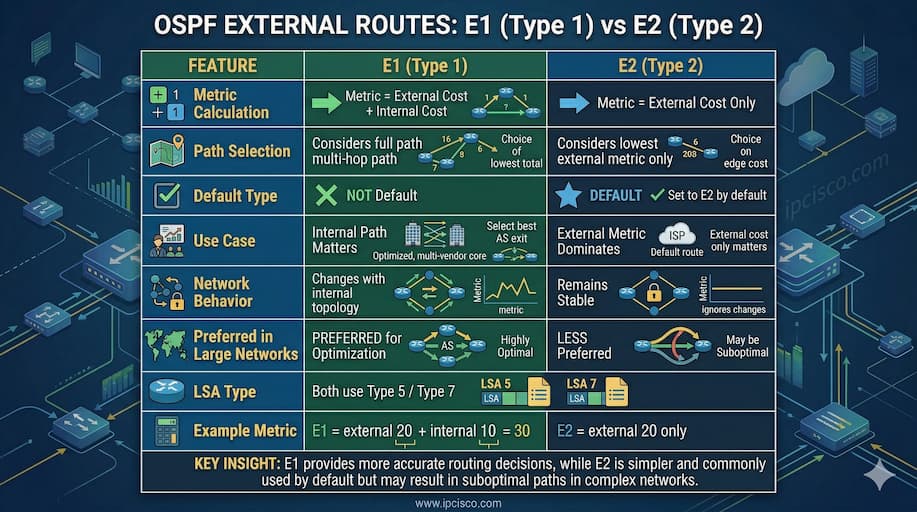
OSPF External Routes Comparison: E1 versus E2

Gokhan Kosem is a Network Engineer, Instructor and the Founder of IPCisco.com with 15+ years of experience in Cisco, Nokia, Huawei, Juniper, Linux, Service Provider Networks, Routing and Switching technologies.
He has worked on the backbone networks of major service providers and network vendors including Nortel, Alcatel-Lucent (Nokia) and has extensive hands-on experience with Cisco, Huawei, Juniper and Nokia networking technologies.
He has trained thousands of networking students worldwide through IPCisco.com, Udemy, books, labs, quizzes, and educational content across multiple social media platforms.
IPCisco.com | Best Route to Your Dreams







Leave a Reply