
- COURSES
- SPECIALS
- BLOG
- MEMBERS
- SHOP
- BOOKSHELF
- ABOUT
- ENROLL HERE

We have learned key lessons of OSPF in this CCNP Encore Course. Here, we will talked about the remainning main lessons of OSPF like OSPF Virtual Links. So, what are these important points of OSFP. These Open Shortest Path First lessons are given below:
Let’s talk about these parts one by one. If you would like to learn How to Configure OSPF on Cisco Routers, you can check the releted lesson also.
Table of Contents
Router ID is an important term for OSPF Operations. OSPF Router ID is a unique 32-bit identifier used to distinguish each router within an OSPF network. In other words, every router in the OSPF Topology have to has a unique Router ID. It is the name of the router in OSPF topology. It is essential for forming neighbor relationships, participating in DR/BDR elections and identifying routes in the link-state database.
How Router ID is chosen? Router ID is generally configured manually on all OSPF Routers. If this is not done, the highest IP address on a loopback interface, then the highest IP address oj physical router interface is elected as Router ID.
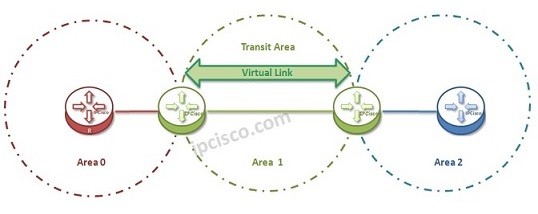
Virtual Links are used for connecting areas to the Backbone Area (Area 0), that is not directly connected to the Backbone Area. In other words, OSPF Virtual Links are logical connections created between two Area Border Routers (ABRs) to extend or repair connectivity to the OSPF backbone (Area 0) when a non-backbone area is not directly connected to it. Since OSPF requires all areas to have a continuous connection to Area 0, virtual links act as a temporary tunnel through a transit area, allowing routers to maintain proper routing and LSDB synchronization.
In this OSPF solution, there is one Transit Area that helps to connect the area to Backbone Area. Both end of the Transit Area is configured with Virtual Links. And this Area that will be connect by Virtual Links, can not be a Stub Area.
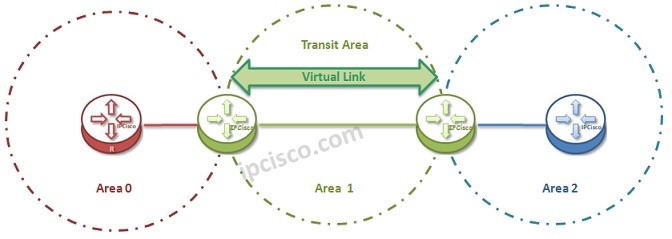
OSPF Virtual-Link Topology Example
In the above picture, Area 1 is the Transit Area. And the Virtual Link will be configured between R2 and R3 routers to connect Area 2 to the Backbone Area, Area 0.
This is a temporary solution to connect one Area to the Backbone Area. So it is not recommended to use this solution as a Permanent solution.
You can check also Packet Tracer OSPF Virtual Link Configuration Lesson.
There are also different Authentication mechanisms in Open Shortest Path First like in other Routing Protocols. This OSPF Authentication mechanisms are different in both OSPFv2 and OSPFv3. In OSPFv2 Authentication can be done with three ways. These Authentication mechanisms are :
In OSPFv3 , Authentication is done with the help of IPSec.
OSPF uses some default timers. The common of this timers are hello timer and dead timer. And these timer values can be changed for the OSPF network types. For broadcast networks, hello timer is 10 seconds and the dead timer is 40 seconds. But in nonbroadcast networks these are changed as 30 and 120.
With this article series, we have talked about the common Open Shortest Path First topic. In the following article series you can find articles about the detailed OSPF features. So, keep on, ipcisco.com ;)
A Router ID is a unique 32-bit identifier.
Router ID is generally configured manually on all OSPF Routers. If this is not done, the highest IP address on a loopback interface, then the highest IP address oj physical router interface is elected as Router ID.
Stability is critical in network. So, network engineers typically configure the Router ID manually or use a loopback interface to ensure consistency even if physical interfaces go down. Because, as you know physical interfaces can be down sometimes.
OSPF virtual links should be used when an area cannot be directly connected to Area 0, often during network migrations or when fixing improper OSPF designs. However, redesigning the network is usually the better long-term solution.
A virtual link must be configured between two ABRs that share a common transit area (which cannot be a stub area), and both routers must have full OSPF adjacency within that transit area.
No. Virtual Links are typically used in migration scenarios or to fix design issues, but are not recommended as a long-term solution.
The default OSPF Times for Broadcast Network are; hello timer is 10 seconds and the dead timer is 40 seconds.
The default OSPF Times for Nonbroadcast Network are; hello timer is 30 seconds and the dead timer is 120 seconds
There are three Authentication mechanisms used by OSPF. These are:
In OSPF Domain, Authentication is used to prevent unauthorized routers from joining OSPF domain.
It is mainly used for router identification in OSPF Domain.
When OSPF Dead Timer expires, neighbor is declared down n OSPF network.

Gokhan Kosem is a Network Engineer, Instructor and the Founder of IPCisco.com with 15+ years of experience in Cisco, Nokia, Huawei, Juniper, Linux, Service Provider Networks, Routing and Switching technologies.
He has worked on the backbone networks of major service providers and network vendors including Nortel, Alcatel-Lucent (Nokia) and has extensive hands-on experience with Cisco, Huawei, Juniper and Nokia networking technologies.
He has trained thousands of networking students worldwide through IPCisco.com, Udemy, books, labs, quizzes, and educational content across multiple social media platforms.
IPCisco.com | Best Route to Your Dreams







Leave a Reply