
- COURSES
- SPECIALS
- BLOG
- MEMBERS
- SHOP
- BOOKSHELF
- ABOUT
- ENROLL HERE

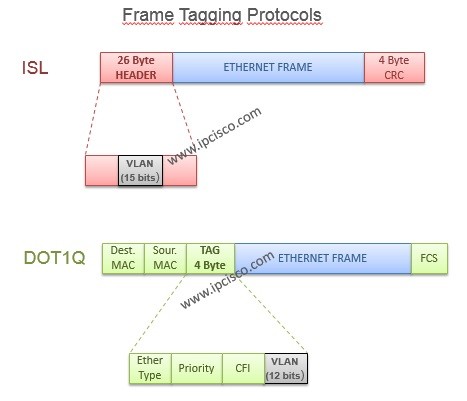
Table of Contents
In this lesson, we will learn VLAN Frame Tagging Protocols, including ISL (Inter-Switch Link) and IEEE 802.1Q (Dot1Q). These VLAN Tagging protocols allow switches to identify VLAN traffic across trunk links, by enabling multiple VLANs to communicate over a single physical connection. In this lesson, we will also explore DTP (Dynamic Trunking Protocol) and DTP trunking modes. We will show Cisco VLAN tagging configuration examples on Cisco switches. For more information about VLANs, you can check our VLANs (Virtual Local Area Networks) lesson and Cisco VLAN Configuration Examples.
There are two types of VLAN Frame Tagging Protocols. These are:
Here, there is an improtant difference between these two vlan tagging protocols. While ISL encapsulates the entire Ethernet frame, IEEE 802.1Q inserts a 4-byte VLAN tag into the frame for VLAN identification.
DTP (Dynamic Trunking Protocol) is different from these tagging protocols. DTP was developed by Cisco and it is a Cisco proprietary protocol used to negotiate trunk links between compatible Cisco switches. DTP does not tag Ethernet frames itself.
Now, let’s check these VLAN tagging protocols and their differences.
ISL (Inter-Switch Link) is a Cisco proprietary VLAN Frame Tagging Protocol used on older Cisco switches. ISL allows multiple VLANs to share a trunk link by encapsulating Ethernet frames with additional VLAN identification information. It is an old protocol, it is good to know ISL.
How Does ISL VLAN Tagging Work? ISL places the original Ethernet frame between its header and trailer. Unlike IEEE 802.1Q, which inserts a VLAN tag into an Ethernet frame, ISL encapsulates the entire original Ethernet frame by adding a header (26 bytes) and a trailer (4 bytes). So, ISL adds 30 bytes of overhead to each encapsulated Ethernet frame.
You can find ISL header & trailer in the below ISL VLAN Tagging example.
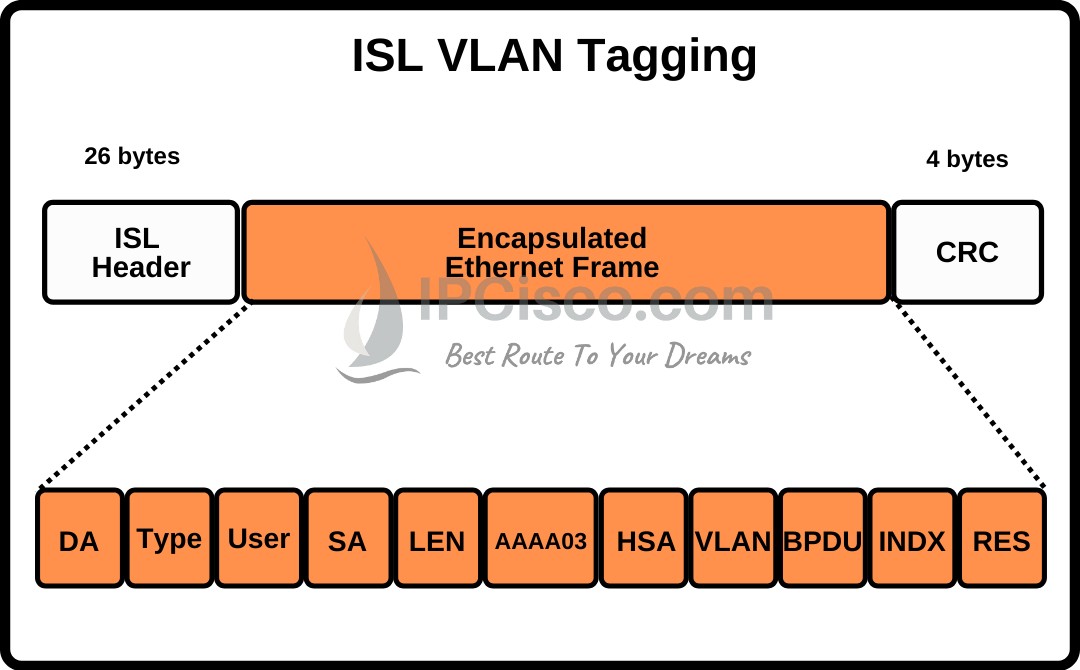
ISL VLAN Tagging Protocol Header and Trailer
The ISL header contains VLAN identification information. This allows the receiving switch to associate the encapsulated frame with the correct VLAN.It uses a 10-bit VLAN ID field. This provides possible 1024 VLAN ID values.
How to Configure ISL on Cisco Switches? On old Cisco switches that support ISL encapsulation. We can configure ISL on Cisco switches with the “switchport trunk encapsulation isl” command. Below you can find an ISL configuration example.
Switch(config)# interface FastEthernet0/1
Switch(config-if)# switchport trunk encapsulation isl
Switch(config-if)# switchport mode trunk
Here, with “switchport trunk encapsulation isl” command we select ISL encapsulation. With “switchport mode trunk” command we configure the interface as a trunk.
ISL is a legacy technology and is generally not supported on modern Cisco switches. Today, IEEE 802.1Q (Dot1Q) is the standard VLAN tagging method used in Ethernet networks.
You can also view VLAN Part 2 Video Lesson Below (Members Only)
Dot1Q (IEEE 802.1Q) is the standard VLAN Frame Tagging Protocol used in modern Ethernet networks. Unlike Cisco proprietary ISL, IEEE 802.1Q is supported by different networking vendors, allowing switches from different manufacturers to exchange VLAN traffic over trunk links.
IEEE 802.1Q (Dot1Q) modifies the layer-2 header and add 4-byte VLAN tag into the Ethernet frame between the Source MAC Address and the original EtherType/Length field. Because the frame is modified, the Frame Check Sequence (FCS) is recalculated.
The 802.1Q tag contains a 12-bit VLAN ID. This provides 4096 possible VLANs from 0 to 4095 on a trunk. VLAN IDs 0 and 4095 are reserved, so the commonly usable VLAN ID range is 1–4094.
You can find Dot1.Q Header example below:
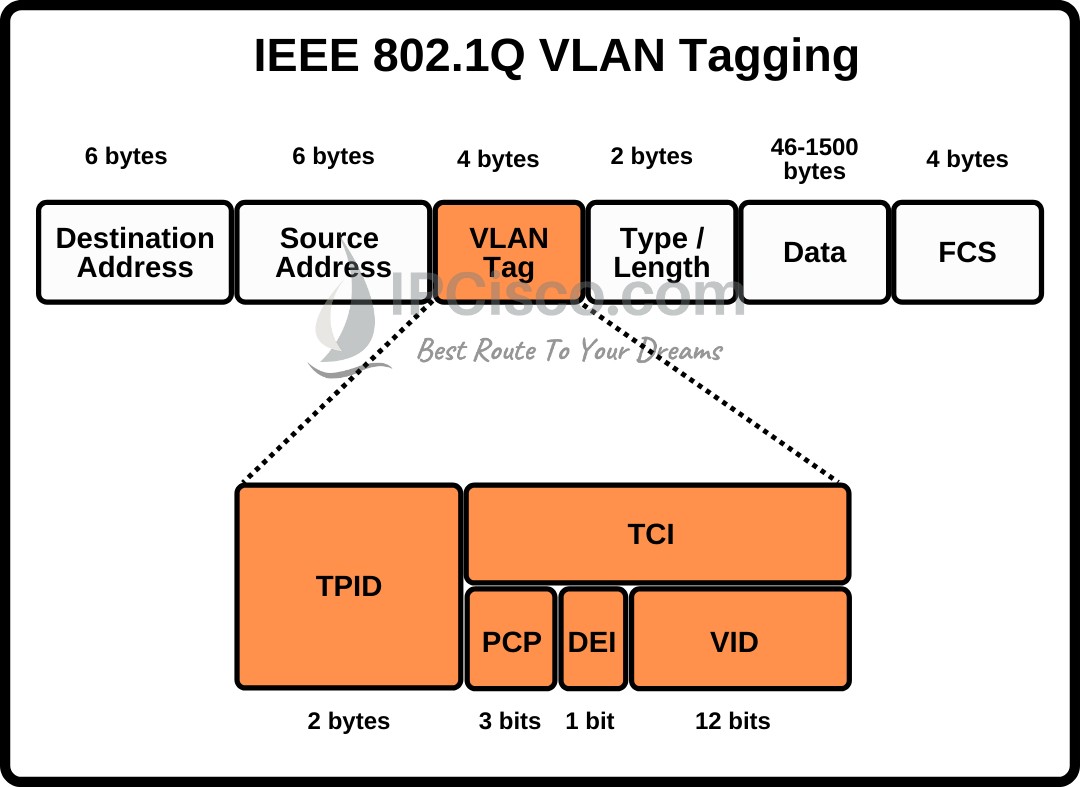
IEEE 802.1Q (Dot1Q) Header, VLAN Tag Fields
The 802.1Q header contains two main fields. These are:
The TCI field is divided into three fields. These are:
The common TPID value for an IEEE 802.1Q-tagged Ethernet frame is 0x8100.
By the way, the standard maximum Ethernet frame size is 1518 bytes, including 4-byte FCS. With ISL, this value increase 30 bytes and the frame become giant to other vendor’s switches. With an IEEE 802.1Q tag, this increases to 1522 bytes. When the FCS is excluded, these frame sizes are 1514 bytes and 1518 bytes, respectively.
How to Configure Dot1q on Cisco Switches? To configure Dot1.Q on Cisco switches, we use the “switchport trunk encapsulation dot1.q” command. Below, you can find a configuration example of IEEE 802.1Q.
Switch(config)# interface FastEthernet0/1
Switch(config-if)# switchport trunk encapsulation dot1q
Switch(config-if)# switchport mode trunk
The configuration of VLAN Tagging Protocols must be same at both ends on switches.
Another important thing in 802.1Q VLAN tagging is the native VLAN. By default, the traffic belong to the native VLAN is transmitted without an 802.1Q tag on Cisco switches. The traffic from other VLANs is tagged. Let’s give an example. We have VLAN 10, VLAN 20 and VLAN 30. We set Native VLAN as VLAN 30. With thsi configuration, VLAN 10 and VLAN 2o are tagged but VLAN 30 traffic will be untagged by default.
Normally, the default Native VLAN is VLAN 1 on Cisco switches.
For a proper configuration and communication, both ends of a trunk link should have same native VLAN configuration.
To do frame tagging protocol selection, we can also use DTP (Dynamic Trunking Protocol). Here, if there are old Cisco devices at both ends and they both support ISL and dot1.q, ISL is preferred.
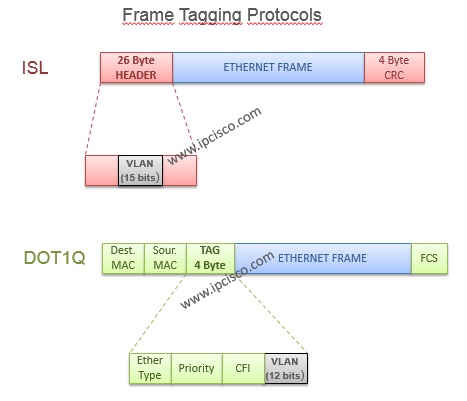
VLAN Frame Tagging Protocols, ISL and Dot1q
We have talked about both VLAN frame tagging protocols. Now, it is time to compare these two protocols. Both ISL and IEEE 802.1Q are VLAN frame tagging technologies used to identify VLAN traffic across trunk links. However, they differ in encapsulation methods, frame overhead, VLAN identification and vendor support. In the below comparison table, you can find the diffferences between ISL and Dot1Q.
| Feature | ISL | IEEE 802.1Q (Dot1Q) |
|---|---|---|
| Standard | Cisco Proprietary | IEEE Standard |
| Tagging Method | Frame Encapsulation | VLAN Tag Insertion |
| Overhead | 30 Bytes | 4 Bytes |
| VLAN ID Field | 10 Bits | 12 Bits |
| VLAN ID Values | 1024 | 4096 |
| Native VLAN | No | Supported |
| Multi-Vendor Support | No | Yes |
| Current Usage | Legacy | Widely Used |
Trunking in Cisco switches can be configured statically or dynamically. In static mode, the interfaces must be configured as trunk manually. In dynamic mode, a specific protocol, DTP (Dynamic Trunking Protocol) is used for this job.
DTP (Dynamic Trunking Protocol) is a Cisco proprietary trunk negotiation protocol which is used to negotiate trunk links between compatible Cisco switches. DTP allows switch interfaces to negotiate whether a link should operate as a trunk or an access connection. To do this, DTP uses different modes.
DTP can simplify trunk configuration in Cisco switches. But it is generally recommended to configure trunk links manually when dynamic negotiation is not required.
There are different DTP modes that can be configured on interfaces. These DTP modes put an interface in a trunk state immediately or they negotiate with the other end interface on the other switch. What are these DTP modes? These are given below:
Now, let’s learn the roles of these DTP modes one by one.
Access Mode: Access mode puts the interface in a permanent non-trunking, access mode.It does not dynamically negotiate to become a trunk. This mode is commonly used for interfaces connected to end devices, such as PCs and printers.
Switch(config-if)# switchport mode access
Trunk Mode: Trunk mode puts the interface in a permanent trunking mode. A trunk link can carry traffic belonging to multiple VLANs. On DTP-capable Cisco switches, a statically configured trunk may still send DTP messages unless negotiation is disabled.
Switch(config-if)# switchport mode trunk
Dynamic Auto Mode: Dynamic Auto mode is a passive DTP mode. It puts interface ready to be a trunk if the other end is in trunk or dynamic desirable mode. It does not actively attempt to convert the link to a trunk. A dynamic auto interface can form a trunk with a compatible interface configured as trunk or dynamic desirable. However, two interfaces configured as dynamic auto do not normally establish a trunk. Dynamic Auto is the default mode of the recent Cisco switches.
Switch(config-if)# switchport mode dynamic auto
Dynamic Desirable Mode: Dynamic Desirable is an active DTP mode. It puts interface ready to be a trunk if the other end is in trunk, dynamic desirable or dynamic auto mode. It actively attempts to convert the link to a trunk. It can establish a trunk with a compatible interface configured as trunk, dynamic auto, or dynamic desirable. Oldest Cisco switches was in dynamic desirable mode by default.
Switch(config-if)# switchport mode dynamic desirable
Nonegotiate: Unlike the previous options, nonegotiate is not a separate switchport mode. Nonegotiate prevents sending DTP frames. This command is used after configuring the switch as access or trunk. With nonegotiate mode, you are deciding the mode and then you are saying that “do not negotiate about this”.
Switch(config)# interface GigabitEthernet0/1
Switch(config-if)# switchport mode trunk
Switch(config-if)# switchport nonegotiate
As a summary, you can check the below shape which shows both manual trunk configuration and the function of different DTP modes.
The following table shows common DTP trunk negotiation results between two compatible Cisco switch interfaces. Which two mode establish trunks, you can check on this table.
| Switch A | Switch B | Trunk Established? |
|---|---|---|
| Dynamic Auto | Dynamic Auto | No |
| Dynamic Auto | Dynamic Desirable | Yes |
| Dynamic Desirable | Dynamic Desirable | Yes |
| Trunk | Dynamic Auto | Yes |
| Trunk | Dynamic Desirable | Yes |
| Trunk | Trunk | Yes |
| Access | Dynamic Auto | No |
| Access | Dynamic Desirable | No |
| Access | Trunk | No negotiated trunk |
As shown above, DTP dynamic desirable mode actively negotiates trunking, while DTP dynamic auto mode waits for negotiation from the neighbor interface.
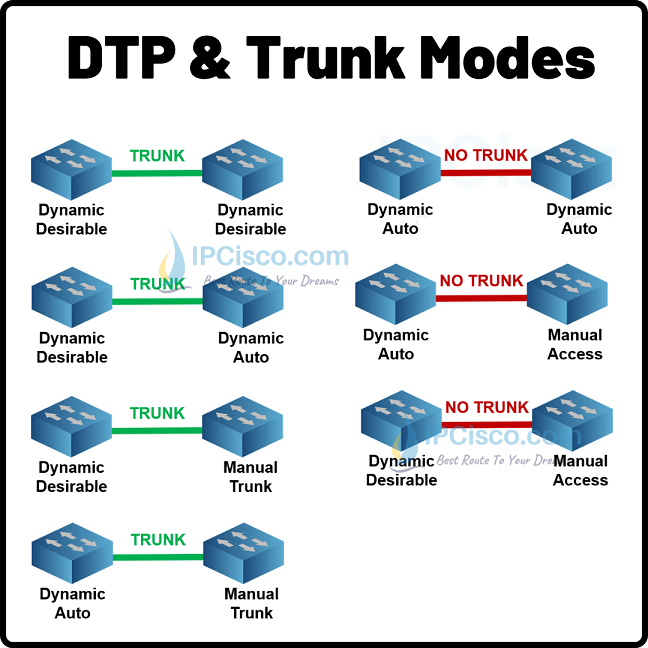
DTP Trunk Modes & Negotiation Results
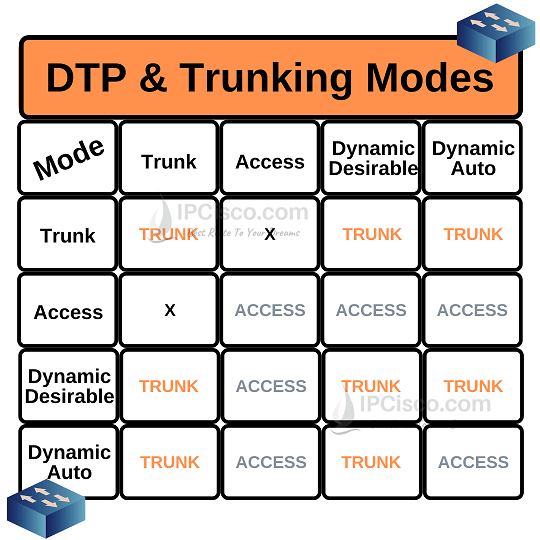
DTP Trunk Modes & Negotiation Results
VLAN tagging is a layer 2 method used to identify which VLAN an Ethernet frame belongs to. With VLAN tagging, multiple VLANs share the same trunk link. IEEE 802.1Q is the most widely used VLAN tagging standard.
IEEE 802.1Q (Dot1Q) is a standard based protocol used for VLAN tagging in modern Ethernet networks. Another VLAN tagging protocol is Cisco ISL, which is a legacy Cisco proprietary protocol used on older Cisco switches.
IEEE 802.1Q is used for VLAN tagging, while IEEE 802.3 defines Ethernet networking technologies. IEEE 802.1Q adds VLAN information to Ethernet frames.
VLAN tagging is typically configured on trunk ports using IEEE 802.1Q. A switch adds a 4-byte VLAN tag to Ethernet frames transmitted over a trunk, except for native VLAN traffic when native VLAN tagging is disabled.
The 802.1Q header is 4 bytes long and contains a 16-bit Tag Protocol Identifier (TPID) and a 16-bit Tag Control Information (TCI) field. The TCI includes PCP (3 bits), DEI (1 bit), and VLAN ID (12 bits).
ISL is a legacy Cisco proprietary protocol that encapsulates Ethernet frames and adds 30 bytes of overhead. IEEE 802.1Q is an industry standard that inserts a 4-byte VLAN tag into Ethernet frames.
IEEE 802.1Q uses a 12-bit VLAN ID field, providing 4096 possible VLANs. VLAN IDs 0 and 4095 are reserved. So VLAN IDs from 1 to 4094 are available.
It depends on the interface configuration. Access ports normally carry untagged traffic for a single VLAN, while trunk ports typically carry tagged traffic for multiple VLANs. Native VLAN traffic may be transmitted untagged also.
By default, VLAN 1 is the native VLAN on Cisco switches. It is normally untagged on an IEEE 802.1Q trunk. However, VLAN 1 can be tagged if another native VLAN is configured or native VLAN tagging is enabled. So, it can be both tagged or untagged according to the configuration.
Yes. The same VLAN can be tagged on one interface and untagged on another. For example, VLAN 10 can be untagged on an access port and tagged on a trunk port.
DTP (Dynamic Trunking Protocol) is a Cisco proprietary protocol used to negotiate trunk links between Cisco switches. It determines whether switch interfaces should operate as trunk port or not.
The main DTP modes are access, trunk, dynamic auto and dynamic desirable modes. Dynamic auto is passive, dynamic desirable is active mode of DTP.
The “switchport nonegotiate” command is used to disable outgoing DTP negotiation messages.
The main difference between DTP and IEEE 802.1Q is their purpose. With DTP, we neegotiates whether compatible switch interfaces should form a trunk link or not. With Dot1Q, we add VLAN identification info to Ethernet frames carried over trunk links. In other words, DTP negotiates trunking, while IEEE 802.1Q performs VLAN tagging.
Cisco Packet Tracer VLAN Configuration Example

Gokhan Kosem is a Network Engineer, Instructor and the Founder of IPCisco.com with 15+ years of experience in Cisco, Nokia, Huawei, Juniper, Linux, Service Provider Networks, Routing and Switching technologies.
He has worked on the backbone networks of major service providers and network vendors including Nortel, Alcatel-Lucent (Nokia) and has extensive hands-on experience with Cisco, Huawei, Juniper and Nokia networking technologies.
He has trained thousands of networking students worldwide through IPCisco.com, Udemy, books, labs, quizzes, and educational content across multiple social media platforms.
IPCisco.com | Best Route to Your Dreams






Leave a Reply