
- COURSES
- SPECIALS
- BLOG
- MEMBERS
- SHOP
- BOOKSHELF
- ABOUT
- ENROLL HERE

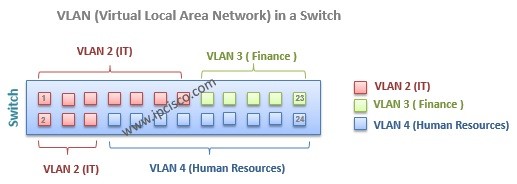
In this lesson, we will focus on some of the key lessons of VLANs. We will learn how to assign ports to VLAN, VLAN Port types and VLAn Tagging.
Table of Contents
VLANs can be assigned statically and dynamically. Static configuration is more common, but dynamic is also used.
Static VLAN assignment is like its name. You will statically assign the ports to the VLAN.
Dynamic VLAN assignment can be done by VLAN Membership Policy Server(VMPS). VMPS needs VLAN-MAC address relationship database. Here, we will use the static one, like many network engineer.
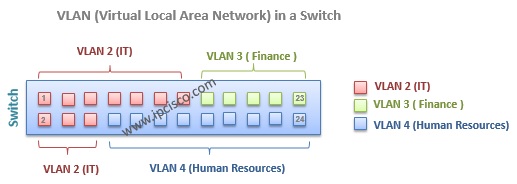
There are two type port used in VLANs. These are:
– Access Ports,
– Trunk Ports
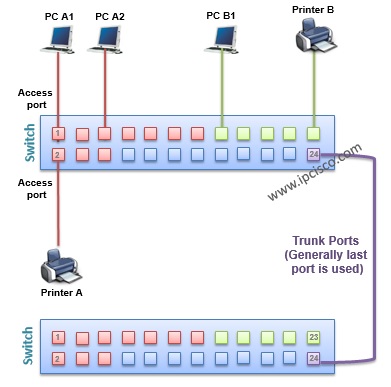
Access ports are the ports that are member of a single VLAN. Host devices are connected to it. This is also default Cisco switch port type.
Trunk ports are the ports that are member of more than one VLAN or all VLANs. This ports are used between switches. To span VLANsbetween more than one switch, some ports are needed to carry VLAN information accross the switches. These ports are trunk ports. You can also carry each VLAN without using any trunk port. But this way is not efficient and not common.
While carrying the frames between VLANs across multiple swithes, frame tagging is required. Because the other end switch need to understand that where the frame will go ( to which VLAN) on the other end. And tagging is used only for the frames going out a trunk port. This is not used for access ports, and anyway this is not necessary.
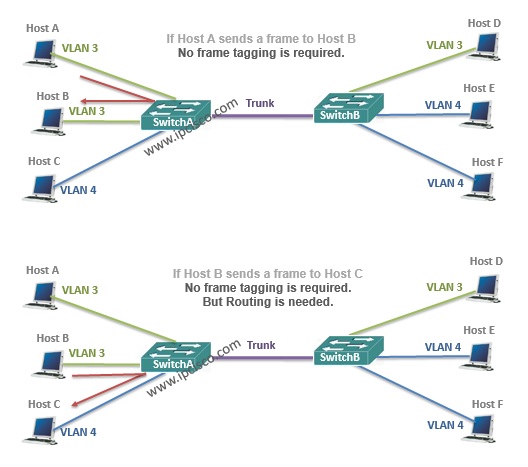
No VLAN Frame Tagging Require

Gokhan Kosem is a Network Engineer, Instructor and the Founder of IPCisco.com with 15+ years of experience in Cisco, Nokia, Huawei, Juniper, Linux, Service Provider Networks, Routing and Switching technologies.
He has worked on the backbone networks of major service providers and network vendors including Nortel, Alcatel-Lucent (Nokia) and has extensive hands-on experience with Cisco, Huawei, Juniper and Nokia networking technologies.
He has trained thousands of networking students worldwide through IPCisco.com, Udemy, books, labs, quizzes, and educational content across multiple social media platforms.
IPCisco.com | Best Route to Your Dreams






Leave a Reply