
- COURSES
- SPECIALS
- BLOG
- MEMBERS
- SHOP
- BOOKSHELF
- ABOUT
- ENROLL HERE


Table of Contents
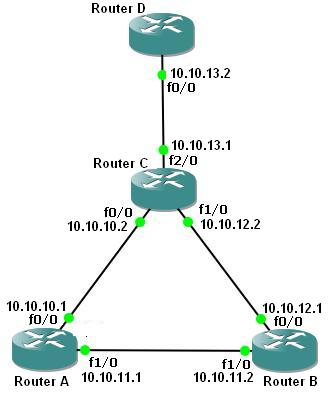
OSPF (Open Shortest Path First) protocol is a well-known routing protocol that is widely used today. To configure a network for OSPF properly, there are some steps. For basic OSPF Cisco Configuration, the following scenario will be a good example.
You can also learn DHCP Server Configuration With Packet Tracer
First of all, we will configure the routers’ interfaces. After that we will configure OSPF as our Routing Protocol. Here we assume that all the interfaces including loopback interfaces, their speed, duplex and descriptions have been configured.
To do OSPF Cisco Configuration, follow the below steps:
In the router A, we will enable OSPF Process, with Process Number “1“.
A(config)# router ospf 1
A(config-router)#
Would you like to follow Cisco Packet Tracer Course on IPCisco?
After enabling OSPF process on our Cisco Router A, then, we will add our networks that will be in OSPF network with their wildcard masks.
A(config-router)# network 10.10.10.0 0.0.0.255 area 0
A(config-router)# network 10.10.11.0 0.0.0.255 area 0
A(config-router)# end
To save our configuration, we will use “copy running-config startup-config” command.
A # copy running-config startup-config
We will configure Router B like Router A. We will enable OSPF and then add OSPF Networks.
B(config)# router ospf 1
B(config-router)# network 10.10.11.0 0.0.0.255 area 0
B(config-router)# network 10.10.12.0 0.0.0.255 area 0
B(config-router)# exit
B # copy running-config startup-config
We will configure Router C like Router A. We will enable OSPF and then add OSPF Networks.
C(config)# router ospf 1
C(config-router)# network 10.10.10.0 0.0.0.255 area 0
C(config-router)# network 10.10.12.0 0.0.0.255 area 0
C(config-router)# network 10.10.13.0 0.0.0.255 area 0
C(config-router)# end
C# copy running-config startup-config
You can download “Cisco Packet Tracer” in Tools section.

Gokhan Kosem is a Network Engineer, Instructor and the Founder of IPCisco.com with 15+ years of experience in Cisco, Nokia, Huawei, Juniper, Linux, Service Provider Networks, Routing and Switching technologies.
He has worked on the backbone networks of major service providers and network vendors including Nortel, Alcatel-Lucent (Nokia) and has extensive hands-on experience with Cisco, Huawei, Juniper and Nokia networking technologies.
He has trained thousands of networking students worldwide through IPCisco.com, Udemy, books, labs, quizzes, and educational content across multiple social media platforms.
IPCisco.com | Best Route to Your Dreams






Leave a Reply