
- COURSES
- SPECIALS
- BLOG
- MEMBERS
- SHOP
- BOOKSHELF
- ABOUT
- ENROLL HERE


Table of Contents
In this section, we will focus on TCP header in packets. Transmission Control Protocol Header can be minimum 20 bytes long. With options, this length can be up to 60 bytes. Here, we will focus on Source & Destination Port Number parts in a TCP Header. the other parts of TCP Header will be explained in other lessons. Below, you can find all TCP Header fields.
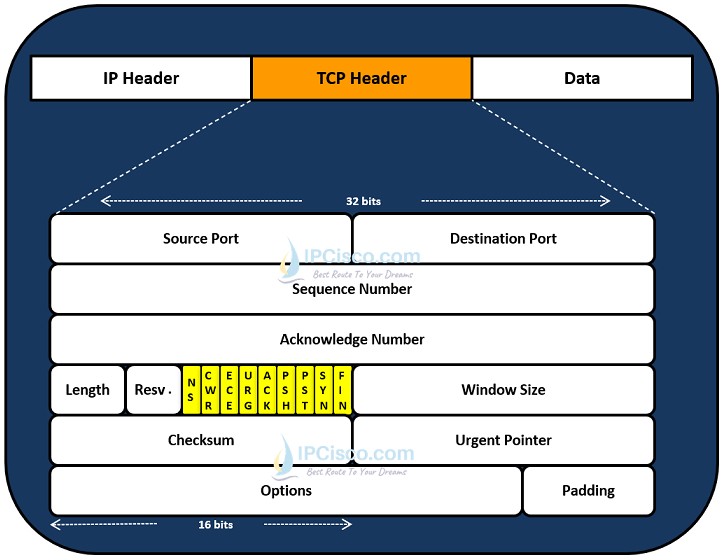
TCP Header Fields
TCP (Transmission Control Protocol) is a layer 4 protocol and its header is also have parameters about layer 4. Before TCP header, packet has layer 3 header, it is IP in our example. And before IP header, packet has layer two header, and this is ethernet II in the example below.

TCP Header in a Packet
You can also check UDP Header and UDP vs TCP Differences lesson.
You can also check the below capture, for understanding the tcp header fields.
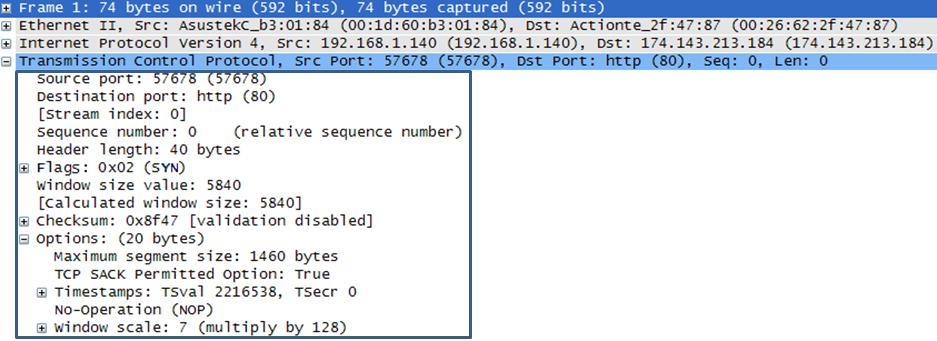
Wireshark Packet Example 1 For TCP Header Fields
The section that we will dive in is the tcp header that I mentine before and this part is shown in a rectangle above. Let’s start with source and the destination por fied in TCP header.
As you can see below, the source and the destnation port number field are shown with repeated red lines. Each port field is 16 bits long.
When a host need to send data, it need the ip address and the port number of the remote node. The ip address is a layer 3 parameter, so it is mentined in ip header. But the port fields are layer 4 parameters and they are mentined in TCP header.
IP header has the destination ip address that make the destination unique in the network. And provide reaching the node. But destination port number defines the target service in the destination node. This can be ftp, http or any layer 4 service what else.
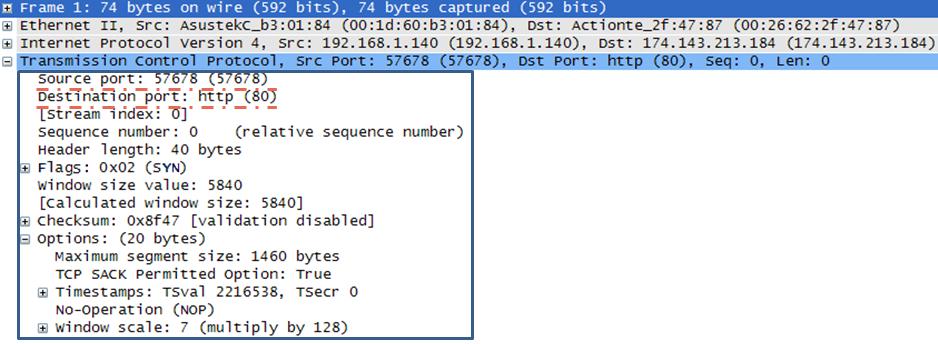
Wireshark Packet Example 2 For TCP Header Fields
Let’s explain this parameters with a real world example.
For example you will request a webpage. To do this first of all your pc send a request with the destintion ip address of the remote server of that webpage. Beside your pc send the destination port number that is related to http, port 80.
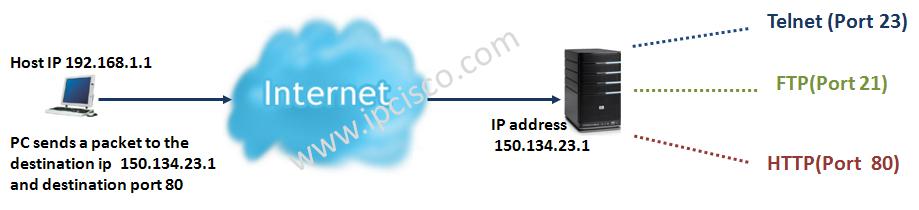
When your request reach to the server, it see its own ip address and accept the request. After that it check the destination port number and send the request to the related servcie. Here, this service is http, port 80 service.
This scenarion is the same when you are doing telnet to a destination or usinf ftp services or etc.
What about source port? Until now we have always talked about destination port, what is the aim for using source port? TCP header use source port for identifying the response for the host’s previous request.
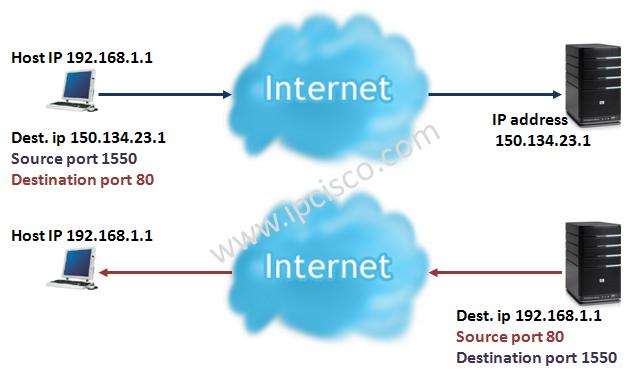
As mentined above, host sends the http request with the source port 1550. The remote server use this source port as its destination port while it sends the response. So the host identify that, the coming response is its previous request’s response.
Let’s continue with the other fields in TCP header…
TCP Header Lesson
Lesson 1: TCP Header: Source & Destination Port Number
Lesson 2: Sequence & Acknowledgement Number
Lesson 3: TCP Header: TCP Options
Lesson 4: TCP Header: TCP Flags
Lesson 5: TCP Header: TCP Window Size, Checksum & Urgent Pointer
Key Lesson: Transmission Control Protocol

Gokhan Kosem is a Network Engineer, Instructor and the Founder of IPCisco.com with 15+ years of experience in Cisco, Nokia, Huawei, Juniper, Linux, Service Provider Networks, Routing and Switching technologies.
He has worked on the backbone networks of major service providers and network vendors including Nortel, Alcatel-Lucent (Nokia) and has extensive hands-on experience with Cisco, Huawei, Juniper and Nokia networking technologies.
He has trained thousands of networking students worldwide through IPCisco.com, Udemy, books, labs, quizzes, and educational content across multiple social media platforms.
IPCisco.com | Best Route to Your Dreams







Leave a Reply