
- COURSES
- SPECIALS
- BLOG
- MEMBERS
- SHOP
- BOOKSHELF
- ABOUT
- ENROLL HERE

LLDP (Link Layer Discovery Protocol) is a Standard Neighbour Discovery Protocol that is used by all vendors. Like all other Neighbour Discovery Protocols like Cisco CDP, LLDP works on Layer 2 (Data-link Layer). By using this Neighbor Discovery Protocol, directly connected neighbours are discovered. You can also view wiki definion here. If you would like to view CDP Protocol, you can also go to CDP Lesson.
To discover a neighbour device, Link Layer Discovery Protocol must be enabled both on the discovering device and the discovered device.
With this protocol, ethernet devices advertise their identification, configuration etc. to the directly connected LLDP enabled devices.
As we mentioned before, there are many Neighbour Discovery Protocols and they are vendor specific. To build a one common protocol, Link Layer Discovery Protocol is developed and it is used on all vendors’ devices. It is independent from the brand of the device used.
There are some specific times of this protocol as other protocols. These are Hello Timer and Dead Timer. Hello Timer is 30 seconds for Link Layer Discovery Protocol and Dead Timer is 120 seconds.
Link Layer Discovery Protocol has an extension version that provide end devices’s discovery. With this extention, it discovers the endpoint PCs, IP Phone. This extended version is LLDP-MED (Media Endpoint Discovery). We will talk about LLDP-MED, in the following articles. Here, in this article, our main focus is the classic one.
Table of Contents
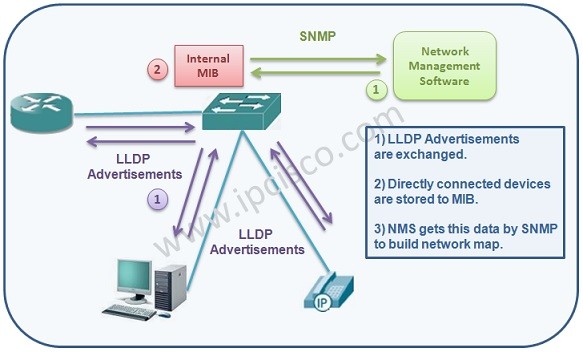
As we have mentioned above, Link Layer Discovery Protocol must be enabled on the devices firstly. After that, LLDP enabled devices send LLDP advertisements each other and the device information are stored in the MIB databases on the devices. Any Network Management Software gets this data by SNMP (Simple Network Management Protocol). And with this data, it builds the network map.
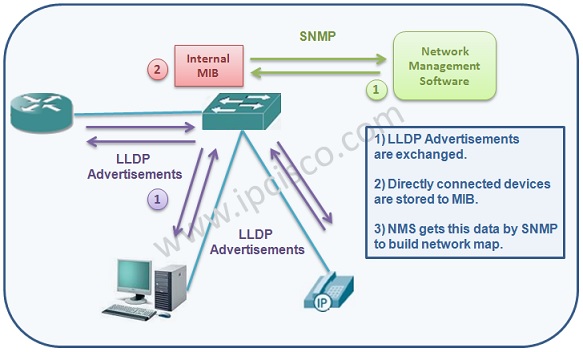
When the device receive a new information about the neightbour device, it stores this neighbour information in the MIB (Management Information Base). There are two MIB. LLDP Local System MIB and LLDP Remote System MIB. Local System MIB stores the information about the local device, the device’s own information. Remote System MIB stores the information gathered from the Link Layer Discovery Protocol neightbour devices.
When the neighbour information come to the device, it stores it in the MIB. And whenever a new information comes, it updates the MIB. If no information come in a certain time, it deletes the neighbour’s information from the MIB (Management Information Base).
The devices that is using Link Layer Discovery Protocol, has a LLDP Agent Software. This Agent is responsible for all the Link Layer Discovery Protocol actions.
Link Layer Discovery Protocol is a One-way protocol, it send in one direction and do not wait for acknowledgement. In this protocol, the advertisements are sent with LLDPDUs (LLDP Data Units).
When you enable Link Layer Discovery Protocol on a port, it can transmit and receive. But you can seperately configure them also.
There are three modes in Link Layer Discovery Protocol. These modes are :
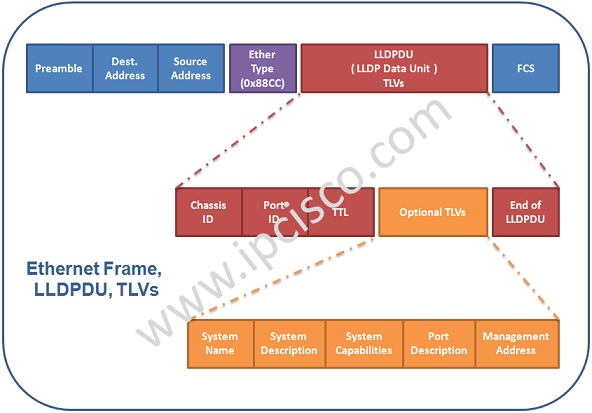
LLDP information is sent in the ethernet frame form. Link Layer Discovery Protocol has no specific Header.
AS you know, in the ethernet frame, there are source and destination mac address fields. After this fields, there is a Ether Type field. In this field, 0x88CC value is used for LLDP.
After using 0x88CC Ether Type value, LLDP Data Unit (LLDPDU) is added to the frame. Data Unit (LLDPDU) is consist of LLDP TLVs (Type Lenght Value). A TLV (Type Lenght Value) advertises a single type of information. This information can be any information about the neighbour device.
There are two types of TLVs :
Mandatory TLVs must be in the Link Layer Discovery Protocol message. Optional TLVs are optional in the Link Layer Discovery Protocol messages.
By default there are four TLVs in a LLDPDU (Mandatory TLVs). These Mandatory TLVs are :
You can add five more additional Optional TLVs to a LLDPDU. These Optional TLVs are:
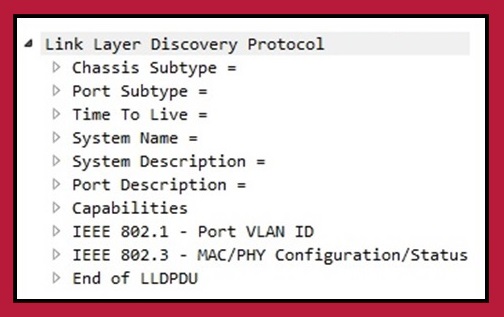
Above, you can see the fields in the Link Layer Discovery Protocol message. In this example header, you can see the mandatory TLVs and the Optional TLVs together. The information about the devices are stored in these fields.
LLDP and CDP are two neighbor discovery protocols works on Layer 2 (Data-Link Layer) of OSI model. How about their difference? When we compare them, there are various imporant difference between these network protocols.
First of all LLDP is a standard based protocol while CDP is a Cisco proprietary vendor specific protocol. The standard name of Link Layer Discovery Protocol is IEEE 802.1AB. This means that, LLDP can works on all vendor devices. On the other hand, CDP wroks only on Cisco devices to discover information about neighbor Cisco devices.
Link Layer Discovery Protocol gets low details like device name, capabilities, port ID etc. CDP gets more details about neighbor Cisco device. This inforamtion can be Device name, IOS version, IP, capabilities etc.
Below, you can find the LLDP vs CDP comparison table.
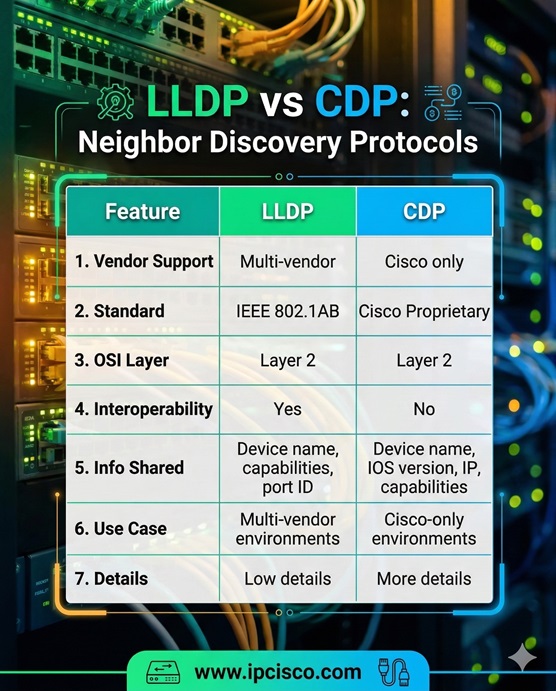
LLDP versus CDP Comparison Table
| Feature | LLDP | CDP |
| Vendor Support | Multi-vendor | Cisco only |
| Standard | IEEE 802.1AB | Cisco Proprietary |
| OSI Layer | Layer 2 | Layer 2 |
| Interoperability | Yes | No |
| Info Shared | Device name, capabilities, port ID | Device name, IOS version, IP, capabilities |
| Use Case | Multi-vendor environments | Cisco-only environments |
| Details | Low details | More details |
How can we configure LLDP on Cisco devices? Here is step by step LLDP Configuration. You can also visit relade configuration lesson to learn more on Cisco Link Layer Discovery Protocol Config.
To enable it, we use “lldp run” command under global configuration mode.
Switch# configure terminal
Switch(config)># lldp run
To configure lldp timers, you can use the below commands.
Switch(config)# interface GigabitEthernet0/1   # Send LLDP packets every 30 seconds
Switch(config-if)# lldp transmit    # Allows the interface to send advertisements.
Switch(config-if)# lldp receive   #Allows the interface to receive advertisements.
To verify Link Layer Discovery Protocol, you can use the below verification commands.
Switch# show lldp neighbors
Switch# show lldp neighbors detail
Switch# show lldp traffic
To configure lldp timers, you can use the below commands.
Switch(config)# lldp timer 30    # Send LLDP packets every 30 seconds
Switch(config)# lldp holdtime 120     # Neighbor info timeout in seconds
Link Layer Discovery Protocol is a vendor-neutral protocol standard as IEEE 802.1AB and works across multiple vendors, while CDP is Cisco proprietary and works only on Cisco devices.
No. Link Layer Discovery Protocol is usually disabled by default. You need to enable it globally using “lldp run” command on Cisco devices.
By default, LLDP sends advertisements every 30 seconds, but the timer can be configured.
Yes. Link Layer Discovery Protocol shows connected devices, interfaces and capabilities, making it useful for network mapping and troubleshooting in multi-vendor environments.
Yes, both protocols can run simultaneously without conflict. Link Layer Discovery Protocol is often used for multi-vendor interoperability, while CDP is used for Cisco-specific details.

Gokhan Kosem is a Network Engineer, Instructor and the Founder of IPCisco.com with 15+ years of experience in Cisco, Nokia, Huawei, Juniper, Linux, Service Provider Networks, Routing and Switching technologies.
He has worked on the backbone networks of major service providers and network vendors including Nortel, Alcatel-Lucent (Nokia) and has extensive hands-on experience with Cisco, Huawei, Juniper and Nokia networking technologies.
He has trained thousands of networking students worldwide through IPCisco.com, Udemy, books, labs, quizzes, and educational content across multiple social media platforms.
IPCisco.com | Best Route to Your Dreams







Leave a Reply