
- COURSES
- SPECIALS
- BLOG
- MEMBERS
- SHOP
- BOOKSHELF
- ABOUT
- ENROLL HERE

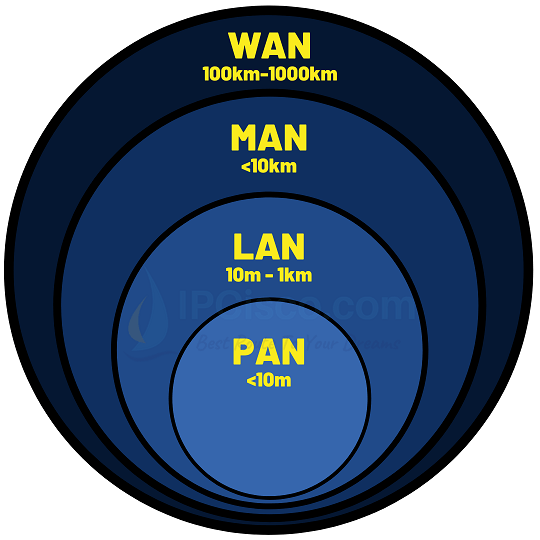
A computer network is basically a group of nodes (pcs, switches, routers etc.) connected together to share data. Devices in this system, shares files, programs or any other data each other. There are different types of networks, small, medium or large according to the need. These network types are PAN, LAN, MAN, WAN, WLAN, CAN, SAN, VLAN and VPN. These network types can be used in you home, in your company or between branches, cities, countries. The four main types based on geographical coverage are are PAN, LAN, MAN, and WAN.
In this lesson, we will focus on different types of networks. According to their size and used area, we can divide networks into different types. These types are given below:
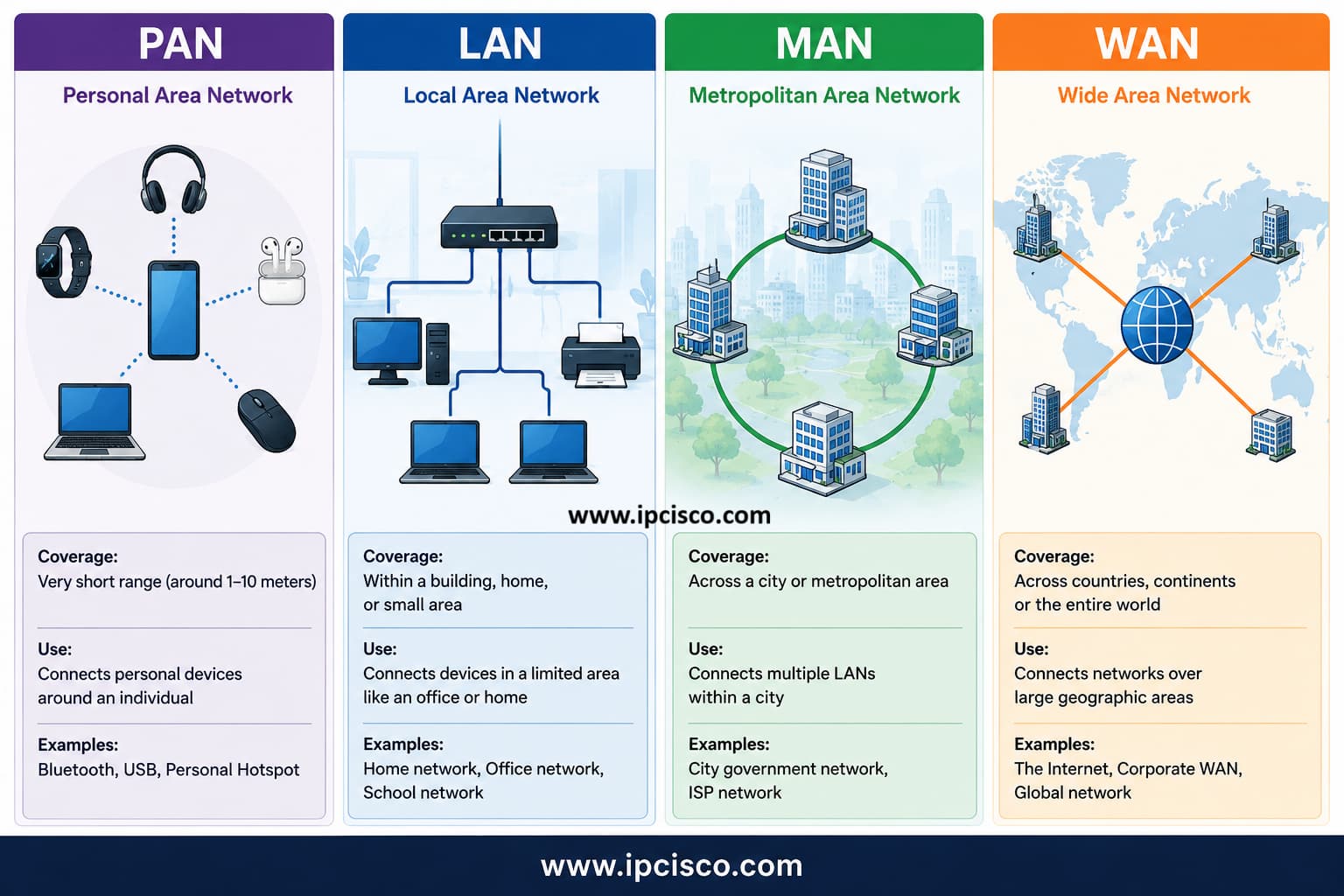
PAN vs LAN vs MAN vs WAN – Network types compared by coverage
Now, let’s focus on each of these types of networks one by one.
Test yourself with Network Quizes Page!
Table of Contents
The smallest network type is PAN (Personal Area Network). A PAN is the network around a single person. It consists of smart phones, laptops, tablets, wearable technology or any other personal digital device.
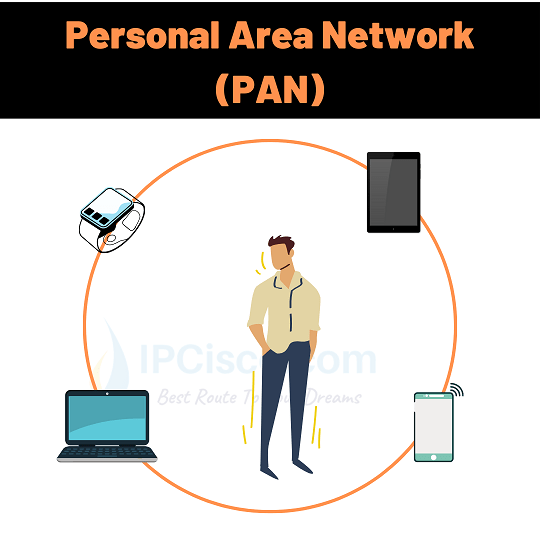
PAN (Personal Area Network) connects personal devices within a short range
PAN covers a very small area, which is almost maximum 10 meters far from a person. With this characteristic, PAN is limited with distance. But it is very important for today’s connected world.
You can also watch Network Types Video Lesson Below (Members Only)
LAN (Local Area Network) is a small type of network used in houses, companies, schools or any other small areas. These types of networks are used for file sharing, resource sharing, communication in a small area. It is also used to share internet connection in any place. For example, the network in your company which you share information or communicate with your colleagues is a LAN.
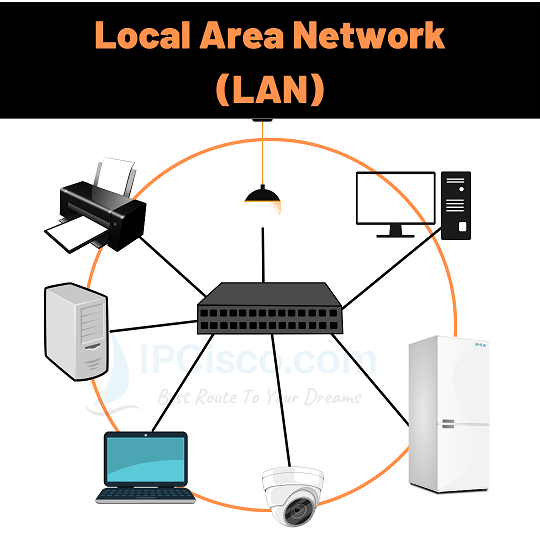
LAN (Local Area Network) connects computers and network devices within a limited area such as a home or office
LANs covers mainly a building or a site. So, it has a distance limitation. With these characteristics, it is smaller than MAN and WAN. In LANs, both copper and fiber optic cables can be used. LANs are fast networks. There are differen LAN topology types.
LANs are one of the most used network types in today’s world. All of us benefit from different LANs every day. We join home network, company network, library network or any other LAN daily.
MAN (Metropolitan Area Network) is another type of networks which is larger than LAN and smaller than WAN. It covers medium range areas, in other words several miles. With this characteristic, a MAN can cover a campus, a region or even a city.
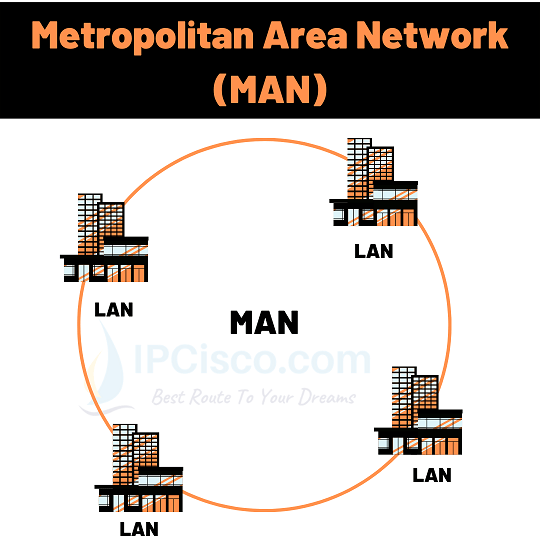
MAN (Metropolitan Area Network) connects multiple networks across a city or metropolitan area
In MANs, mainly fiber optic cables are used. This is because the covered distance. Fiber optic provides good performance for these types of networks. Wireless technology can be also sued for MANs.
MANs are costly networks and it need experienced network engineers for MAN administration.
WAN (Wide Area Network) is the largest network type used in computer networks. It covers large geographical areas. WANs can also connect other small and medium networks like LANs and MANs.
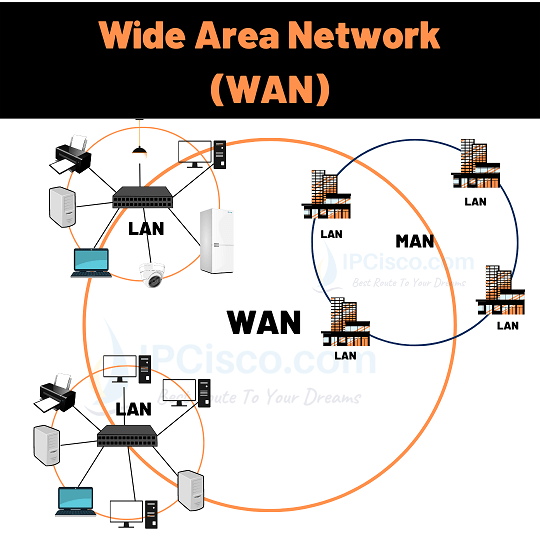
WAN (Wide Area Network) connects networks across large geographical areas
Building a WAN is very costly. It is also hard to manage a Wide Area Network. It needs expert network engineers for building, maintenance and troubleshooting.
WANs are slower than MANs and LANs. Because it covers a very large geographical area.
Beside the above basic types of networks, there are also other networks used in computer networking. These networks types are given below:
Now, let’s explain these different network types.
WLANs are the wireless LANs, which covers a small area to provide a wireless connection to laptops, smartphones or any network devices. It is used by wireless capable devices and provide a small network in a limited area.
Wireless networks in your homes, in your company or in Starbucks are all WLAN examples.
SAN (Storage Area Network) is a specialized network used to provide high-speed access to shared storage resources. It is mainly used with disk arrays, storage systems, tape libraries and servers. SANs are commonly found in data centers and enterprise networks where large amounts of data need to be stored and accessed efficiently. Technologies such as Fibre Channel and iSCSI can be used in SAN environments.
CAN (Campus Area Network) connects multiple networks within a limited geographical area such as a university campus, company campus, hospital complex or industrial site. It is mainly used to connect different buildings, departments and LANs within the same organization. A CAN is generally larger than a LAN but smaller than a MAN. High-speed fiber links are commonly used between buildings.
VPN (Virtual Private Network) is the private network which uses public internet to connect remote locations. This is mainly used by company networks or as private usage at homes.
VPN (Virtual Private Network) creates a secure connection over a public network such as the Internet. It is commonly used by companies to connect remote offices, employees and corporate networks securely. VPNs are also widely used by home users to protect their Internet traffic and improve privacy. Technologies such as IPsec and SSL/TLS-based VPNs can provide encrypted communication between VPN endpoints.
VLANs are the virtual LANs used in network switching. With this network type, a switched network can be divided into different broadcast domains. By doing this, it provides security, scalability, efficiency in a switched network.
In this lesson, we have learned different types of networks used in computer networking. You will work each of these networks during your career. By working on these networks practically, you will be more familiar to these network types.
BAN (Body Area Network) is a network of small devices located on or around human body. This can be sometimes inside the body. It is mainly used for short-range communication between wearable devices, sensors, smartwatches and other personal devices. A BAN usually covers a smaller area than a PAN and can use wireless technologies such as Bluetooth.
PAN (Personal Area Network) connects personal devices within a short range around a user, such as smartphones, laptops, wireless earbuds and smartwatches. BAN (Body Area Network) is more specialized and connects wearable or sensor devices located on, around or sometimes inside the human body. BAN typically operates over a smaller area and is commonly used for wearable and body-sensor communication.
| Feature | PAN | BAN |
|---|---|---|
| Coverage | Around a person | On, around, or near the human body |
| Typical Range | A few meters | Very short range |
| Common Devices | Smartphones, laptops, earbuds, smartwatches | Smartwatches, fitness trackers, wearable and body sensors |
| Technologies | Bluetooth, USB, Wi-Fi | Bluetooth, BLE, wearable sensor technologies |
| Main Use | Personal device connectivity | Wearable and body-sensor connectivity |
| Example | Smartphone connected to wireless earbuds | Wearable sensor communicating with a smartphone |
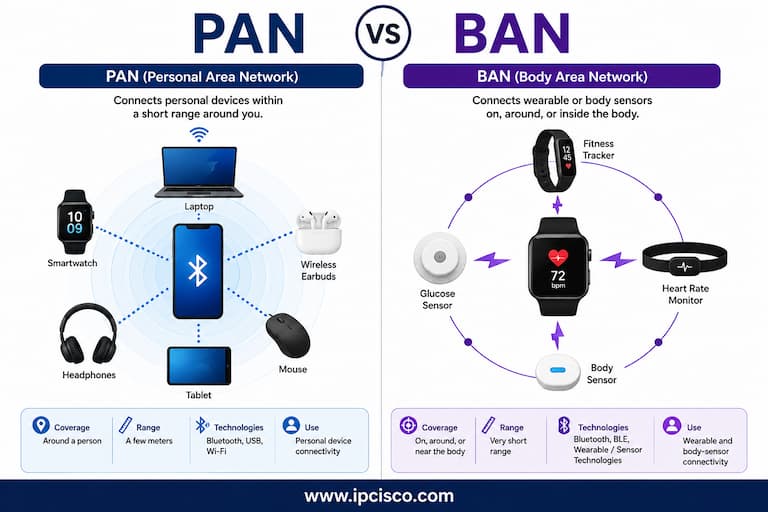
PAN vs BAN – Personal and Body Area Networks compared
PAN (Personal Area Network) and LAN (Local Area Network) are both used to connect devices within relatively small areas, but their coverage and purpose are different. PAN mainly connects personal devices around a user, while LAN connects multiple devices within a home, office or building.
| Feature | PAN | LAN |
|---|---|---|
| Coverage | Around a person | Home, office, or building |
| Typical Range | A few meters | Up to a building or local site |
| Common Devices | Smartphone, smartwatch, earbuds | PCs, switches, printers, servers |
| Technologies | Bluetooth, USB, Wi-Fi | Ethernet, Wi-Fi |
| Example | Phone connected to wireless earbuds | Office network |
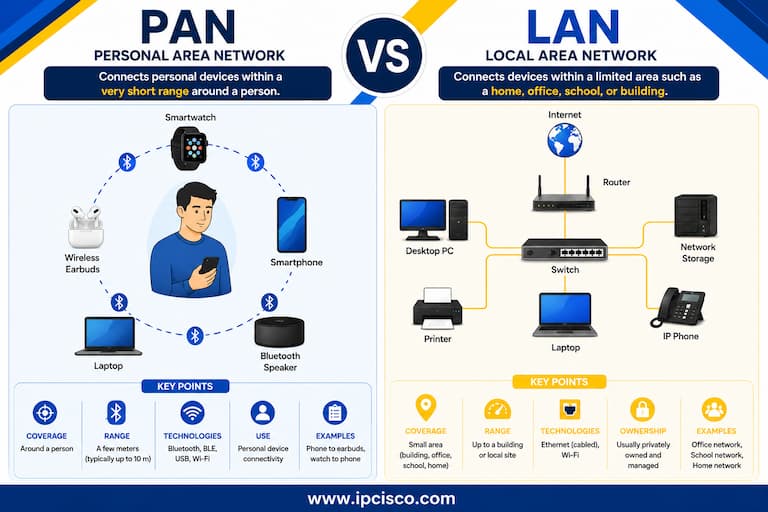
PAN vs LAN – Personal and Local Area Networks compared
LAN (Local Area Network) connects devices within a small area such company networks. MAN (Metropolitan Area Network) covers a larger area and typically connects multiple LANs across a city or metropolitan region. A MAN can be used by organizations, universities, service providers or local authorities to connect geographically separated locations within the same city.
| Feature | LAN | MAN |
|---|---|---|
| Coverage | Small geographical area | City or metropolitan area |
| Typical Area | Home, office, school, or building | Multiple locations across a city |
| Connects | Devices within a local network | Multiple LANs |
| Ownership | Usually privately managed | Organization, service provider, or local authority |
| Example | Office network | Company buildings connected across a city |
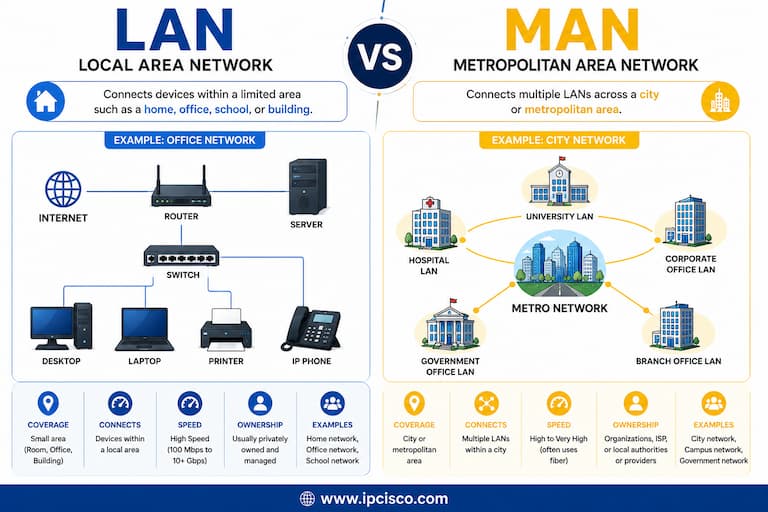
LAN vs MAN – Local and Metropolitan Area Networks compared
LAN (Local Area Network) connects devices within a limited geographical area such as a home, office or building. WAN (Wide Area Network) connects networks across much larger geographical areas such as cities, countries and continents.
| Feature | LAN | WAN |
|---|---|---|
| Coverage | Small geographical area | Large geographical area |
| Typical Area | Home, office, school, building | Cities, countries, continents |
| Ownership | Usually privately managed | May use ISP or carrier infrastructure |
| Typical Speed | Generally high | Depends on WAN technology and service |
| Example | Office network | Corporate WAN connecting branch offices |
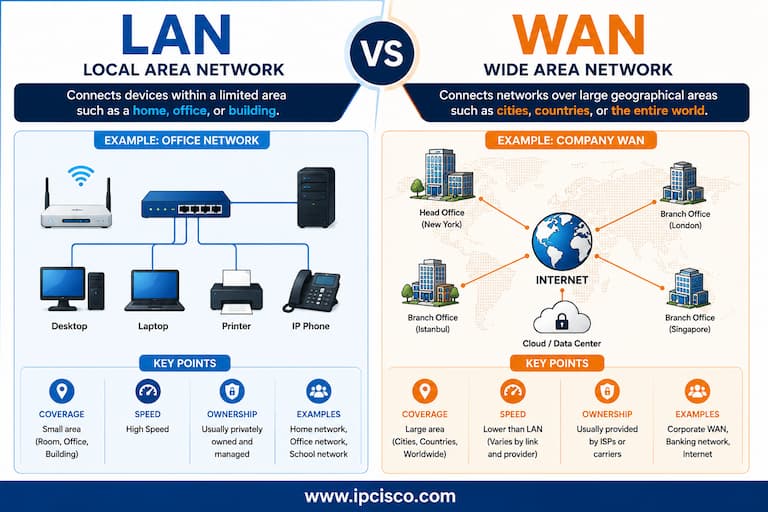
LAN vs WAN – Local and Wide Area Networks compared
MAN (Metropolitan Area Network) connects networks across a city or metropolitan area, while WAN (Wide Area Network) covers much larger geographical areas like cities, countries or continents.
| Feature | MAN | WAN |
|---|---|---|
| Coverage | City or metropolitan area | Large geographical area |
| Typical Area | Across a city | Across cities, countries, or continents |
| Connects | Multiple LANs within a metropolitan area | Networks across distant locations |
| Typical Use | Campus groups, city networks, metro services | Enterprise branches and global networks |
| Example | City-wide organizational network | International corporate network |
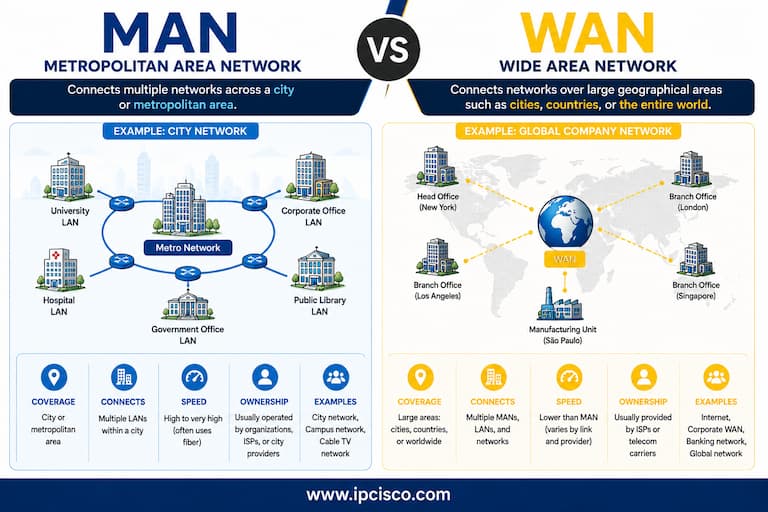
MAN vs WAN – Metropolitan and Wide Area Networks compared
Below, you can find our Network Types Cheat Sheet, which summarizes the main types of computer networks, including PAN, LAN, MAN, WAN, WLAN, CAN, SAN, VLAN and VPN. You can download the high-resolution PNG and PDF versions from our Cheat Sheets page.
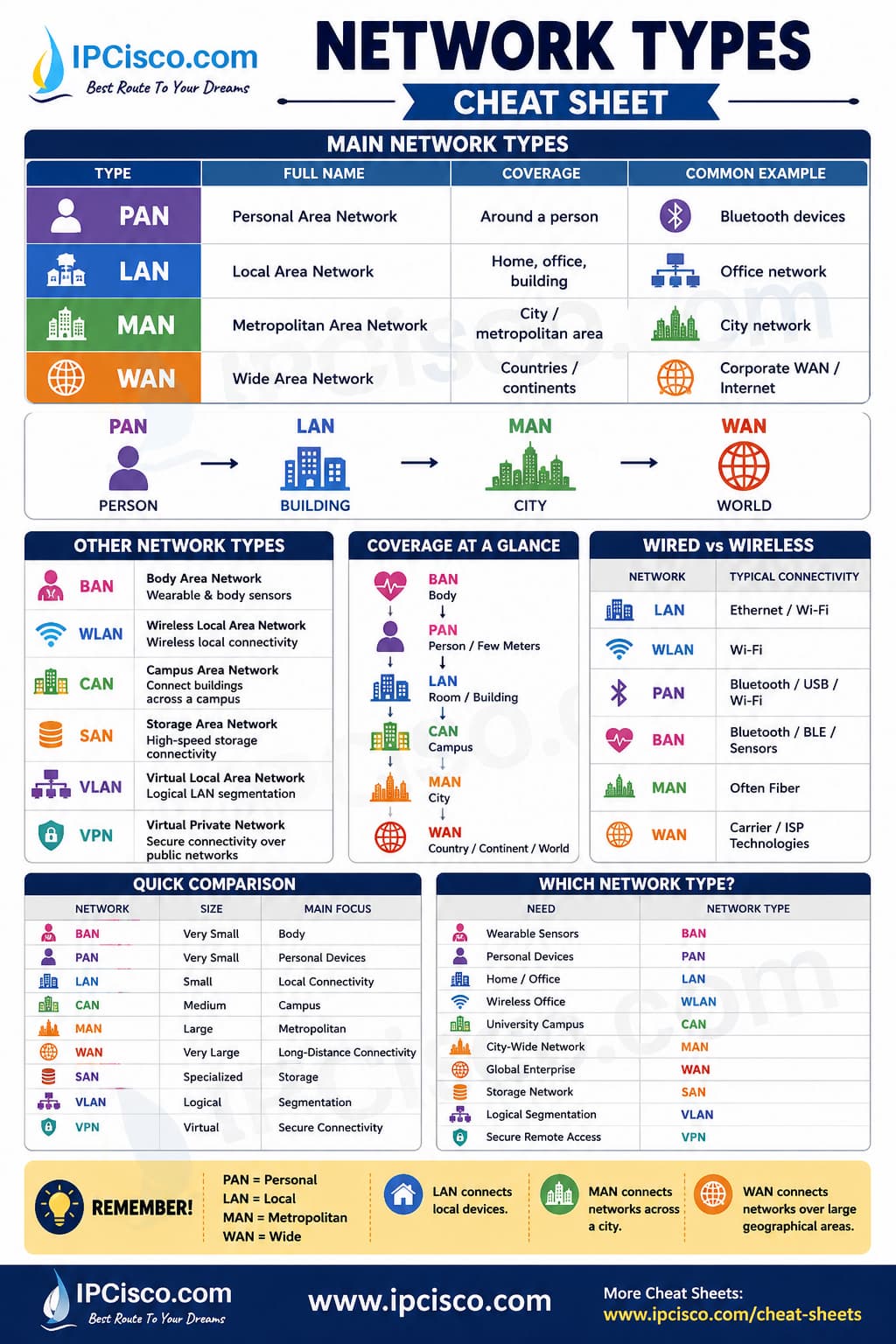
Network Types Cheat Sheet – Quick comparison of common computer network types
The four main types of networks are PAN (Personal Area Network), LAN (Local Area Network), MAN (Metropolitan Area Network) and WAN (Wide Area Network). They are classified from a small personal environment to networks spanning countries and continents.
Common types of computer networks include PAN, LAN, MAN, WAN, WLAN, CAN, SAN, VLAN and VPN. Each network type is designed for different environments, geographical sizes and networking requirements.
The main difference is their geographical coverage. PAN (Personal Area Network) covers a very small personal are. LAN (Local Area Network) typically connects devices within a home, office, or building. MAN (Metropolitan Area Network) can span a city or metropolitan area,. WAN (Wide Area Network) connects networks across much larger geographical areas.
A LAN (Local Area Network) is commonly used in offices to connect computers, printers, servers, access points and other network devices within a limited geographical area. Wireless office networks are generally referred to as WLANs.
A WAN (Wide Area Network) covers the largest geographical area among PAN, LAN, MAN and WAN. WANs can connect networks across cities, countries and continents. The Internet is the best-known example of a global interconnected network.
A LAN is a local network within a limited area and can use wired Ethernet connections, while a WLAN (Wireless Local Area Network) provides local network connectivity using wireless technologies such as Wi-Fi.

Gokhan Kosem is a Network Engineer, Instructor and the Founder of IPCisco.com with 15+ years of experience in Cisco, Nokia, Huawei, Juniper, Linux, Service Provider Networks, Routing and Switching technologies.
He has worked on the backbone networks of major service providers and network vendors including Nortel, Alcatel-Lucent (Nokia) and has extensive hands-on experience with Cisco, Huawei, Juniper and Nokia networking technologies.
He has trained thousands of networking students worldwide through IPCisco.com, Udemy, books, labs, quizzes, and educational content across multiple social media platforms.
IPCisco.com | Best Route to Your Dreams







I want certifited
Great….
Thank you Bramhanand :) Good luck!
Need more .
Well put together
Thank you Abdulraheem:) Good luck!
Great
Thank you Michael:) Good luck!