- COURSES
- SPECIALS
- BLOG
- MEMBERS
- SHOP
- BOOKSHELF
- ABOUT
- ENROLL HERE

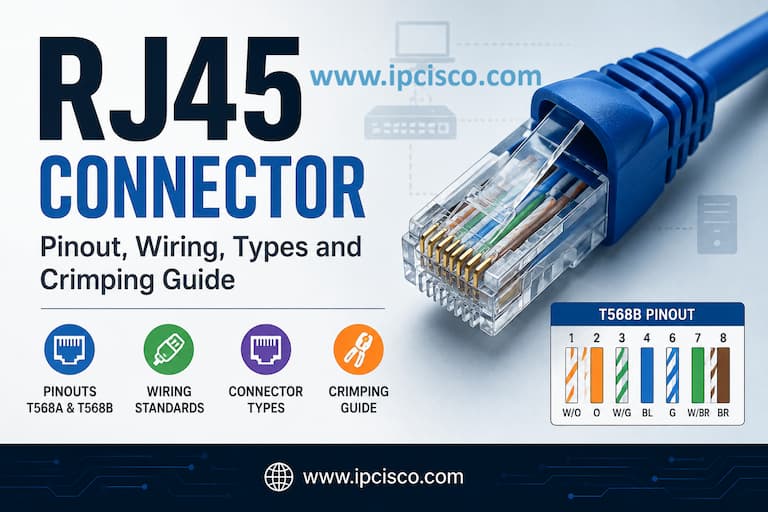
RJ45 connectors are the most commonly used connectors in computer networking. They are widely used to connect computers, switches, routers, access points and other network devices through twisted-pair Ethernet cables. In this lesson, you will learn what is an RJ45 connector, RJ45 pinouts, T568A and T568B wiring standards, straight-through and crossover cables, RJ45 connector types, compatible Ethernet cable categories and how to choose, crimp and troubleshoot an RJ45 connection.
Table of Contents
RJ45 is one of the most commonly used network connectors in Ethernet networks. It is the modular connector found on twisted-pair Ethernet connections. The Ethernet connector commonly called RJ45 has eight positions and eight contacts (8P8C), allowing the eight conductors of a four-pair Ethernet cable to be terminated.
RJ45-style connectors are widely used with Ethernet cables such as Cat5e, Cat6 and Cat6a to connect network devices including computers, switches, routers, access points and IP phones.
RJ45 connectors and Ethernet cabling are associated with the Physical Layer (Layer 1) of the OSI Model, where the physical transmission of data between network devices takes place.
More Networking Fundamentals & Complete CCNA Course!
RJ45 stands for Registered Jack 45. However, there is an important technical distinction: the modular connector commonly called RJ45 in Ethernet networking is an 8P8C (8 Position, 8 Contact) connector.
In everyday networking terminology, the term RJ45 has become the standard name used for this Ethernet connector, even though the original RJ45 registered-jack specification is not identical to the Ethernet 8P8C wiring arrangement.
An RJ45 connector is a small rectangular modular connector with eight electrical contacts. The plug typically has a plastic locking tab that holds it securely inside an Ethernet port.
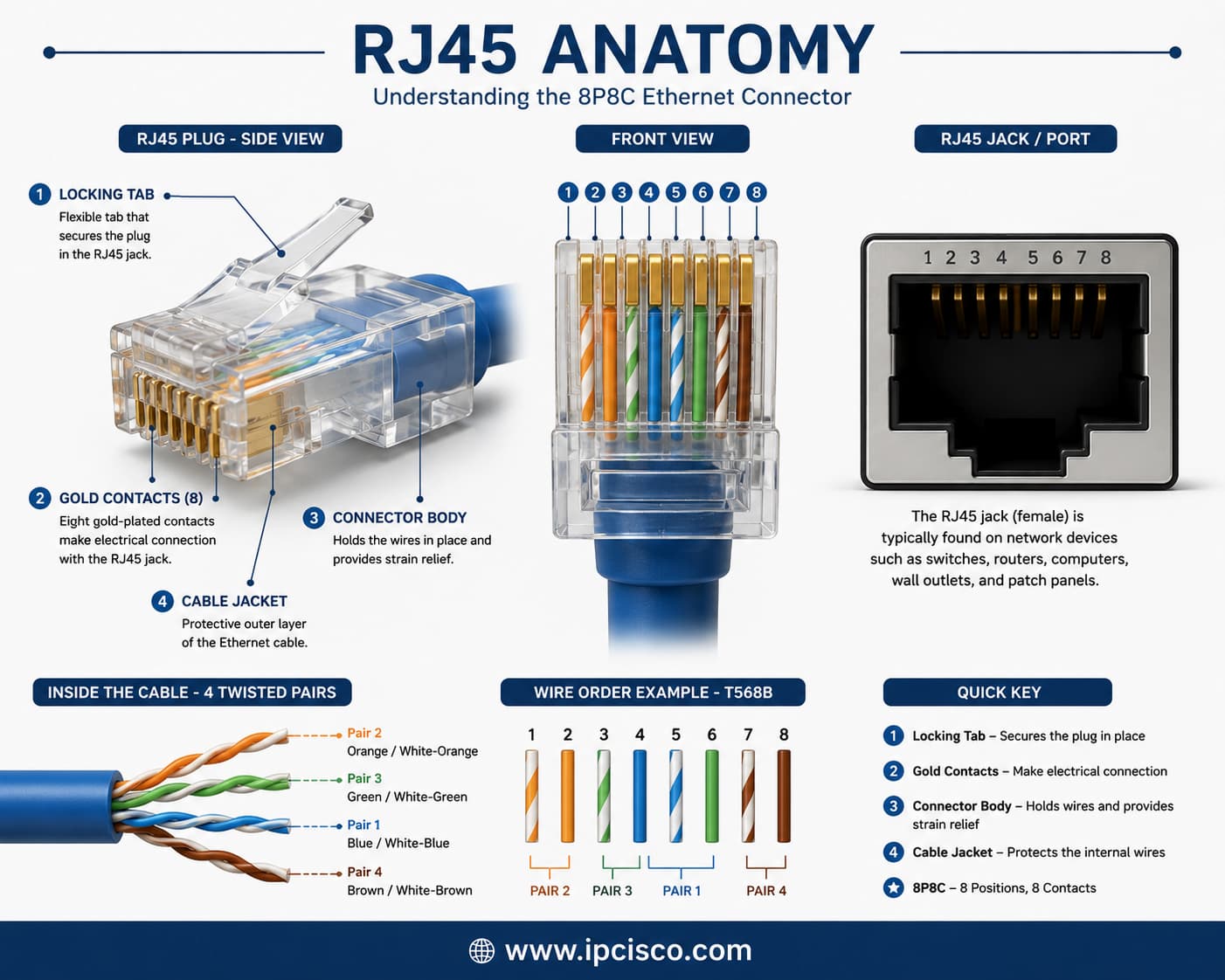
RJ45 Connector Anatomy
Inside a transparent RJ45 plug, the eight individual conductors can usually be seen arranged side by side according to the T568A or T568B wiring standard. RJ45 jacks are commonly found on computers, network switches, routers, wall outlets and patch panels.
The RJ45 pinout defines the position of each of the eight wires inside an Ethernet connector. Correct pin placement is essential because an incorrectly terminated cable can cause connectivity problems, reduced Ethernet speeds or complete link failure.
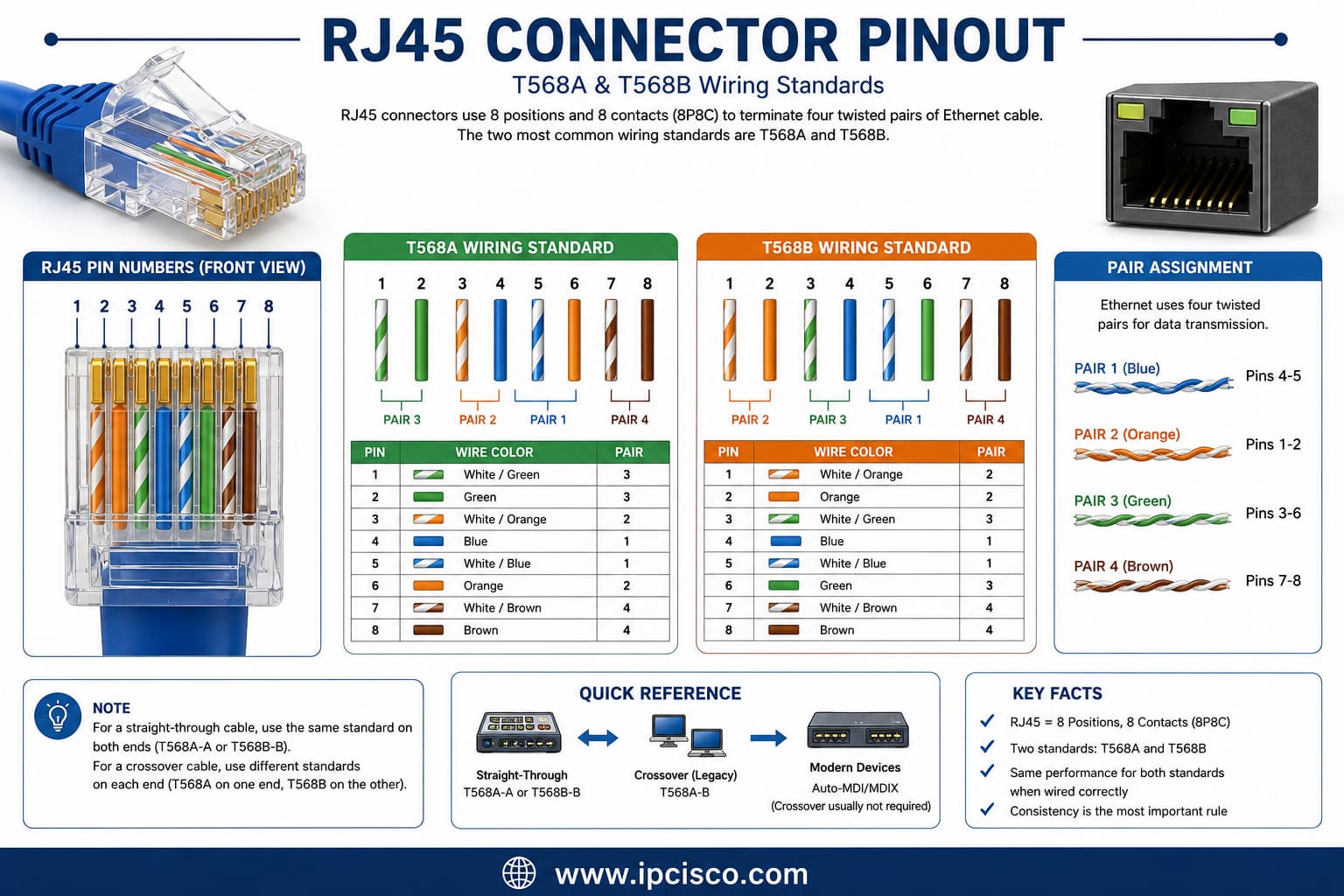
RJ45 Connector Pinout
Ethernet cabling primarily uses two standardized wiring schemes: T568A and T568B. Both use the same four twisted pairs but arrange the green and orange pairs differently.
| Pin | T568A | T568B |
| 1 | White/Green | White/Orange |
| 2 | Green | Orange |
| 3 | White/Orange | White/Green |
| 4 | Blue | Blue |
| 5 | White/Blue | White/Blue |
| 6 | Orange | Green |
| 7 | White/Brown | White/Brown |
| 8 | Brown | Brown |
T568A is one of the two recognized wiring schemes used for terminating twisted-pair Ethernet cables. Its pin order starts with the white/green and green conductors, followed by the orange, blue and brown pairs in their defined positions.
For a straight-through Ethernet cable using T568A, the same T568A wiring arrangement is terminated at both ends of the cable.
T568B uses the same four twisted pairs as T568A but exchanges the positions of the orange and green pairs. It is widely encountered in existing Ethernet installations and commercial networks.
For a T568B straight-through cable, both ends of the Ethernet cable are terminated using the T568B wiring sequence.
The main difference between T568A and T568B is the position of the green and orange wire pairs. Electrically, both standards can support the same Ethernet speeds and performance when installed correctly.
| Feature | T568A | T568B |
| Green Pair | Pins 1 and 2 | Pins 3 and 6 |
| Orange Pair | Pins 3 and 6 | Pins 1 and 2 |
| Ethernet Performance | Same | Same |
| Common Use | Residential and specified installations | Common in existing commercial installations |
| Straight-Through Cable | T568A on both ends | T568B on both ends |
The most important rule is consistency. For a normal straight-through cable, the same wiring standard should be used on both ends. The wiring scheme should also match the cabling standard already used in the building or network infrastructure.
Neither T568A nor T568B is inherently faster or better for Ethernet performance. Both can provide the same network speed, bandwidth and transmission distance when correctly terminated.
The best choice is generally the standard already used in your network. T568A may be specified by particular cabling requirements, while T568B is commonly encountered in many existing installations.
Straight-through and crossover cables differ in how the conductors are terminated at their two ends. Traditionally, the cable type was selected according to the devices being connected. For example, we if connect different devices like switch to router connection, we use straight-through cable and if we connect same type devices like router-to-router connections, we use crossover cables.
| Feature | Straight-Through | Crossover |
| End 1 | T568A or T568B | T568A |
| End 2 | Same as End 1 | T568B |
| Traditional Use | Different device types | Similar device types |
| Example | PC to Switch | Switch to Switch |
| Common Today | Yes | Rarely required due to Auto-MDI/MDIX |
Straight-through cables use the same wiring standard at both ends, while crossover cables use T568A at one end and T568B at the other.
A straight-through Ethernet cable uses the same pinout at both ends. This can be T568A to T568A or T568B to T568B. This is the most common Ethernet patch cable used in modern networks.
Traditionally, straight-through cables were used to connect different device types, such as a computer to a switch or a router to a switch.
A crossover Ethernet cable uses T568A on one end and T568B on the other. This crosses specific transmit and receive pairs and was traditionally required when directly connecting certain devices of the same type.
Typical historical examples include switch-to-switch and computer-to-computer Ethernet connections.
In most modern Ethernet networks, crossover cables are no longer required because network interfaces commonly support Auto-MDI/MDIX. This feature automatically detects the required transmit and receive configuration.
As a result, standard straight-through Ethernet cables can usually be used even when directly connecting similar modern network devices.
In network cabling, RJ45-style 8P8C connectors are primarily associated with twisted-pair copper Ethernet cabling. However, the connector must be compatible with the cable category, conductor type, shielding and cable dimensions.
Cat5e, Cat6 and Cat6a commonly use 8P8C modular connectors, while connector requirements become more specific with higher-performance and shielded cabling.
| Cable | RJ45 / 8P8C | Typical Ethernet Speed | Typical Maximum Distance |
| Cat5e | Yes | 1 Gbps | 100 m |
| Cat6 | Yes | 1 Gbps / 10 Gbps | 100 m / 10G up to about 55 m |
| Cat6A | Yes | 10 Gbps | 100 m |
| Cat7 | Not always | 10 Gbps | 100 m |
| Cat8 | Yes for Cat 8.1 | 25 / 40 Gbps | 30 m |
You can learn more about Cat5e, Cat6, Cat6a, Cat7 and Cat8 in our Network Cabling lesson.
RJ45 connectors look similar, but they are not all identical. Different connector designs are available depending on cable shielding, conductor construction, cable category and installation method.
Selecting the correct RJ45 connector is important for maintaining a reliable physical connection and achieving the expected Ethernet performance. Here are the types of RJ45 connectors.
Shielded RJ45 connectors include metallic shielding designed to maintain the shielding continuity of shielded twisted-pair cables. They are commonly used in environments where electromagnetic interference (EMI) is a concern.
For effective shielding, the connector, cable and grounding strategy should all be compatible.
Unshielded RJ45 connectors are commonly used with UTP Ethernet cables in homes, offices and general LAN installations. They are inexpensive, lightweight and easy to terminate.
UTP connectors are suitable for environments where significant electromagnetic interference is not expected.
Pass-through RJ45 connectors allow the individual wires to extend through the front of the connector before crimping. This makes it easier to verify the wire order and maintain the conductors in the correct sequence.
A compatible pass-through crimping tool trims the excess conductors during termination.
Standard RJ45 plugs require the conductors to be cut to the correct length before they are inserted into the connector. The wires remain completely inside the plug during the crimping process.
They remain widely used for Ethernet patch cables and field terminations.
Ethernet cables can use solid or stranded conductorsnand RJ45 plugs should be selected accordingly. Solid conductors are commonly used for permanent structured cabling, while stranded conductors are frequently used in flexible patch cables.
The contact design of the plug may differ between solid and stranded cable types, so using a connector specifically rated for the conductor type helps ensure a reliable termination.
Crimping an RJ45 connector means terminating the individual conductors of a twisted-pair Ethernet cable inside an RJ45 plug. Correct wire order and proper termination are essential for reliable Ethernet communication.
The basic process is to strip the outer cable jacket, arrange the conductors according to T568A or T568B, trim them evenly, insert them fully into the connector and use an RJ45 crimping tool to secure the contacts. And lastly, test the connection.
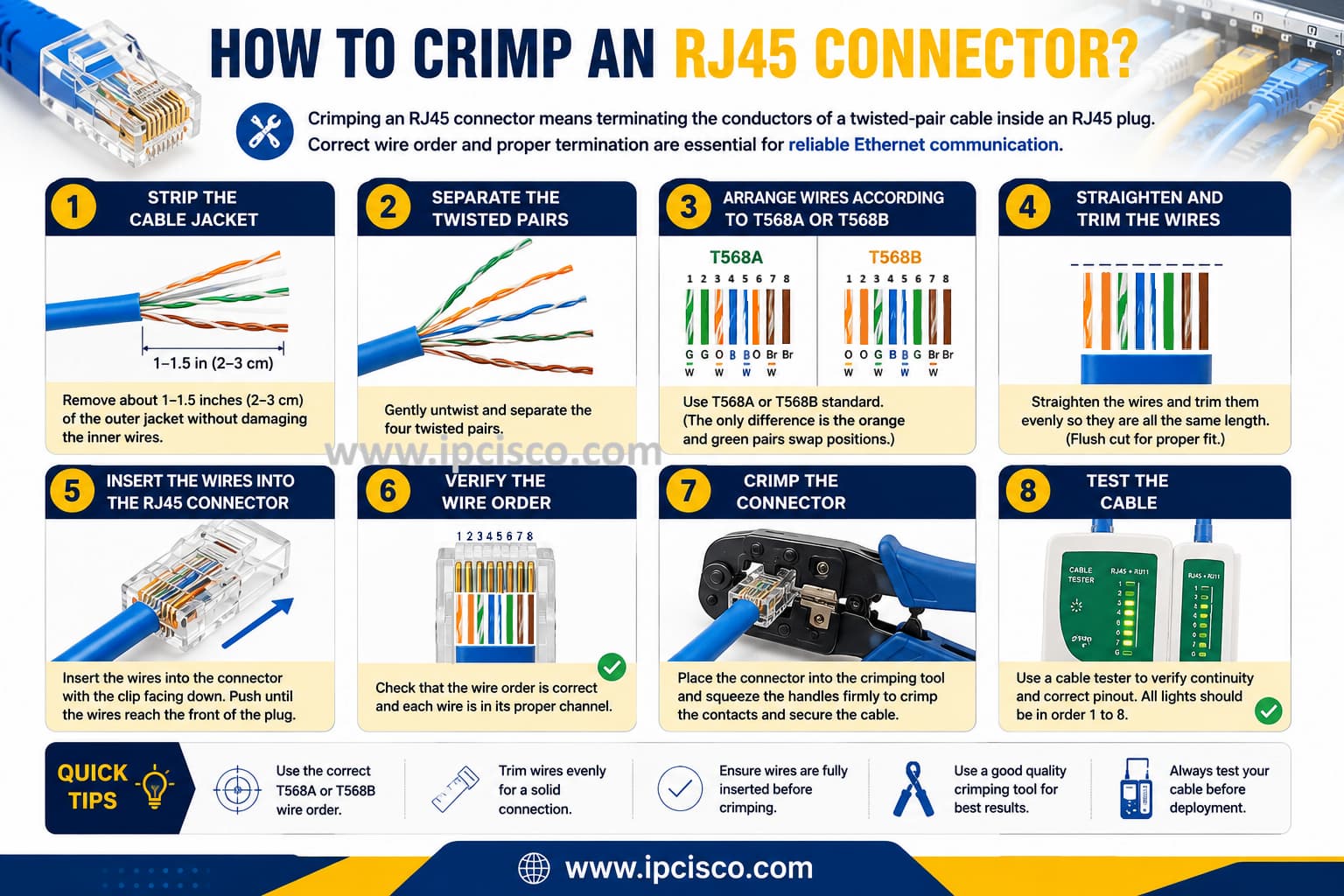
How to Crimp an RJ45 Connector
After terminating an RJ45 connector, the Ethernet cable should be tested before deployment. But how to test an RJ45 Ethernet Cable? Here, we can do this job by using a basic cable tester. A cable tester can verify whether all eight conductors are connected to the correct pins at both ends.
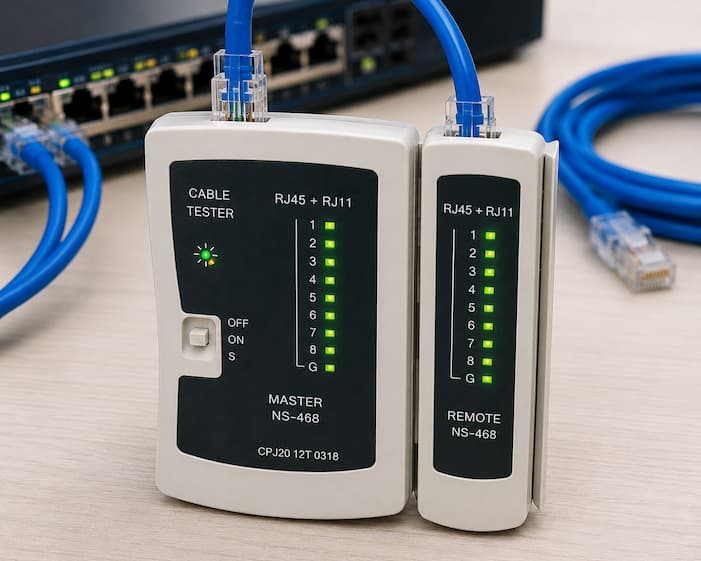
Testing an RJ45 Ethernet Cable
Testing can help identify common cabling faults such as opens, shorts, reversals and miswires. More advanced certification testers can also measure performance characteristics required for a particular cable category.
RJ45 and Ethernet are often confused, but they are not the same thing. Ethernet is a family of networking standards, while RJ45 is the common name used for the 8P8C modular connector frequently used with twisted-pair copper Ethernet.
Ethernet can operate over different physical media, including copper and fiber optic cables. Therefore, not every Ethernet connection uses an RJ45 connector.
RJ45 and SFP are commonly used for network connections, but they serve different purposes. RJ45 connectors are mainly used with twisted-pair copper Ethernet cables, while SFP (Small Form-factor Pluggable) modules provide modular network interfaces that can support fiber optic or copper connections depending on the transceiver type.
RJ45 connections are widely used for LAN access connections, while SFP ports are commonly found on network switches and routers for uplinks, fiber connections and longer-distance network links. You can learn more about SFP types, speeds, connectors and applications in our SFP guide.
| Feature | RJ45 | SFP |
| Interface Type | Fixed copper connector | Modular transceiver interface |
| Common Media | Twisted-pair copper | Fiber or copper |
| Common Use | LAN access connections | Uplinks and flexible network connections |
| Long Distance | Limited | Yes, with suitable fiber transceivers |
| Replaceable Module | No | Yes |
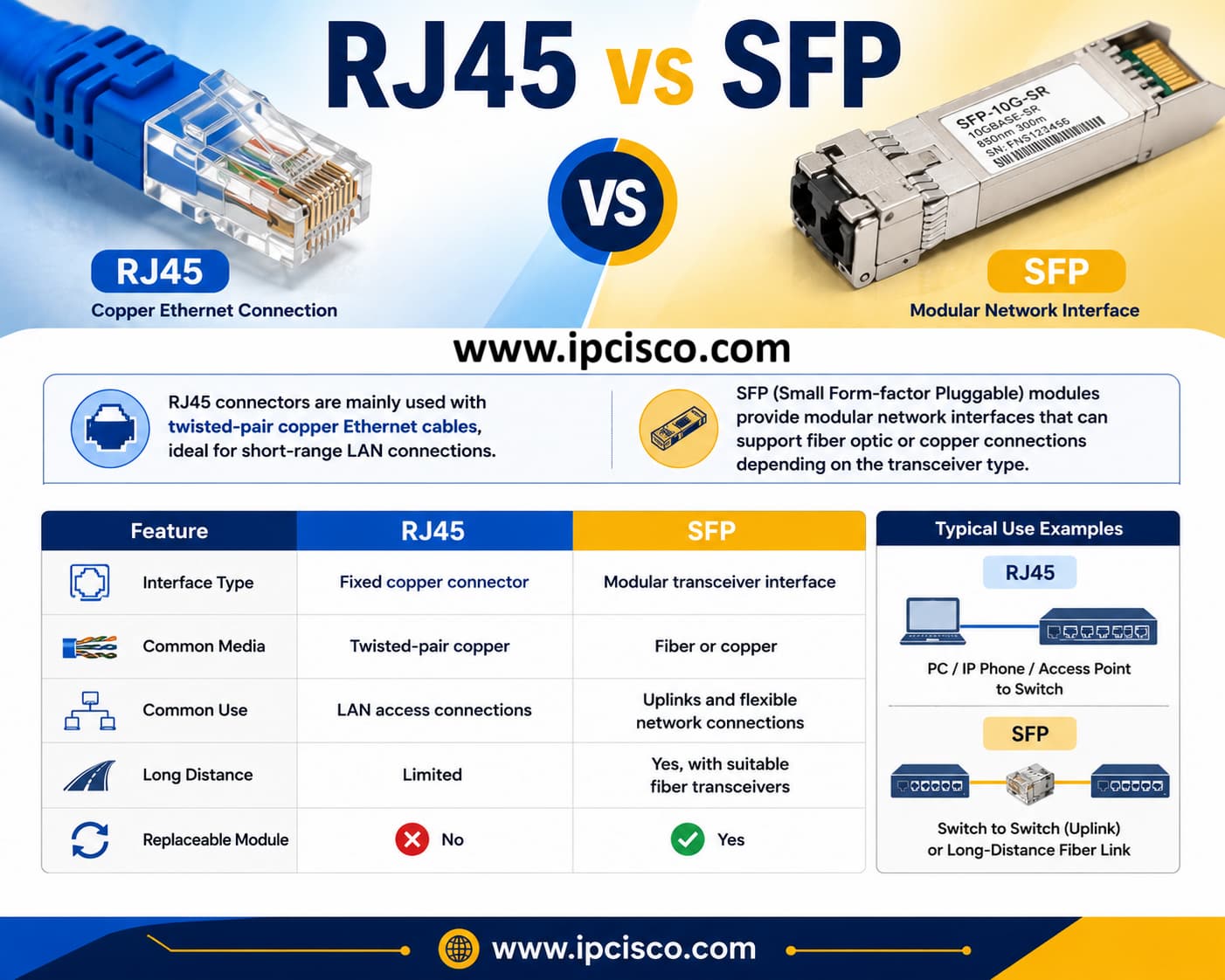
RJ45 vs SFP Comparison
RJ45 and RJ11 are modular connector terms commonly associated with networking and telecommunications, but they differ in size, contact arrangements and typical applications. RJ45-style 8P8C connectors are commonly used for Ethernet, while smaller RJ11-family connections are traditionally associated with telephone services.
An Ethernet RJ45-style plug is wider and has eight contact positions, making it easy to distinguish from common telephone plugs.
| Feature | RJ45-style Ethernet | RJ11-family |
| Typical Use | Ethernet Networking | Telephone |
| Common Arrangement | 8P8C | 6P2C / 6P4C |
| Size | Wider | Narrower |
| Typical Cable | Cat5e, Cat6, Cat6A | Telephone Cable |
| Common Application | LAN, Router, Switch, PC | Telephone, DSL |
RJ45-style connectors became extremely popular because they provide a practical, inexpensive and standardized way to connect copper Ethernet devices. However, their performance and reliability depend heavily on the cable category, termination quality and installation environment. Here are the advantages and disadvantages of RJ45.
Advantages
Disadvantages
For longer distances and high-bandwidth backbone connections, fiber optic cable types are commonly preferred instead of copper Ethernet cabling.
There are various RJ45 problems. Here, we will talk about some of these problems. RJ45 connection problems are often caused by physical damage, incorrect termination or cabling issues rather than the Ethernet protocol itself. Inspecting the connector and testing the cable are usually the first troubleshooting steps.
Here are the most common RJ45 and Ethernet cabling problems.
A damaged locking tab can prevent the RJ45 plug from remaining securely seated in the Ethernet port. The connection may become intermittent if the cable moves.
What is the solution of a broken RJ45 clip? Replacing or reterminating the connector is generally the most reliable solution.
Incorrect T568A or T568B wire placement can cause the cable to fail or operate incorrectly. To prevent from such a RJ45 problem, always verify all eight conductor positions before crimping. And use a cable tester which can quickly identify many wiring errors.
A loose connector can cause intermittent connectivity, link drops or unstable Ethernet performance. To prevent this, check whether the plug locks firmly into the port and inspect both the connector and jack for physical damage.
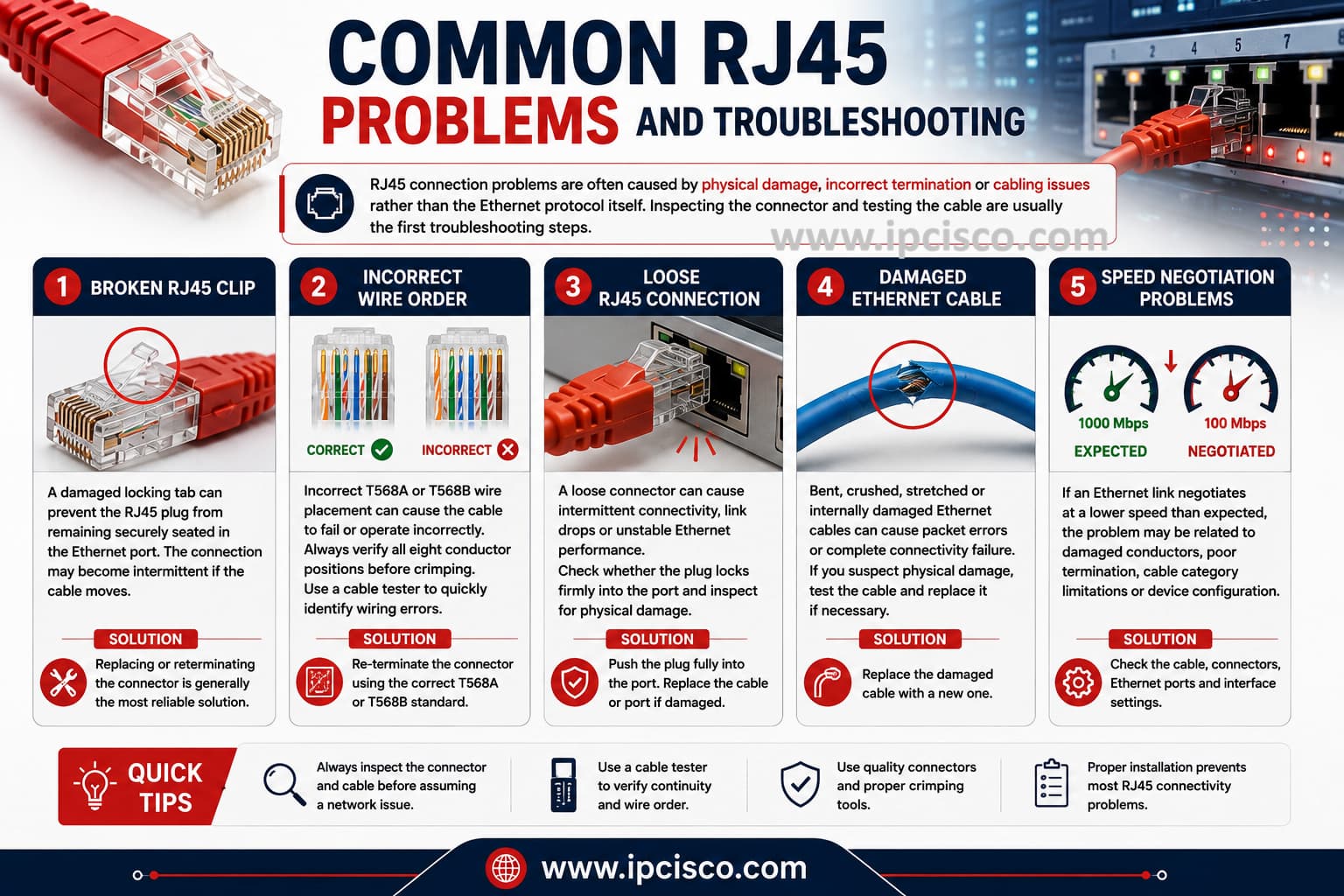
Common RJ45 Problems and Troubleshooting
Bent, crushed, stretched or internally damaged Ethernet cables can cause packet errors or complete connectivity failure. If you suspect from a physical damage, test the cable and replace it if it is necessary.
If an Ethernet link negotiates at a lower speed than expected, the problem may be related to damaged conductors, poor termination, cable category limitations or network device configuration.
Possible solutions can be checking the cable, connectors, Ethernet ports and interface settings when troubleshooting negotiation problems.
Different RJ45 connector types are designed for different Ethernet cabling environments. RJ45 Connector comparison table compares common RJ45 connector options based on shielding, installation method, cable compatibility and typical use.
| RJ45 Type | Best For | Shielding | Key Feature |
| Unshielded RJ45 | Home and Office LANs | No | Simple and affordable |
| Shielded RJ45 | High-EMI Environments | Yes | Maintains cable shielding |
| Pass-Through RJ45 | Easy Manual Termination | Depends on model | Wires pass through the connector |
| Standard RJ45 | General Ethernet Cabling | Depends on model | Traditional crimp termination |
| Solid-Conductor RJ45 | Solid Ethernet Cable | Depends on model | Contacts designed for solid conductors |
| Stranded-Conductor RJ45 | Patch Cables | Depends on model | Contacts designed for stranded conductors |
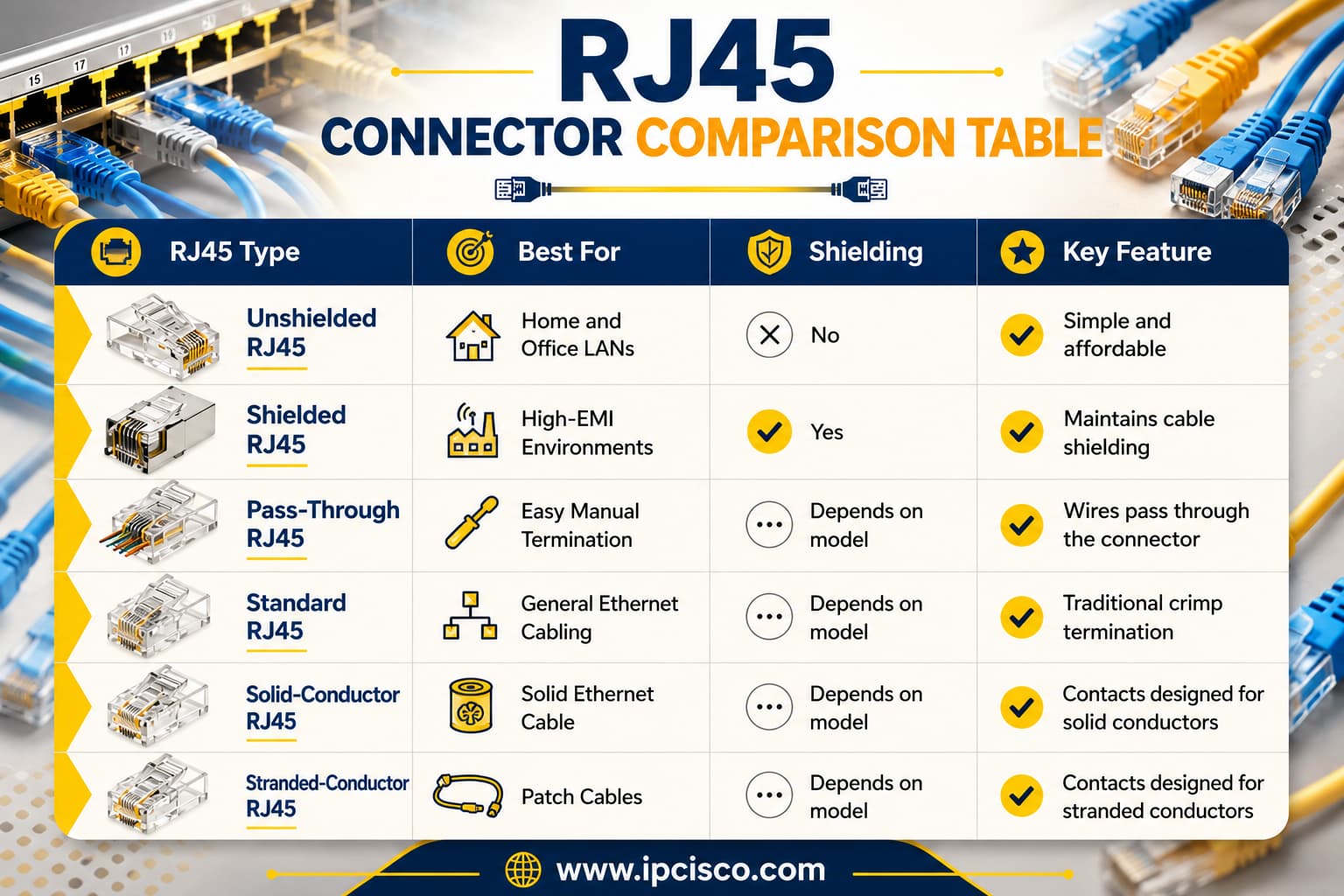
RJ45 Connector Comparison Table
The right RJ45 connector depends on the Ethernet cable category, shielding type, conductor construction and installation environment. A connector should always be rated for the cable you are terminating rather than selected only by its physical appearance.
| If You Need… | Recommended RJ45 Connector | Why? |
| Home or Office UTP Network | Unshielded RJ45 | Affordable and suitable for normal Ethernet environments. |
| High-EMI Environment | Shielded RJ45 | Helps maintain shielding against electromagnetic interference. |
| Easy DIY Termination | Pass-Through RJ45 | Makes wire alignment and verification easier. |
| Cat6 Network | Cat6-Rated RJ45 | Designed for Cat6 cable dimensions and performance. |
| Cat6A Network | Cat6A-Rated RJ45 | Supports higher-frequency Cat6A cabling. |
| Solid Installation Cable | Solid-Conductor RJ45 | Designed for solid copper conductors. |
| Flexible Patch Cable | Stranded-Conductor RJ45 | Designed for flexible stranded conductors. |
| Cat8 25G / 40G Link | Cat8-Rated Shielded 8P8C | Designed for high-frequency Cat8 Ethernet applications. |
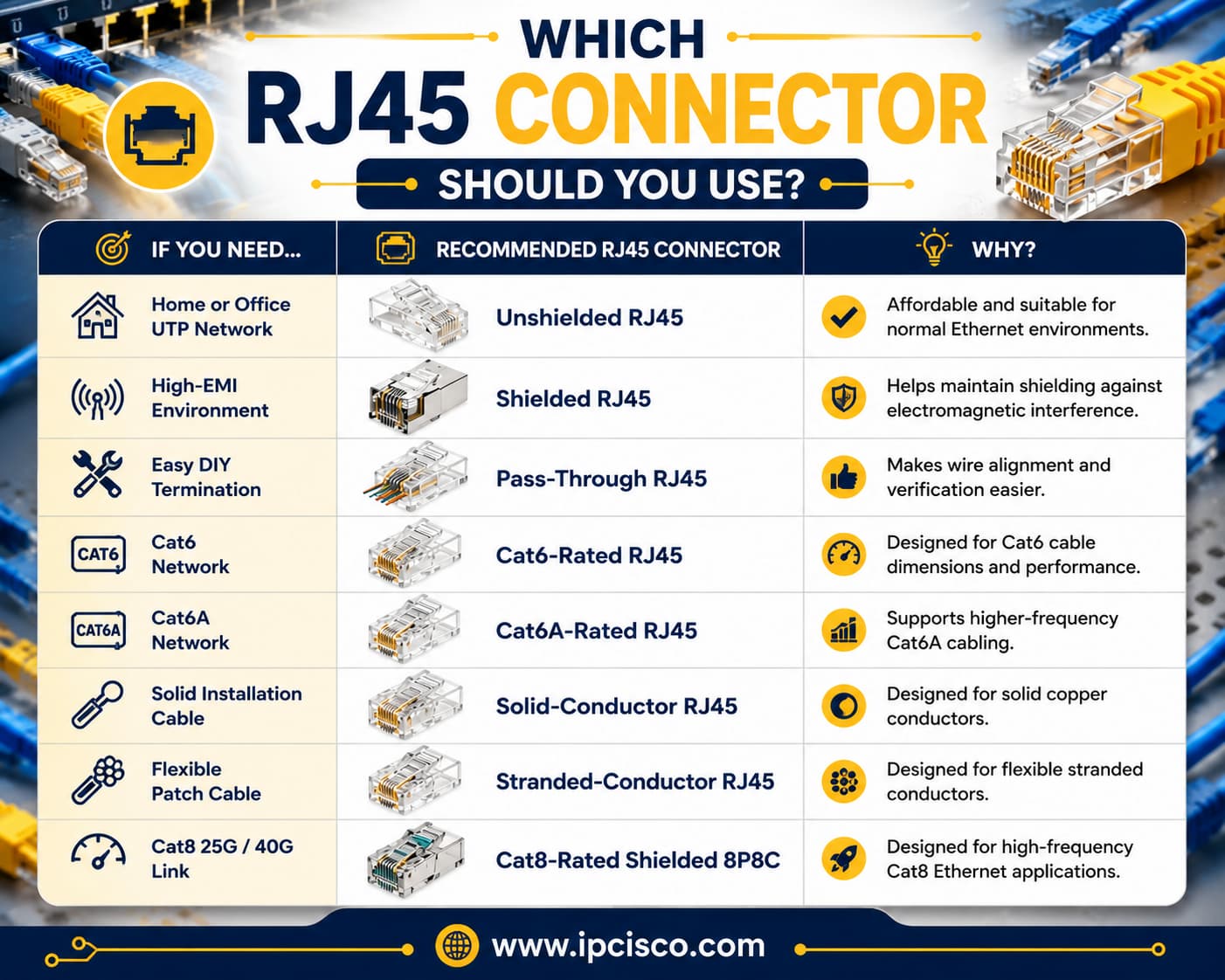
Which RJ45 Connector Should You Use?
For general home and office UTP cabling, an unshielded category-compatible connector is usually sufficient. Shielded installations should use compatible shielded connectors, while pass-through connectors can make manual termination easier.
This RJ45 Connector Cheat Sheet summarizes the most important RJ45 and Ethernet wiring concepts in one quick reference. It covers RJ45 pinouts, T568A and T568B wiring, cable categories, connector types, straight-through and crossover cables, and common troubleshooting points.
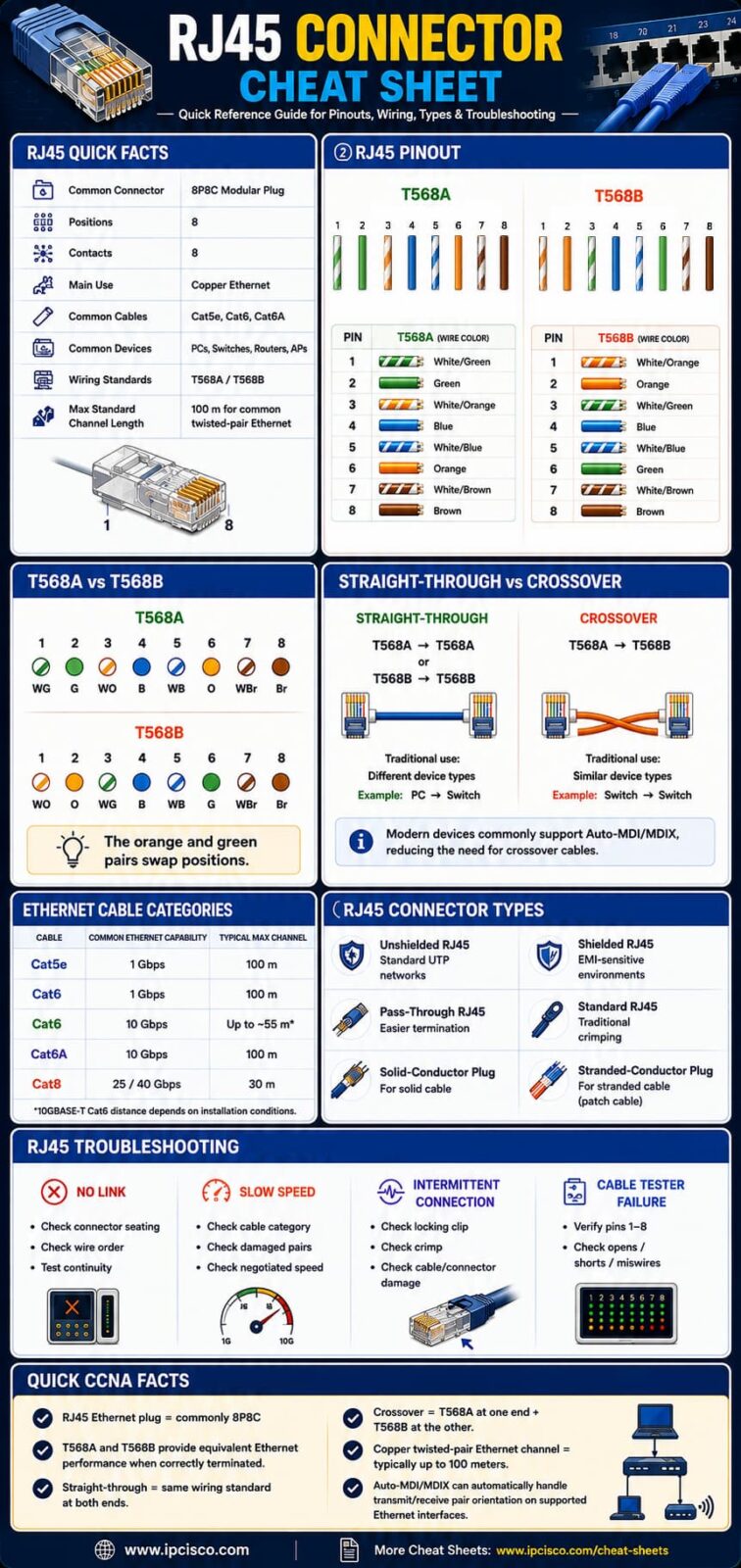
RJ45 Connector Cheat Sheet
Use this cheat sheet as a quick reference when studying Ethernet cabling, preparing for networking certifications or terminating twisted-pair network cables. Do you need a high-resolution version? Download this RJ45 Connector Cheat Sheet from our Cheat Sheets page.
An RJ45 Ethernet plug is commonly connected to an Ethernet port on a switch, router, computer, access point, IP phone, network printer, patch panel or wall jack.
No. RJ45 commonly refers to the connector, while an Ethernet cable is the cable carrying the Ethernet connection. Many copper Ethernet cables use RJ45-style connectors at their ends.
RJ45 Ethernet and Wi-Fi serve different connection methods. Wired Ethernet generally provides more consistent performance, lower latency and less susceptibility to wireless interference, while Wi-Fi provides mobility and easier wireless connectivity.
Yes. The connector should be compatible with the cable category, conductor type, cable diameter and shielding. Using an unsuitable connector can result in poor termination or reduced network performance.
In many 8P8C Ethernet installations, physically compatible lower-category cabling can connect to a higher-category jack. However, the complete link will only perform according to the capabilities of its lowest-rated component.
Cat6 Ethernet installations commonly use the modular 8P8C connector popularly called RJ45. Cat6 describes the cable category, while RJ45 refers to the connector terminology commonly used for the Ethernet interface.
Not necessarily. Cat6 is a practical choice for many home networks because it supports Gigabit Ethernet over standard channel distances and can support 10 Gigabit Ethernet over shorter distances, depending on installation conditions.
No. RJ45-style Ethernet connectivity remains widely used in home, office, enterprise and data center networks. Fiber and wireless technologies are increasingly important, but copper Ethernet continues to be a major networking technology.
Yes. An RJ45 Ethernet connection can connect a device to a router, modem/router or other network equipment that provides Internet access. However, RJ45 itself does not provide Internet service; it is part of the physical network connection.
The main limitations include copper Ethernet distance constraints, susceptibility to electromagnetic interference in some installations, physical connector damage and the need for correct cable termination. Fiber optic connections are generally more suitable for much longer distances.
Yes. Cat5e Ethernet cables commonly use RJ45-style 8P8C connectors. For reliable performance, use a connector designed for the cable’s conductor type and dimensions.
Yes. Cat6 Ethernet cables commonly use RJ45-style 8P8C connectors. However, the connector should be rated and designed for Cat6 cable to maintain the expected performance.
Yes. Cat6a supports RJ45-style 8P8C connectivity, but a Cat6a-compatible connector should be used. Shielded Cat6a installations may also require shielded connectors.
Yes, common Category 8.1 cabling supports shielded 8P8C modular connectivity. Cat8 components should be appropriately rated because Cat8 is designed for significantly higher frequencies and short-distance 25GBASE-T and 40GBASE-T applications.

Gokhan Kosem is a Network Engineer, Instructor and the Founder of IPCisco.com with 15+ years of experience in Cisco, Nokia, Huawei, Juniper, Linux, Service Provider Networks, Routing and Switching technologies.
He has worked on the backbone networks of major service providers and network vendors including Nortel, Alcatel-Lucent (Nokia) and has extensive hands-on experience with Cisco, Huawei, Juniper and Nokia networking technologies.
He has trained thousands of networking students worldwide through IPCisco.com, Udemy, books, labs, quizzes, and educational content across multiple social media platforms.
IPCisco.com | Best Route to Your Dreams