
- COURSES
- SPECIALS
- BLOG
- MEMBERS
- SHOP
- BOOKSHELF
- ABOUT
- ENROLL HERE

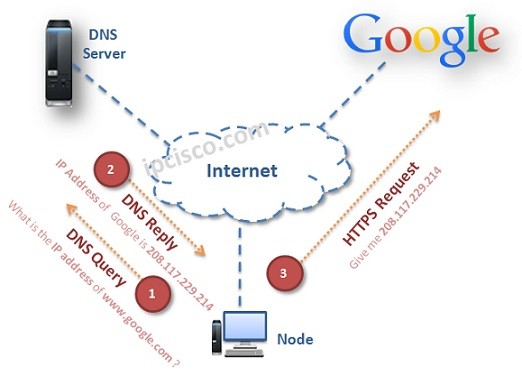
Table of Contents
DNS (Domain Name System) is a common protocol that is used to translate hostnames to the IP addresses. Normally, we use website addresses on our browsers. These website addresses are resolved to IP addresses by DNS. Without Domain Name System, it is difficult to reach this website with its hostname only. In general we can define websites as hosts. Like websites, a single host can also use hostnames for IP resolution. Here, we will also learn what a DNS server is and how it works. We will also talk about DNS Configuration on another lesson. You can also check the wikipedia definition for it, here.
Let’s give an example about Domain Name System. Think about that, if you would like to reach www.google.com, you write this website address to the browser and you can reach Google website. At the backplane, this hostname is resolved to the IP address of Google. You can also reach Google without DNS, by writing only its IP address, 142.250.187.164. But it is difficult to remember an ip address. So, Domain Name System makes life easier with this resolving mechanims.
DNS is a Client / Server Protocol. To use Domain Name System, a DNS Server must be configured firstly. In this DNS Server, IP addresses and related Hostnames must be mapped. After this process whenever a user request a hostname, DNS Server replies with its IP Address. Then time user’s browser can use the IP address of this hostname to access the website. User is unaware of whole this process. He/She only writes the hostname and reached the website.
Download DNS & IP Service Cheat Sheets!
With DNS configuration, the node sends a query that request the IP address of the sent hostname. DNS Server sends a response message that includes the IP address of this hostname. After that, the node reaches to the website.
DNS Messaging
This is done in the same way in the local network. Think about the below topology. Here, firstly DNS Client sends a DNS Request to the DNS Server. DNS Request includes the name of the host. It requests the mapped IP address to this host. DNS Server replies with DNS Reply. This DNS Reply includes the IP address of the host. After receiving the IP address, DNS Client(DNS Client1) can reach to the host (Here DNS Client2).

In real world, there are many DNS Servers. Each DNS Server does not have the complete database of all domain names. Instead, different DNS Servers work together for name resolution.
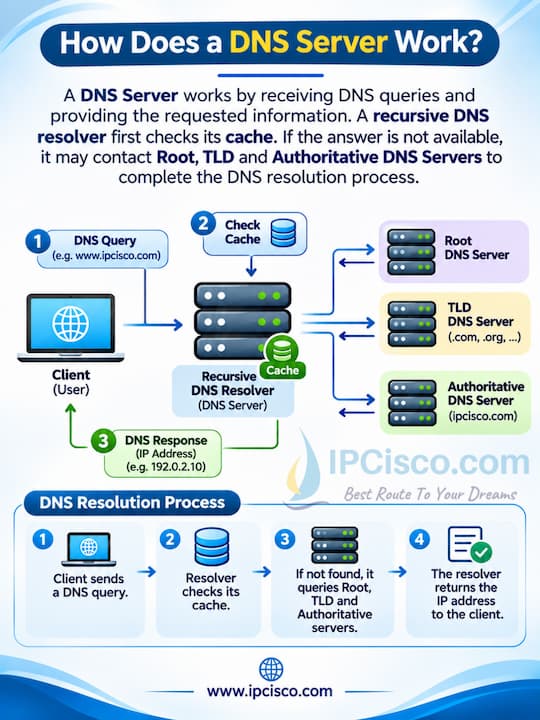
When a DNS Client sends a query, the DNS Resolver first checks its cache. If the requested information is not available, it can contact other DNS Servers, including Root DNS Servers, TLD DNS Servers and Authoritative DNS Servers. After finding the required IP address, the DNS Resolver sends the answer back to the client. This process is called DNS Resolution. With this mechanism, users can access websites by using domain names instead of remembering IP addresses.
How DNS Server Work?

How DNS Works in Real Life?”
A DNS Server (Domain Name System Server) is a server that helps the devices to find the IP addresses of domain names and hostnames. Think about this scenario. We want to reach a website. To do this, we usually use website domain name instead of its IP address. Here, DNS Servers help us to find the correct IP address of the website. Because in ip networking, devices knows their ip addresses instead of domain names. Shortly, DNS Servers make communication easier by allowing us to use domain names instead of remembering IP addresses.
Let’s give an example here. You will visit www.google.com. When you write this address in your browser, your computer needs to learn the IP address of this website. For this purpose, it sends a DNS Query to its configured DNS Resolver. Here, if the requested information is already in the DNS Resolver’s cache, it sends the answer directly. If it is not in its cache, the resolver contacts with the other DNS Servers to find the required information. After finding the IP address, it sends a DNS Response back to your computer.
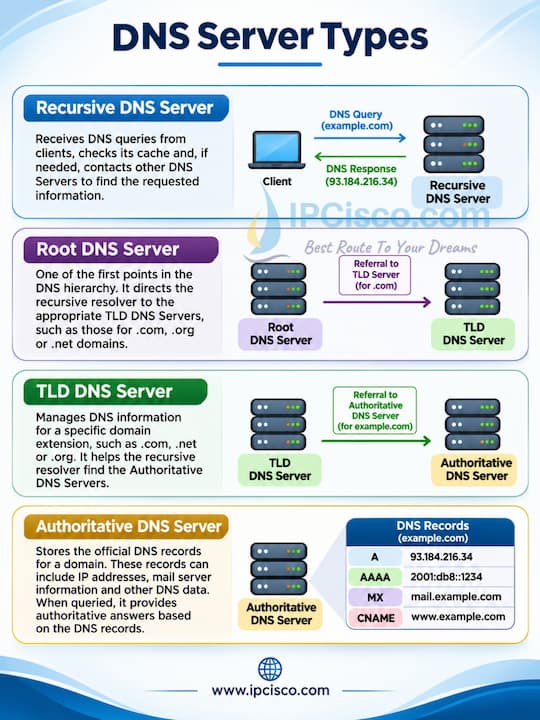
There are four main types of DNS Servers. Each of them has a different role in the DNS resolution process. What are these DNS Server types? These are:
Let’s explain these DNS Server types briefly.
DNS Server Types
A Recursive DNS Server receives DNS queries from clients and finds the requested information on their behalf. It first checks its cache. If the answer is not available in its cache, then it contacts other DNS Servers to resolve the domain name and returns the result to the client.
A Root DNS Server is one of the first points in the DNS hierarchy. When a recursive resolver needs to find a domain name, a Root DNS Server directs it to the appropriate Top-Level Domain (TLD) DNS Servers, such as those responsible for .com, .org or .net domains.
A TLD (Top-Level Domain) DNS Server manages DNS information for a specific domain extension, such as .com, .net or .org. It helps the recursive resolver find the Authoritative DNS Servers responsible for the requested domain name.
An Authoritative DNS Server stores the official DNS records for a domain. These records can include IP addresses, mail server information and other DNS data. When queried, it provides authoritative answers based on the DNS records configured for that domain.
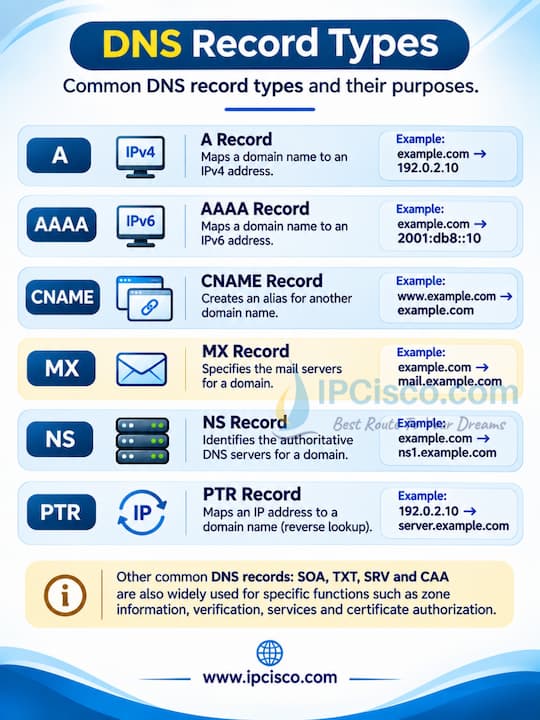
DNS uses different record types to store information about domain names, IP addresses, mail servers and other network services. Each DNS Record Type has a different purpose. Let’s check the most commonly used DNS records with the below table.
| DNS Record | Full Name | Description | Example |
|---|---|---|---|
| A | Address Record | Maps a domain name to an IPv4 address. | example.com → 192.0.2.10 |
| AAAA | IPv6 Address Record | Maps a domain name to an IPv6 address. | example.com → 2001:db8::10 |
| CNAME | Canonical Name | Creates an alias for another domain name. | www.example.com → example.com |
| MX | Mail Exchange | Specifies mail servers for a domain. | example.com → mail.example.com |
| NS | Name Server | Identifies authoritative DNS servers. | example.com → ns1.example.com |
| PTR | Pointer Record | Maps an IP address to a hostname for reverse DNS lookup. | 192.0.2.10 → server.example.com |
| SOA | Start of Authority | Contains administrative information about a DNS zone. | Primary NS, Serial Number |
| TXT | Text Record | Stores text information for verification and email security. | SPF Policy |
| SRV | Service Record | Identifies servers providing specific services. | _sip._tcp.example.com |
| CAA | Certification Authority Authorization | Specifies which certificate authorities may issue certificates. | letsencrypt.org |
DNS Server DNS Records
The A Record and AAAA Record are used for forward DNS resolution.
The PTR Record is commonly used for reverse DNS resolution.
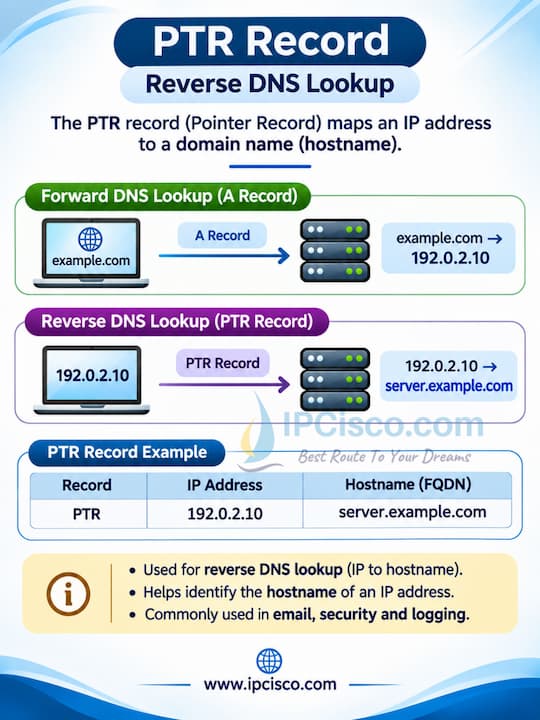
DNS a and ptr Recods
The MX Record is used for email routing.
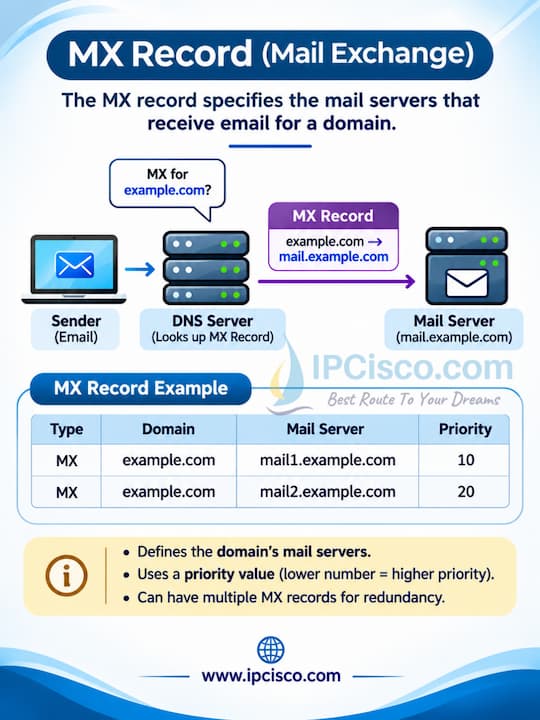
DNS mx Recod
The CNAME Record creates an alias for another domain name.
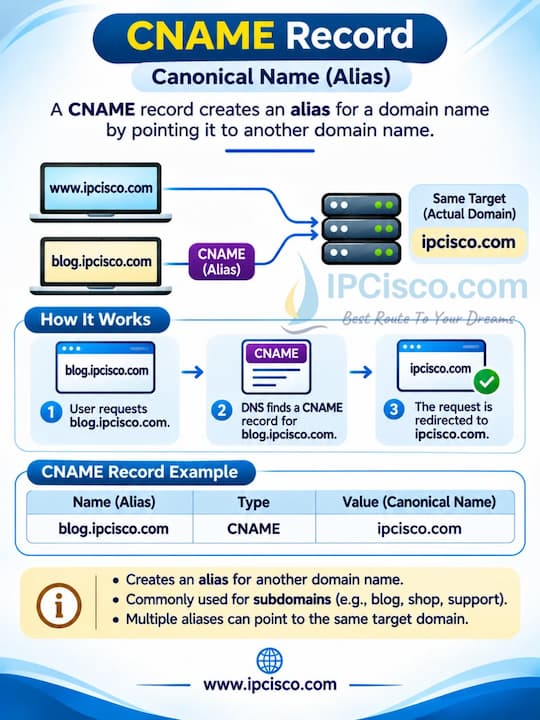
DNS cname Record
DNS stands for Domain Name System. It is a distributed naming system that helps devices find IP addresses and other information associated with their domain names.
A DNS Server works by receiving DNS queries and providing the requested information. A recursive DNS resolver first checks its cache. If the answer is not available, it may contact Root, TLD and Authoritative DNS Servers to complete the DNS resolution process.
The four main types of DNS Servers involved in DNS resolution are Recursive DNS Servers, Root DNS Servers, TLD DNS Servers and Authoritative DNS Servers. Each has a different role in finding DNS information.
DNS uses port 53 for traditional DNS communication. Most standard DNS queries use UDP port 53, while TCP port 53 is also used for DNS operations such as zone transfers and responses that require TCP.
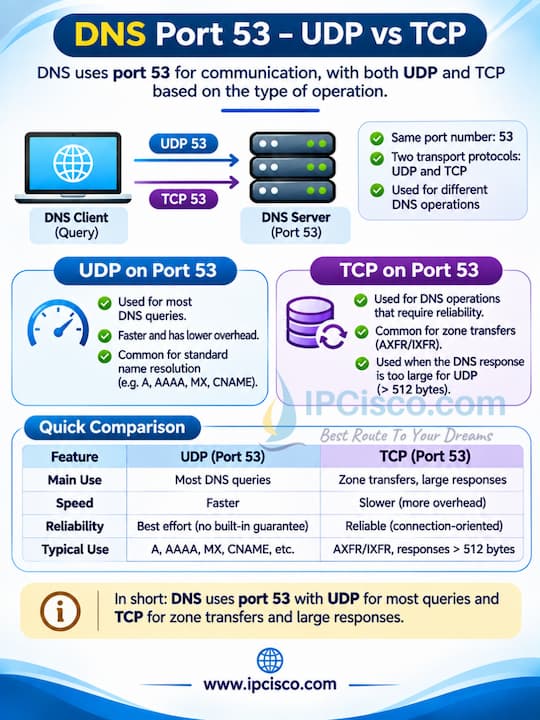
DNS Port 53 Explained
Domain Name System translates domain names into IP addresses, while Dynamic Host Configuration Protocol provides IP configuration information automatically to the devices in a network. DHCP also provides DNS server addresses to the clients.
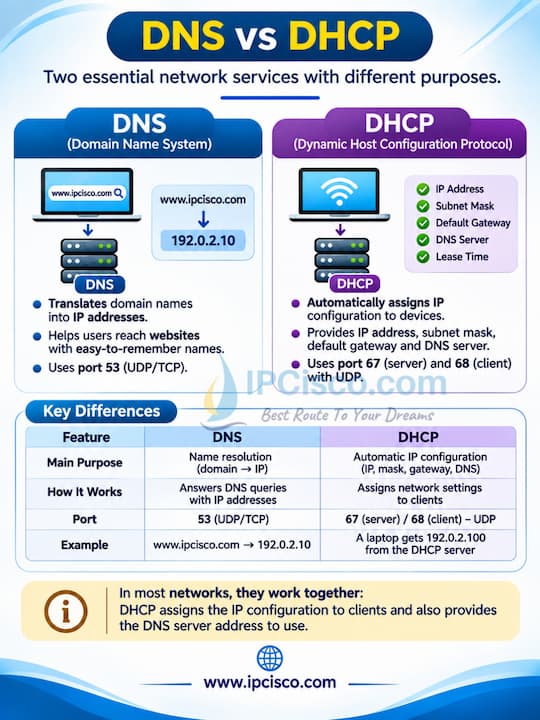
DNS versus DHCP
To fix a DNS Server problem, firstly you can check your Internet connection and DNS server settings. You can also clear DNS cache, restart your router or test another DNS server. On Windows, you can use the ipconfig /flushdns command to clear the local DNS resolver cache.
You can find your configured DNS Server address in your network settings. On Windows, you can use run->cmd to open the command line and then you can use the ipconfig /all command to check the DNS Servers field. On Linux, you can use resolvectl status commanto check DNS settings. On Mac, you can use scutil –dns | grep ‘nameserver\[[0-9]*\]’ command on terminal to check DNS settings.
If you have DNS problems, you can reset your device’s DNS settings to automatic configuration or manually configure another DNS resolver. On Windows, you can also run ipconfig /flushdns to clear cached DNS records. This command does not reset the DNS server itself.
Common DNS attacks are DNS Spoofing, DNS Cache Poisoning, DNS Amplification Attacks, DNS Tunneling and DNS Hijacking. These attacks can redirect users, disrupt DNS services or misuse DNS traffic. Security measures such as DNSSEC validation, access controls and DNS monitoring can protect you from these malicious threats.

Gokhan Kosem is a Network Engineer, Instructor and the Founder of IPCisco.com with 15+ years of experience in Cisco, Nokia, Huawei, Juniper, Linux, Service Provider Networks, Routing and Switching technologies.
He has worked on the backbone networks of major service providers and network vendors including Nortel, Alcatel-Lucent (Nokia) and has extensive hands-on experience with Cisco, Huawei, Juniper and Nokia networking technologies.
He has trained thousands of networking students worldwide through IPCisco.com, Udemy, books, labs, quizzes, and educational content across multiple social media platforms.
IPCisco.com | Best Route to Your Dreams







Leave a Reply